
Monitor Deleted Files In Realtime With Delete Extension Monitor

Delete Extension Monitor is a commercial software for Windows that allows you to monitor file deletions on Windows machines.
Sometimes you may want to know when files are deleted, moved or otherwise tampered with on a computer system. Maybe you want to make sure that important files do not get deleted by other users of the computer, or that you have access to a log to document file deletions.
Update: The program is no longer free of charge. You can download a 30-day limited trial version, but need to purchase a commercial license before you may use it after that period.
The software Deletion Extension Monitor for Windows has been designed for that purpose. The program, unfortunately only compatible with 32-bit versions of the operating system, monitors file deletions on the system in realtime. It works similar to programs like Moo0 FileMonitor, Disk Pulse, What Changed or Spy the Spy
Delete Extension Monitor
The program keeps a log of all files that have been deleted while the program was running. Information displayed for each delete operation are the date and time of deletion, the process that deleted the file, the filename that was deleted as well as the size and extension of the file.
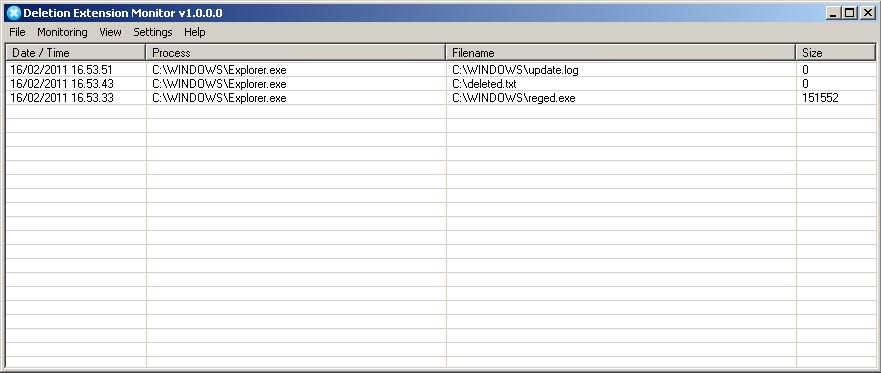
You can use the program to find out why, when and by which program a file was deleted on the system.
The program does not monitor all file deletions by default. It only monitors a default set of file extensions, exe, dll or pdf, and provides the means to add additional extensions under monitoring > file extensions.
You can remove, add or edit file extensions to only monitor delete events for file extensions you are interested in. It is not recommended to add file extensions to the list that are deleted quite often, as it would flood the program window with new events. The program does however offer to monitor all files that get deleted. Just check the monitor all file extensions option to do just that.
You can configure Deletion Extension Monitor to ignore files larger than a specified size, and to backup files before they get deleted to recover them when needed. Keep in mind though that you won't get the disk space back on deletions if the option is enabled.
Windows users can download the latest version of Deletion Extension Monitor from the developer website. (via Instant Fundas)
Closing Words
Delete Extension Monitor is a commercial program for all versions of Windows. It does what is is supposed to do, but does not offer advanced functionality that the free alternatives listed above don't offer in one form or another as well.




















