
Dual Monitor Tools For Windows

Microsoft has improved dual monitor support in the Windows 7 operating system. It is for instance relatively easy to setup a multi-monitor system and make use of some of the operating system's built in feature to manage the display and application windows on those two monitors.
While support has been improved, it is not nearly as sophisticated or optimized as it could be.
Dual Monitor Tools

Dual Monitor Tools tries to change that by adding multiple dual-monitor features to the operating system. Supported by the application are all Microsoft operating systems from Windows XP to the very latest version of Windows 10.
Dual Monitor Tools provides access to six core features and lots of options. The main features are: Swap Screen, Launcher, Wallpaper, Cursor, Tools, and Snap. Want to know what each does? Read on then.
Previous versions of the application included individual tools to manage functionality but the latest versions of Dual Monitor Tools changed that. All options are accessible from a single options menu in the newest versions of the tool.
It first needs to be noted that each feature comes with its own executable which reduces the memory footprint significantly considering that you only need to run the executable of the program that you need.
Swap Screen

This feature introduces hotkeys that simplify and optimize the handling of windows on multiple monitor systems. The settings are divided into the four sub-categories Active Window, System Defined Areas, User Defined Areas, and Other Windows.
Most of the hotkeys provided by the program are disabled by default, and it is up to you to enable them.
Features include minimizing windows, rotating screens, moving windows to a specific part of the screen, snapping windows, or changing the cursor resistance to move between screens.
Launcher

Launcher is a separate program that accepts searches and commands. You may use it to launch applications, open Internet pages, change the behavior of windows, or open the program's options.
Configuration options include adding, editing, or removing supported commands, configuring hotkeys to activate the launcher, or using import and export commands to move configurations between devices.
Dual Wallpaper
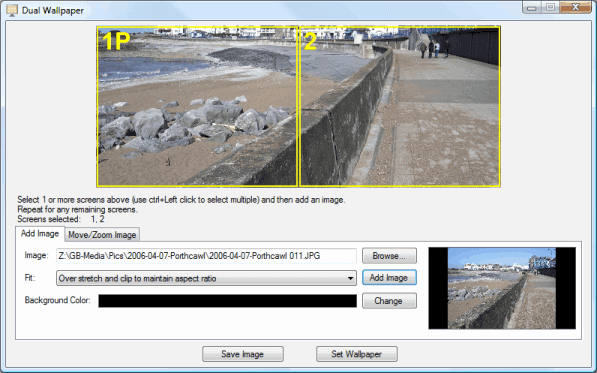
This program simplifies the handling of wallpaper images on dual screen monitors. It is for instance possible to spread a single image across multiple monitors or different images on each monitor.
The application can change wallpapers automatically and perform automatic operations on them such as expand or shrink to make them fit the selected area.
Cursor
Cursor provides options to control the movement of the cursor on multi-monitor systems. You can lock the cursor to a screen and define hotkeys to allow movement, or vice versa.
Snap
The last application of the Dual Monitor Tools pack can be used to capture images on one screen and display those images directly on the next. Pretty nice if you run a fullscreen application on one monitor and need to take screenshots.
Interested users can download the latest version of Dual Monitor Tools from the Sourceforge project website.



















According the the download page at http://dualmonitortool.sourceforge.net/download.html , Dual Monitor Tools requires the “.NET 2.0” (presumably Microsoft .NET Framework or .NET alternative).
Guess I am too stupid, but the “Dual Wallpaper” don’t work on my W7 x64 (Notebook and external monitor). Every time I click on “Set Wallpaper” a black picture is created …
Are you running Windows 7 Starter edition by any chance?
This does not support changing the wallpaper, but if you google “windows 7 starter wallpaper” you will find plenty of hacks to get around this.
Hm, I cannot really tell why it won’t work for you, strange though.