
Nokia NBU Explorer

Nokia phone owners can install the Nokia PC Suite or Nokia Ovi on their computer system to backup the contents of the phone. The backup includes various information including contacts, messages, bookmarks and photos. The backups are stored in nbu, nfb, nfc or arc files which cannot be read natively.
Nokia phone owners who want to access the contents need to restore them to the phone in order to do so. That's not very practical considering that some users may have switched to other phones in the meantime.
The free open source software NBU Explorer offers help for users who want to access their Nokia phone backups on the PC. The software program is easy to use and offers to parse, extract and view the contents of the backup.
Nokia NBU, NFB & NFC backup file (produced by Nokia Content Copier) and ARC backup file (phone side backup to memory card) parser, extractor and viewer. It can help you to check content of backup or extract files from it. Requires MS .Net Framework 2
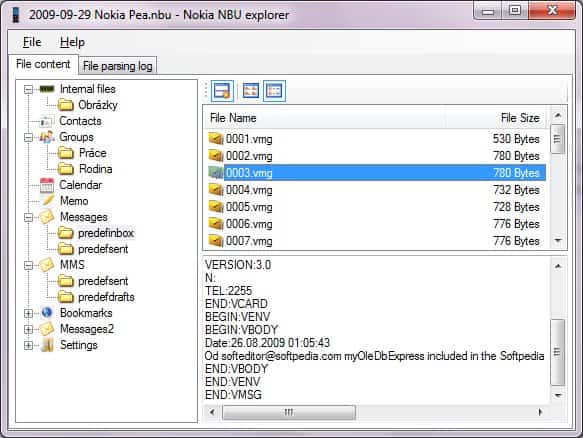
Nbu backups can be loaded into the application via the file menu. The program displays the contents of the backup file automatically, with options to browse and view the contents directly in the application window. It is for instance possible to view images that have been taken or stored on the phone directly in the interface.
It is furthermore possible to extract backup contents to the local system, so that they become accessible directly.
NBU Explorer is a helpful application for users who want to access Nokia phone backups directly on their PC to access SMS, pictures, contacts and other contents.
The application requires the Microsoft .net Framework 2.0. It is compatible with most Microsoft operating systems including 32-bit and 64-bit editions of Windows XP, Windows Vista and Windows 7.
Advertisement

















Ahhhh. NBU Explorer is a great software. Fills in all the gaps in Nokia’s own PC Suite and gives a phone user the ultimate flexibility to make use of their backup.
Unfortunately, switching from Nokia/Symbian 60 to Android (using a Samsung Galaxy Y dual SIM with 2.3.6) makes me feel that Google/Android has no idea of the real-time needs of a user. Neither Samsung’s own Kies application nor any of the 3rd party ones provide the same power and flexibility as NBU Explorer.
May I request all the readers of this comment to help me find an application similar to NBU Explorer for Android based phones? AND since I am using a dual SIM phone- a SMS counter that can keep track of messages sent out via each SIM separately?
Looking forward to any help on these two issues. So far my searches on the internet (incl on Google’s and Samsung’s own app stores) have turned nothing useful.
Best regards.
Farid Ansari
WOnderful………
just what i was looking for…
THANKS…!!!
Many thanks! Great!