
Java Portable

Java Portable has been designed specifically for situations where Java support is needed but not necessarily guaranteed on the host system. The distribution is part of the Portable Apps collection and compatible with Java dependent applications that are offered on the site.
The portable Java installer can be downloaded from the Portable Apps website. It then needs to be executed to download the latest JRE to a location on the computer system.
The portable Java Runtime Environment provides the Java environment for applications of the apps suite.
Probably more interesting than this is the fact that portable apps offer a Java Portable Launcher which can be used to launch third party Java programs as well.
It can be that those third party apps are not necessarily portable in nature but that is the only difference there is. One benefit of this approach is that background processes like jqs.exe are not automatically running on the computer system.
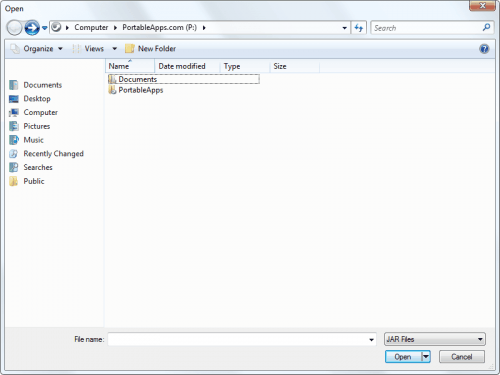
It is important to download and install the applications in the right sequence. Here is how it is done. Start by downloading the Portable Apps suite from the main website. It is sufficient to download the bare bones version but other versions are fine as well.
Install the Portable Apps suite on your computer, preferably on a USB stick or other portable storage device.
Download portable Java [link] and Java portable launcher [link] now.
It is now possible to launch (the now portable) launcher. This launcher is used to start applications that are linked to it and to install new applications from the Options > Install A New App menu.
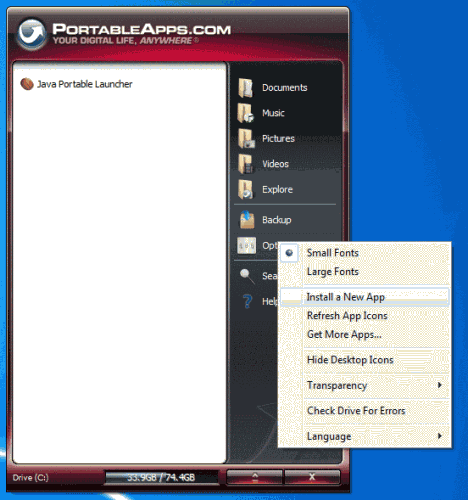
Select the executables of Java Portable and Java Portable Launcher one after the other. Both applications will be placed in the Portable Apps suite directory structure. They are also portable from that moment on.
Third party Java applications can now be launched from the portable apps start menu or by dragging and dropping the JAR files directly on the JavaPortableLauncher.exe file in the directory structure.
Update: We have taken a second look at the portable version of Java, and suggest you take a look at it as well.
Advertisement

















No matter what I do this portable JAVA never runs.
I have followed the instructions above, but nothing happens. There isn’t even a link or program (.exe) to click on to make things run.
Can someone supply useful, working help please?
This is great technology! (where was it in 1982?)
I hope java stays relevant forever!
I’m thinking of embedding jetty, or tomcat, or maybe even jboss seam into my app.
writing user interfaces in html is a lot easier than swing.
and all the client user needs is http://localhost
what could be easier?