
Microsoft Office Outlook Hotmail Connector 14 Download

Microsoft Outlook Hotmail Connector 14.0 final has just been released by Microsoft. Outlook Connector allows Outlook users to manage Windows Live Hotmail email, calendar and contacts from within Outlook. The new version of the Outlook Hotmail Connector plugin is compatible with Outlook 2003, 2007 and the brand new Outlook 2010.
The development team has added several benefits for Outlook 2010 users including:
- Junk filter settings. Your safe sender, blocked sender, and safe recipient lists are synchronized between Outlook and Hotmail.
- Integrated Send/Receive. Send/receive works just as it does for your other Outlook accounts.
- Integrated connection status. The Hotmail account status appears in the Outlook status bar.
- Rule support for secondary accounts. Rules can be applied to your Hotmail account in Outlook, even if it is not your primary Outlook account.
- Sync your drafts. The Outlook Drafts folder synchronizes with the Hotmail Drafts folder.
Windows Live Hotmail email accounts are integrated nicely into the Mail Folders sidebar of Outlook from where they can be accessed like any other email.
Contacts are also accessible right from withing Microsoft Outlook.
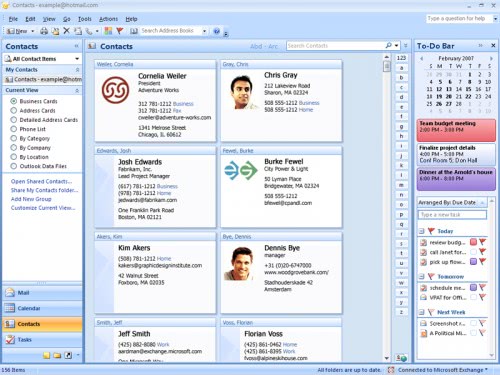
Microsoft Office Outlook Hotmail Connector 14 Download
- For Outlook 2003, 2007, 2010 (32-bit): Outlook Hotmail Connector 14.0 for Outlook 2003, 2007 and 2010 32-bit [link]
- For Outlook 2010 (64-bit): Outlook Hotmail Connector 14.0 for Outlook 2010 64-bit [link]
Download the 32-bit or 64-bit edition of the Outlook Hotmail Connector to your computer system. This should save the file OutlookConnector.exe. Double-click the file once it has finished downloading and follow the installation instructions. Make sure Microsoft Office is closed during installation. Users of Outlook Connector 12.1 and later can directly install the new version, everyone else needs to uninstall previous versions of Outlook Connector first before they can make the installation.
Verify Outlook Connector is properly installed
Outlook 2003 and Outlook 2007 users:
1. Open Outlook.
2. Click Outlook Hotmail Connector, and then click About Outlook Hotmail Connector.
3. The version appears in the About Outlook Hotmail Connector dialog box. If the version number is equal to or greater than 14.0.4760.1000, you have successfully installed Outlook Hotmail Connector 14.0.
Outlook 2010 users:
1. Open Outlook.
2. Click the File tab.
3. Under Account Information, click the down arrow, and then select your Hotmail account:
4. Click Additional Information, and then click About Outlook Hotmail Connector.
The version number appears in the About Outlook Hotmail Connector dialog box. If the version number is equal to or greater than 14.0.4760.1000, you have successfully installed Outlook Hotmail Connector 14.0.
Update: Downloads do not seem to be available anymore. You can still find the page with instructions here.
Advertisement



















Stupid, this page is false. There are no links