
Auslogics Disk Defrag

Auslogics Disk Defrag is a hard disk defragmentation software for devices running the Microsoft Windows operating system.
Note: The setup of the program is classified as potentially unwanted software by many security services.The reason for that is that it includes other programs that may be installed if you are not careful. Select custom installation during setup, and make sure you deselect any options there that you don't need.
The company's Boostspeed program would have been installed on our test system if we would not have disabled the option during setup. Also, Disk Defrag's setup tried to install Yahoo as the homepage and search engine in Chrome, Firefox and Internet Explorer.
Last but not least, setup tried to install Auslogic's Driver Updater program after installation. We suggest you download and run the portable version instead which does
Auslogics Disk Defrag
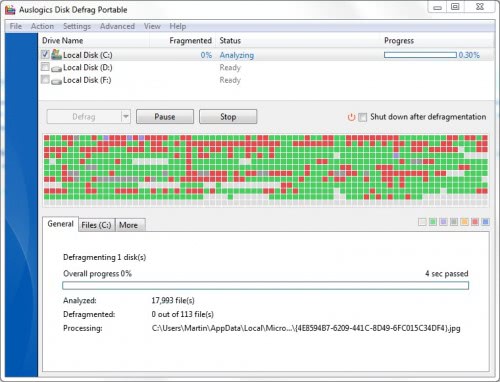
Auslogics Disk Defrag is a disk defragmentation software for Windows. The program lists all connected hard drives on start, and checks all mounted platter-based drives for fragmentation. It ignores Solid State Drives (SSD) automatically during that scan which is good.
You may want to run an analysis of the selected drives first before you run any defragmentation job. The reason for doing so is simple: if a drive is not really fragmented, there is little reason to run a defrag job on it.
The analysis is quick, and the fragmentation status of each drive is listed in the program's interface afterwards.
From there, it is up to you to select the drives that you want to defragment. You can select a drive to use the information displayed in the lower half of the interface for additional help in making that decision.
Auslogics Disk Defrag lists the number of fragmented files there, junk files, and the disk space wasted by junk files.

You may furthermore click on files for a list of all fragmented files, on Volume Information for general volume related information, and on SMART and SSD Support for technical readings.
If this is your first run, you may want to pay a visit to the program's settings to make sure preferences are set correctly.
You find a couple of handy options there. You may enable Explorer integration, make Disk Defrag the default defragmentation program on the Windows device, configure the skipping of files, and whether you want important system files moved to the beginning of the disk, file or folder exclusions, whether you want free disk space to be wiped to block file recovery attempts, and whether you want to run disk cleanup prior to defrag jobs.

Check out the SSD Drive Support tab of the settings if a SSD is connected to your PC. You may hide it from the listing of drives, or make use the of the TRIM feature There are quite a few options there that are of interest in this regard.
Auslogics Disk Defrag features a special algorithm for defragging Solid State Drives. I did not try that option though.
The process of defragmenting drives may take a while. This depends largely on the performance of the drive, the number of fragmented files, the overall size of the drive, and the load of the system during the operation.
You may change the priority of the defragmentation process under Settings, and use the scheduler as well. This can be useful to schedule recurring defragmentation jobs, for instance when the PC is idle for a certain amount of time.
Closing Words
Auslogics Disk Defrag is available as an installer or portable version. It can be downloaded from the developer's website where it is available for all Microsoft operating systems that have been released since Windows XP including Windows 7, Windows 8.1 and Windows 10.
The program is excellent, but it is held back by the integration of potentially unwanted program offers, as well as ads for other company products that it may display at times.
You may even run into issues downloading the program, as browsers may block it. This is the main reason why we have rated the program so low. If Auslogics would remove the offers and ads, we'd give it a 5 out of 5 score.




















The idea to continu working while disk defrag is on its an option not to negociate and Auslogics Disk Defrag lets the user continu its pc job while the disk is defragged. Some softs asks to reboot to start defrag or to complete defrab but its not the case of Auslogics Disk Defrag.
Free defrag software is the first one I check and I must say that with Auslogics Disk Defrag no more waiting for files to open.
This is the defragger I use. i don’t know that it is better than the freeware competition, but it works for me; pretty quick on my PC but I keep the hard drive fairly clean. Have seen no rewrite errors at all, an overlooked aspect of defraggers.