
How To Password Protect Data On CDs or DVDs

A recent comment here at Ghacks asked for help in finding a software program or solution to password protect CDs or DVDs. The following post explains how to password protect data on CDs and DVDs. Please note that this method is only working with data CDs or DVDs and not audio or video CDs or DVDs that shall be played in standalone players. You can however use the method to encrypt a video DVD or audio CD and play it on the computer.
The only way to password protect data is to use encryption. It would theoretically be possible to zip or compress the files and use a password to protect them which would however mean that the data would need to be uncompressed before it could be used.
All you need to password protect CDs or DVDs is True Crypt (or another software that can create encrypted containers). The Open Source encryption software can create so called containers that can be filled with data. These containers are password protected and can only be accessed if the correct password is supplied. The user does need True Crypt on the other hand to access the CDs and DVDs.
Start by downloading True Crypt from the official website. Click on the Create Volume button after installation. This opens a wizard that can be used to create an encrypted file container.
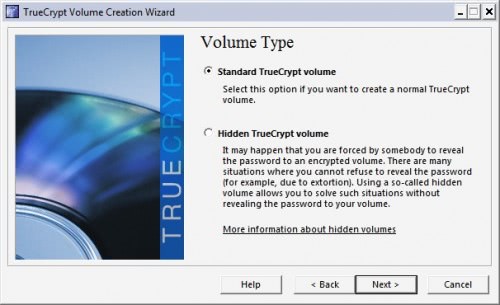
Select to create a standard True Crypt volume.
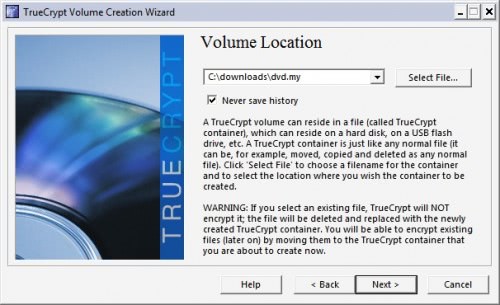
Now select a filename and location on the hard drive for the container.
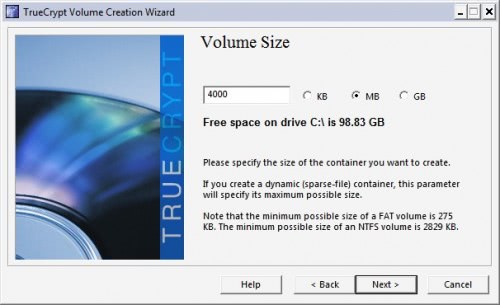
Keep the algorithms and select an appropriate size for the container. You might need to experiment with the sizes a bit. If sizes do not matter that much select 650 Megabytes for a CD container and 4000 Megabytes for a DVD container.
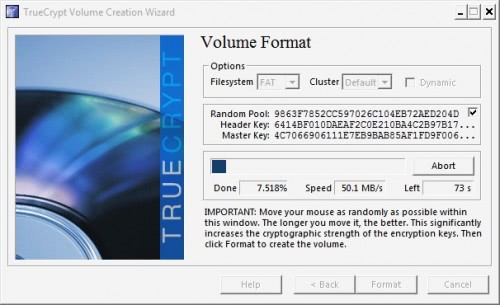
Now select a password and use the format button to format the container.
Now that the container is created it needs to be mounted which basically means to use the password to make it accessible in Windows. Click on the select file button in the True Crypt main menu and locate the created container. Now select the Mount button. True Crypt will ask for a password. Just enter the password supplied to access the container. The container becomes available as a drive letter in Windows then. You can now transfer data in the container. Once all data has been added it can be burned to CD or DVD depending on the size of the container.
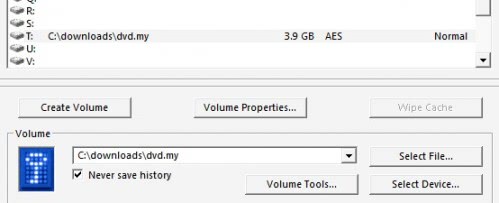
The user then needs to select the file on the CD or DVD whenever data on the disc should be accessed. Everything else will remain the same.
Advertisement

















Hi, Nice tutorial, I want to know which one ll be burned in CD/DVD? Whether the container file which we created with password at the start or the drive that loaded after when we select the container file in true crypt??
You burn the container file as it is password protected. If you would burn the mounted drive, you’d end up with unprotected files on the disc.
Hi, Is there anybody here to reply for this que???
Hi,Great tutorial, I want to make cd that should be system dependent.
That it shoud generate a number when cd is inserted in a cd,and on the basis of that number different passwords need to be entered.same cd with same password should not work if inserted in some other system, It should generated new number for which new password has to be provided.
Thanks a lot martin for helping me through this. Truecrypt really worked for me. It is really simple and useful software.
Great that it worked out for you ;)
I have burned the unmounted container on the disc but now i am not able to see or recover data on the disc because it is in file format. Please guide me through this.
You need to mount the disc to see the contents.
I have the same query that BPS asked. truecrypt does not password protect the burned DVD. martin please suggest if there is any way to password protect the dvd.
The TrueCrypt container is encrypted, which means that no one can access the data if you do not decrypt it first.
Thanks martin for your reply, but truecrypt encrypted data when burned on dvd can be easily accessed as it doesnot reqire password. It does encrypt data on computer hard drive but not on optical disc.
That’s why you burn the unmounted container on the disc.
I am afraid the author is missing a very important point. It is that, once you mount the Truecrypt container and then copy the files to DVD/CD, they will be in decrypted form and that Truecrypt Password is no longer needed to see the files on the DVD/CD. In otherwords, the DVD/CD is not password protected as the author states.
BPS, the idea is to put the container on the disk, not the encrypted files.
Or you could the CD/DVD encryption from the FREE CompuSec suite. It’s a much easier program for the average user to use.
Martin,
Thanks for your response.
I currently use Windows XP Professional (at work), and I don’t foresee an upgrade to Windows 7 for at least a year. Any ideas on something that will work on Windows XP?
I have tried TrueCrypt and Cryptainer, but they both require that the end user of the flash drive or other media have the TrueCrypt or Cryptainer software to unlock files. I am interested in password protecting a flash drive (or the files on it) so that a customer in the field can unlock it without any special software–just an unlock key. Do you know of any way to accomplish this without a huge investment of time or money?
Mike if you have Windows 7 Ultimate or Enterprise you can use Bitlocker To Go to do that. The program comes with those operating systems and places an executable on the encrypted drive that works in other Windows systems. The user only has to enter the passphrase to mount the data.
Great tutorial. You may also want to burn TrueCrypt in the CD/DVD together with the container (but not inside the container). That, way you won’t have any trouble downloading or bringing TrueCrypt with you.
Supermamon that’s a good tip.
Could this method protect a flash drive?
Is it possible to modify a encrypted volume so it would be unable to mount? Ex: by a virus…
Thanks!
TrueCrypt is Awesome. The coolest thing about burning the file container to a cd/dvd is the ability to create the hidden container within it before burning.
What do you think about AxCrypt? I use it a lot whenever I have to send files to someone not so tech savy. I have never tried to burn an AxCrypt file to a cd/dvd but it seems like the self decryption option would come in handy on something like that so it could be mounted in a system that does not have TC installed.
Rush I have not been using AxCrypt a lot but it surely is a good alternative for these situations.