
Powerful Device Manager Device Remover

Device Remover is a portable device manager for the Windows operating system that enables you to manage, edit and remove devices on Windows PCs.
The program is compatible with 32-bit and 64-bit editions of Windows from Windows 2000 to the latest version (currently Windows 10 at the time of writing) and requires the Microsoft .net Framework 2.0.
The main advantage of Device Remover is that it displays all installed devices, drivers and services of the current Windows operating system including hidden, detached, problematic and currently functioning ones. While you may display some of the information using the default Windows Device Manager as well, Device Remover simplifies the process significantly.
If you have worked with the default device manager before, you know that it is rather bare bones and lacks information that would make life easier.
Device Remover
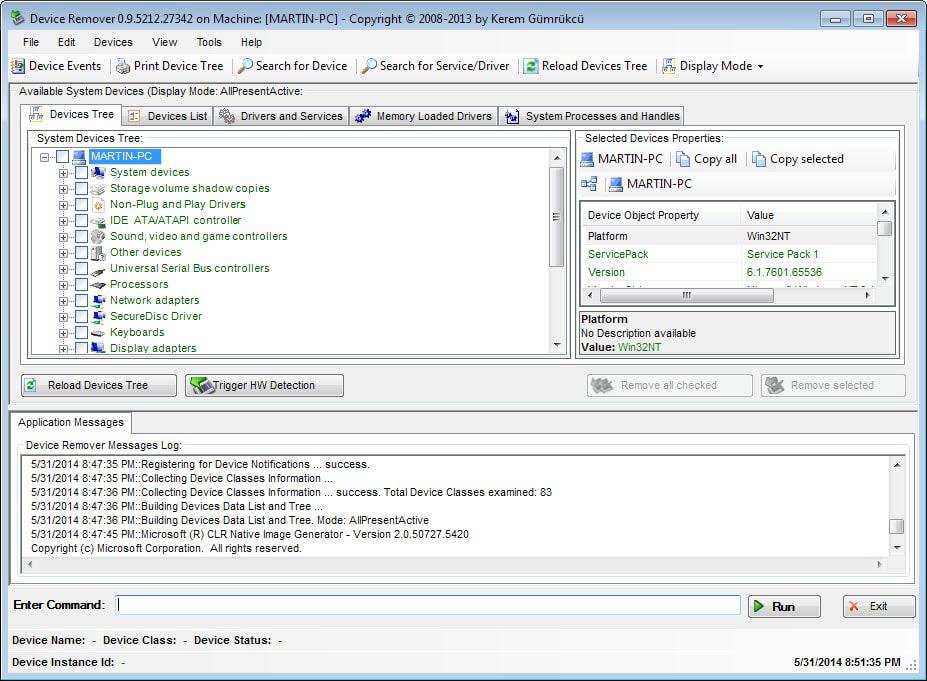
Device Remover displays all relevant information in its interface which means that you do not need to run commands on Windows, or turn to other third-party software to collect all the information necessary to manage drivers and devices on the PC.
The program runs a scan of the system on start which can take a while to complete. It displays a command prompt and splash screen during that time, but will load a user interface once the scan has finished.
The software interface is divided into various tabs and windows that display all kinds of information. The main window display a device tree, device list, drivers and services tab. A selected item will be displayed in detail on the right pane. The information is color coded and makes use of checkboxes to allow for mass editing and removal of devices and drivers.
The different view modes are interesting for most users. It is possible to display only hidden and detached drivers and devices for instance. This makes it easy to analyze and remove those from the computer system. Hovering the mouse over an entry displays a popup with extensive information about it.
To remove devices, simply select them on the devices list or devices tree tab and click on remove all checked afterwards. Since you can remove pretty much any device here, it is important that you make sure that you have selected the right devices before you start the removal process.
A click on drivers and services runs another scan after which services and system drivers are displayed in a list. Here you can also remove items or create new ones. The results listing is color coded, but there are not any information available as to what each color means.
It is possible to search for specific devices or drivers using the built-in search, and to print or export the device list to a txt or csv file.
Verdict
Device Remover is a professional looking software program for the Windows operating system that provides the means to manage device drivers and devices effectively. The download of the setup file on the author's homepage failed during the test but it was possible to download the portable version without problems.
Update: The program is no longer available on the developer's website. We have uploaded the latest version of the application to our own server for archiving purposes. We don't support the program in any way. You can download the application with a click on the following link: (Download Removed)




















Just in time for me, I’m having issues with countless Wireless device on my Vista 64 machine. Hopefully this may help.
Thanks!
ermmm… a lot of wrong words..
suck = such
I attracter = It attrated
I currently using revo; but, its multifuction suck remove startup. Still powerful and I would like to try yours one above. I attracted my view because it was standalone and one fuction only. thank you.
Great follow-up Martin.
Glad you wrote about it. No problem downloding the installer at my end.
cheers,
boris