
Solid State Drives Test Results

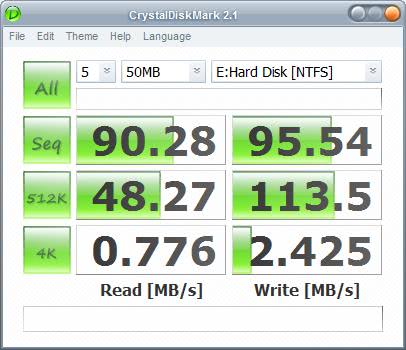
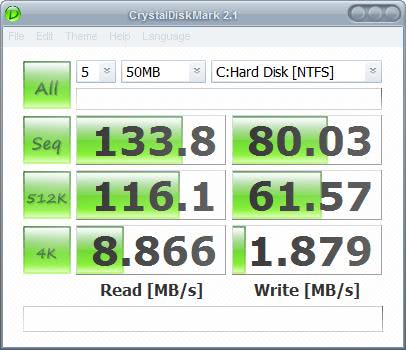
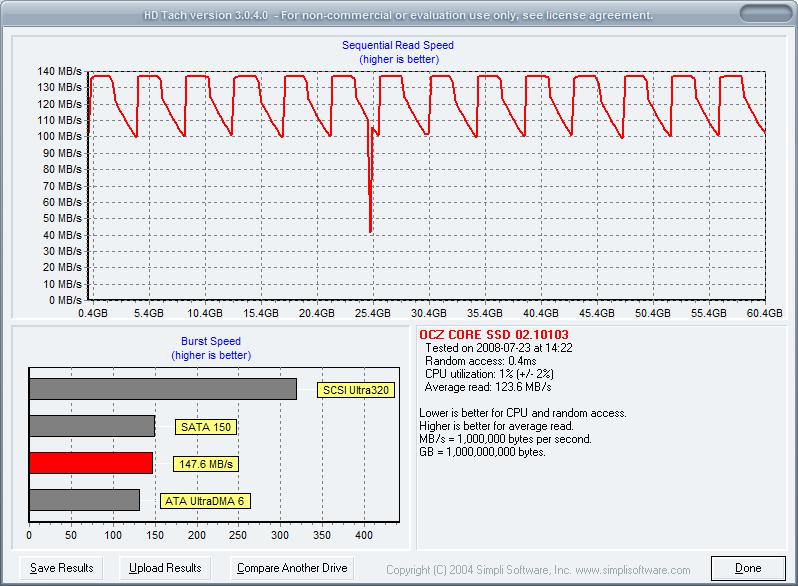
I ordered and added the OCZ 64 Gigabyte Core Series Sata II Solid State Drive to my computer and have been playing around with it for some time now. This Solid State Drive has some serious advantages over conventional hard drives. The boot speed is faster and you also notice that some applications load up faster than normally. It's a visible speed bump.
The question however is if you want to shell out the extra bucks for that visible speed gain and I think it comes down to a discussion among video card enthusiasts. Some purchase the top product that produces a few additional frames but costs double the amount of the video card that computes less frames. Still both make the games playable.
It's the same with the current generation of Solid State Drives except for a few scenarios where they really shine. They need less energy to run and are completely silent which makes them an ideal candidate for a notebook hard drive replacement. That's in my opinion the number one reason to purchase a Solid State Drive, to place it in a mobile device or computer that is being used as a media player.
Where operating systems and desktop computers are concerned I would probably wait for the next generation that surely sees another huge price drop and speed increase.
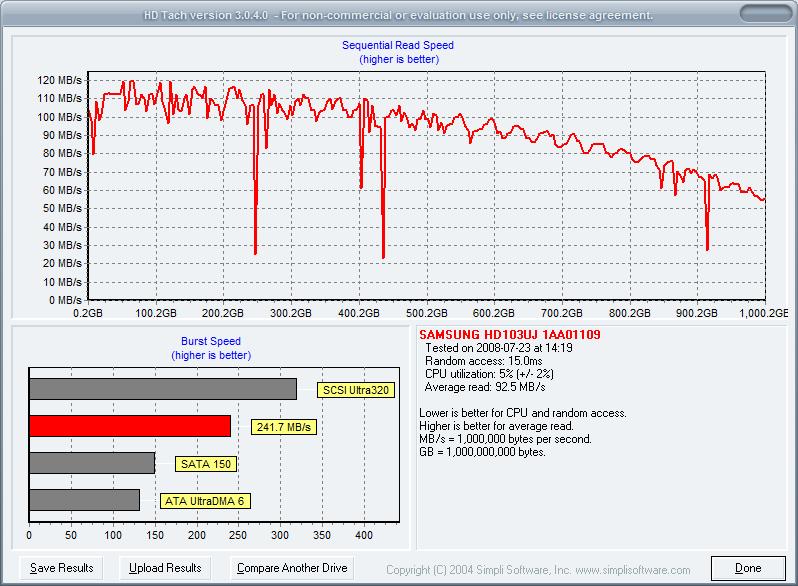
Don't get me wrong.. The Solid State Drive is faster than my shiny new Samsung hard drive, it loads pretty much everything faster but some of its gains, the silence, can only be effective if I would remove the conventional hard drives and that is not possible until the flash drives come with sufficient storage space.
Conclusion:
You should consider buying a Solid State Drive if..
- You turn on and off the operating system regularly
- You load and close many applications and files during the computer uptime
- You do not need space but energy efficiency or silence
- You want bragging rights
- You got the money to buy one
Everyone else is better of waiting for the next generation of flash drives in my opinion.
Advertisement











Solid State Drives have a lower write time because the contents of the cell that contains the information has to be erased before data can be written to it again.
I do not know why I have a higher read speed with my Samsung hard drive, maybe it’s because of the SATA controller ?
I,m wondering how you got such a high read speed on the Samsung drive?
My Seagate drive tested under HDTach only produces an average read speed of 68.6 MB/s. It’s an ST3320620AS 3 AAE model (320GB, SATA 3.0). I have a higher burst speed than than the Samsung (258.1 MB/s and and a faster random access (13.3ms).
AS for the SSD drive, why are these so much slower on writes?
Not to be confused with the 4k vs 512 figures above but…
Windows uses 4k sectors for formatting NTFS and the same figure is used internally for memory paging.
Interestingly you can format a drive using 512k sized sectors with disk management, this brings noticeable I/O improvements but in my experience causes problems with certain drivers rendering any sector size above 4k on system/application drives unusable, shame!
My guess is that 4k is the best trade-off size for paging X86 ASM instruction, anyone confirm this?
Looking back on this i’m wondering if my rambling bears any relevance to the article anymore lol, oh well i’ve done it now, it stays :P