
Disable Automatic Virus Scanning in Firefox

Firefox 3 is making use of the installed virus scanner on Windows to scan downloads automatically after they have been fully downloaded to the system.
This feature is only available on Windows and if an anti-virus application is installed on the user's system. While this feature may be a good way to avoid downloading malicious files it ,ay on the other hand be the source of complications like delays, freezes or that harmless files (false positives) are blocked by the anti-virus software.
I personally do not think that such a feature is necessary due to the real-time protection that most anti-virus applications provide anyway, as they will scan the file when it is launched on the system.
The Mozilla team created a new preference that gives Windows users the option to disable the automatic virus scanning in Firefox which comes in handy if you have a anti-virus software installed but do not want it to scan the downloads or encounter issues because of this.
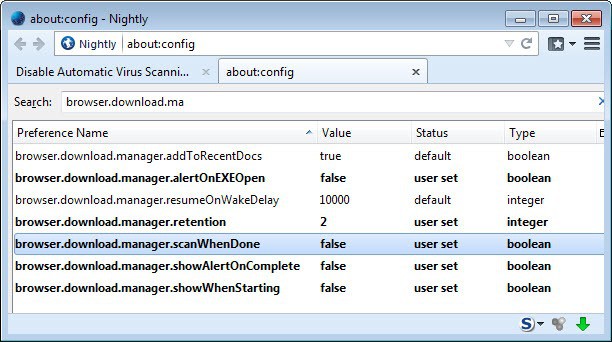
Type about:config in the Firefox location bar and filter for the string browser.download.manager.scanWhenDone. The default value of that parameter is true which means that scans will be done whenever a file is downloaded. Setting it to false will disable the automatic virus scanning in Firefox 3.
During research I came upon another error that is connected to the Download Statusbar extension. If you receive the error message Anti-virus Program not found after a download completes in Firefox 3 and have the Download Statusbar extension installed you need to set the path to the anti-virus program manually in the Download Statusbar options.
Please note that the virus scanning works in newer versions of Firefox as it did in Firefox 3. It is enabled by default in Windows, and to disable it, you need to follow the steps outlined above.
The only difference to Firefox 3.6 and earlier is that setting the preference to false will also disable Windows security policy checks.
Advertisement















I keep getting the same Firefox fucking bullshit plug-ins outdated
notice. I can’t shut it off. Firefox has some Hal the Computer
advice on turning the message off. But that doesn’t work and/or
the procedure is worthless. No such functions to follow.
2012 and FF still does this stupidity.
Thanks for such wise information…. really appreciated. …
thank you very much, it works in firefox 4.0 too. :)
Thanks so much. I could understand it if you’re downloading an .exe or something, but it’s absolutely ridiculous that it scans, say, a jpeg, *when it’s already downloaded the jpeg into temporary internet files and displayed it anyway*. Brilllliant, Firefox 9_9
Wonderful! Thanks a lot… ))
Thanks a lot. this solved my long lasting problem, when firefox in my old machine scanned longer files, it took ages.
Tnx a lot!
Thanks!
Answered this perfectly!
Thank you! This helped me out so much!
Ahhh. That’s much better. Thank you :)
Thanks for the help man.
Shut up, Terry.
The virus scanner in Firefox is a piece of fucking bullshit. I have on purpose downloaded viruses from theserials.com (all the files there are viruses) and it didn’t pick anything up. Whoever added this feature is a fucking n00b.
Thank you Martin.
I was hoping I could disable the virus scan for individual file types, like .torrent files, ridiculous. Thanks for the tip!
thanks, i was not liking the scan, especially for really small files like torrents
Thank you so much, this scan takes forever on large files.
anti virus comes with the browser, very small one but it does however take up memory whilst in use.
Same issue here – never had any anti-virus software installed on my machine, and don’t have one right now, yet Firefox 3 seems to scan every file I download. Is this is a “false scan” or did they actually manage to install an anti-virus with the browser?
Follow the instructions CORRECTLY in the article, works fine, thanks.
same here no virus scanner installed and firefox still says it is scanning the file
Terry as far as I know this should not happen. Did you import old data from Firefox by chance? Which operating system did you install? Did you check the about:config entry?
What is your problem, Mr. James Johnson? Such a childish, rude reply can only make a person think very little of you.
I only stated a true observation and inquired about it. Maybe it was just a bug in the build of Firefox 3? I do have the latest release. I saw this while downloading drivers before I installed McAfee.
shut up terry
Well, the article is wrong or misleading. I reinstalled Windows on my machine, install the drivers, install a few applications.
WITHOUT installing a virus scanner, Firefox 3 shows that it is scanning every download. Is there some scan built-in to the software, or is this a bug showing that it’s scanning when it isn’t?
Thanks, man. Honestly, I know what I’m doing on my PC and I don’t need “automatic virus scanning”.
Thank you! This helped me out so much!
Cheers it was scanning my downloads even tho I dont have a virus scanner anymore(ditched AVG), so I wonder how it actually scanned something.
Thanks a million for this tip! I was going nuts! My system automatically does a scan – I was getting near infinite loops on downloads!
Thanks.
Thanks man worked wonders, hated that virus scan.
thankyou, man. that was annoying the hell out of me. I’m also running NOD32 and am entirely happy that it knows what it’s doing without having to delay my access to my freshly downloaded files once they arrive.
thanks man that helped heaps! that auto scan was starting to get anoying! CHEERS!
I use nod32 when I download something it will scan it automatically with firefox or not. This just lags firefox for me but if you just have an anti virus leave it on.
^^Yash is a grammar nazi XD
typo: 1st line …built in
theres a lot of antivirus software on the market today, and all of it promises to protect your PC. you must keep up to date with any relevant changes because there are a lot of new ways your PC can be infected by viruses, so you must be aware and prepared.