
Remove Windows Components in Vista

Microsoft seems to be under the impression that change is good and will not confuse users of a previous versions of their Windows operating system once they upgrade to a new version of Windows.
It is interesting that they decided to change on elementary function in Windows Vista if you compare it to Windows XP: the Add/Remove Windows Components.
If you go into the Control Panel in Windows Vista you will not find Add / Remove Programs like in Windows XP and there is also no SYSOC.INF file where you can remove the HIDE parameter to add more windows components to the Add / Remove Programs menu.
The function in Windows Vista is called Turn Windows Features on or off and is available in the Programs and Features menu.
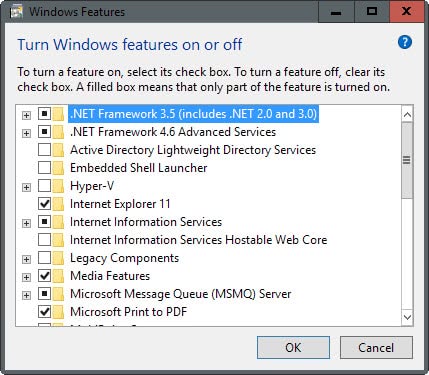
There is however a huge difference. You may have noticed the on or off phrase and that is exactly what is happening. The components that you select are not uninstalled and still on the hard drive if you select to turn a feature off. So, you can't use the feature to free up hard drive space like you could before.
There is only one known way to remove Windows components permanently and that means to prepare a special installation DVD with Vlite or another program that allow you to remove components from the Vista installation DVD.
That's however not the easiest thing to do and if you are not an experienced user you may run into a couple of issues here. While you can't break anything, you may burn a couple of coasters until you have figured out how to create the right Vista installation disc using a program like Vlite.
You can however remove lots of Windows components using the Programs and Features applet including the Windows Firewall, Windows Media Player and Windows Mail, but again, those are only disabled, not deleted from the hard drive.
Update: All new versions of Windows, up to Windows 10 which is the latest version at the time of updating this article, use the same "turn Windows features on or off" applet that Microsoft introduced in Windows Vista.














my computer has problems some one install windows vista he to the copy for the internet of windows vista the copy has a virus the reason is the i want to cnages to windows7 home primiun because has support for my computer
Uninstalling Or Changing A Program In Windows Vista
1.Click the Start button located in the lower-left corner of the Windows Vista desktop.
2.Then click on Control Panel.
3.In the Control Panel, click on Programs.
4.Then click on Programs and Feature to show all your installed programs.
5.Now use your mouse to scroll down to the program you want to remove.
6.Then highlight that program and click the Uninstall button on the top menu bar.
7.Windows will then remove that program from your computer including all related system files.
8.Some programs include the option to change or repair the program in addition to uninstalling it.
9.To change a program, click on either the Change or Repair button on the top menu bar.
10.More often than not Windows will ask you to reboot your system after uninstalling a program.
11.Whether you are asked to do so or not, you should exit all programs and reboot your system.
Note: This Technical Brief Will Work For All Microsoft Windows Vista Editions.
You Can Also Add Other Windows Components By Reading: How To Add / Remove Vista Components
Oh Martin, you forgot the link again… ;)
Here it is: vLite, which is the Vista-equivalent of XP’s nLite.