
Save Flash Games to your hard drive

I have to admit that I like to play flash games from time to time and enjoy some tremendously. It happens that websites that offer flash games are not available all the time that you want to play the game, or that you may not have an active Internet connection but still want to play some games.
This is why I would like to explain how you can easily save flash games to your hard drive to play them without an Internet connection.
The process is pretty straightforward most of the time: visit a website that displays a flash game on its website. Right-click a free area on that page and select View Page Source from the right-click menu. You could alternatively click on View > Page Source in Firefox. Internet Explorer uses right-click and select View Source while Opera users right-click and select Source, or tap on F12 to open the browser's Developer Tools.
Search that source for a url that ends with the swf file extension (search for the term .swf). This is the location of the flash game on the server. Copy that address and paste it into the browser window again. The flash game should load just fine. Go to File > Save Page As in Firefox and the flash game should be saved on your hard drive.
Drop the file into your favorite browser to play the game. To make it easier you could assign a software to swf files which would have the result that you only need to double-click the flash games to start them. To do that right-click the file and select properties from the menu.
Now click on the change button and select your main browser as the program to open swf files with. I have created a small video that explains the whole process.
Update: Please note that while this method works well on a number of gaming sites that offer Flash games, it won't work on sites like Kongregate, Armorgames and other major flash gaming sites. Let me show you how you can download Flash games from those sites as well. I'm going to show you how to download games from Kongregate and you can use the method then to download from other sites as well.
You need the Firefox add-on Live HTTP Headers for that. If you are using a different web browser try to find an extension that offers a similar functionality.
Open Firefox after you have installed the add-on and press the Alt key to bring up the menu bar. Click on Tools > Live HTTP Headers to bring up the window of the browser extension. Switch to the Generator tab here and configure the window the following way:
- Uncheck CSS and images
- Check request
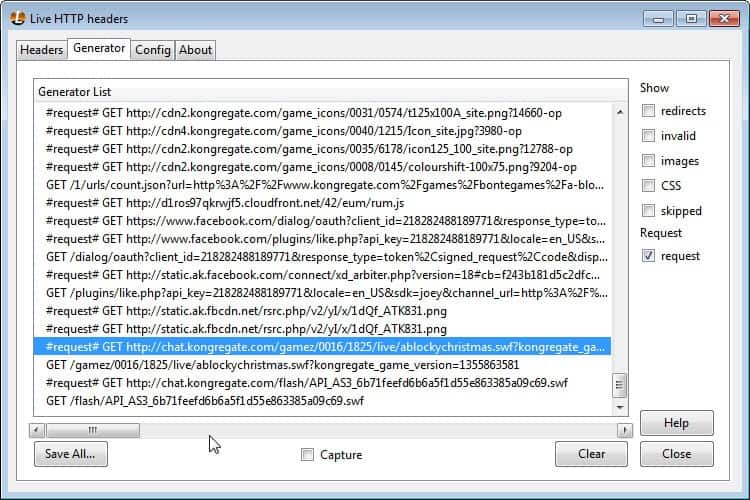
Load the Flash game on Kongregate and watch the headers that the browser retrieves. You need to find reference to a .swf file here. Kongregate games at the time of writing always start with #request# GET http://chat.kongregate.com/gamez/ followed by IDs and other information.
Right-click the line and select copy. Paste it into the browser's address bar and remove the #reqest GET information from the front. This should load the Flash game in full screen. To save it to the local computer press Ctrl-S or select Firefox > Save Page As from the menu.
Drag and drop games into the browser to play them after you have downloaded them to your local system.
Update: Note that you may use the network tab of the Developer Tools.The advantage of this method is that you don't need to install a browser extension to download the Flash games to your system.

- Tap on the F12 key in your browser of choice to get started (I use Google Chrome for this demonstration).
- Switch to the Network tab.
- Load the Flash game site, and the Flash game in that tab.
- Type swf in the search field of the Developer Tools.
- Locate the right SWF file if there are multiple, and select "open in new tab". This should save the SWF file directly to the local system, or give you options to save it while it plays (depending on browser).













ok! thanks for intersting info.
Other method use “no script” extension for firefox, and when show swf box download the game! simply
With firefox you can’t download flash games from many sites like kongregate or miniclip because they protect the swf in the source.
Check out http://www.flashgamedownloader.com which is able to download from any website including kongregate,addictinggames,miniclip,onemorelevel and many more..
After you download you can easily double click and play any game anytime without internet connection!
Hey Thanks for Great Tutorial.
I thought i would require any software to download swf files from Websites.
But through firefox i can capture any swf within few clicks from any website!
Again Thanks :)
Ok, the i can save a flash game on HD and that is great, but what you do with those games that have special features only unlocked when played in the original sponsor site? (Armor Games and Kongregate uses it a lot!).
For example, i downloaded Epic Wars 3 from kong. But 2 caracters remain locked. I found a java file named “test_gam_domain” that sould be the key, but dont know how to crack the domain test. I just want to play the full thing alone, cause the main site lags me like hell.
Then, im short, how you pass the domain check? I need to desconpile the flash file and found the line that need this info?
Thanks in advance.
yeah, it gives me the thing where I have to extract stuff. This sucks, what a joke. I don’t use firefox, so why are you telling me advice of what to do if I have it? Work harder next time if you actually wnat to help people.
Nicholas att least he was trying to help
ya it didnt explain enough at all. i guess most people are jsut supposed to magically know what you’re talking about. makes no sense
didnt work for me
Yes the cookies smell good……
random much….
(gets banned lol)
ummm…..srry but i tryed to do those things and its weard can u tell me what to search on Ghacks.net to get the vidio plz
or if u have a way of getting a free flash save thingy plz help i need games on my labtop
it dunt work for me. i gt up too the bit were u save the file but i cant save it it blanked out
anyone now y?
I have been using this way to save flash files for a while now, but is there a way to save working versions of the other flash games that stop this method.
http://www.kongregate.com/games/garin/monsters-den
Is the most recent one that i cant save. Well you can but it only gets 10 seconds into the website advertisement and dies. I managed to save a working version of the older game, 1.0 from max games (using the above methods). But not the newer 1.1.
or ….
# Go to Tools -> Page Info
# Click on ‘Media’ Tab
(It will have all kinds of media (images, audio, video, flash file) links.
The .swf file you’re looking for will be filed under ‘Embed’ type.)
# Just click “Save as”
Option 2 —
Most of us have ad-block in installed. Check the option ‘Show tabs in Flash and Java’
Next time you want to save a .swf, just right-click the ad-block’s tab and ‘Save link as’ ..
Thinker I have plans, just wait and see ;)
You like flash games, but you dont post them any more on this site! I miss them ! :P