
Create Recoverable archives with Quickpar

I have published a guide about par files before and find them ultra-useful.In short, they can be used to repair any rar file that is part of an archive as long as the blocks of the par file are at least of the same size than the corrupt rar parts.Say, someone transfers a 1 Gigabyte Rar archive to another server or hard drive, and some files become corrupt in the process. If parity files have been created in the process, they can be used to correct those errors and repair the damaged files so that the archive can be extracted. A software like Quickpar can be used to split big files into smaller ones and create several par files so that you can restore the whole archive if part of it gets corrupted.
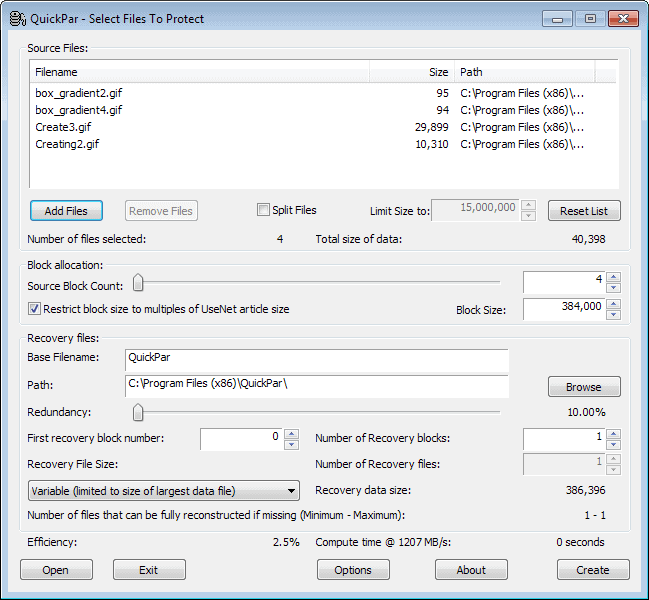
To use Quickpar you simply add one or multiple files that you want to split with a click on the add files button in the QuickPar interface.
Once the files have been added, you check the split files option and set a file size limit if you do not want to use the suggested 15,000,000. Then you select the number of recovery blocks and decide the percentage that you want recoverable.
A value of 10% for instance allows you to repair the archive if 10% or less of it is corrupt or damaged.
So where is this useful? This is excellent if you want to backup important files, videos or pictures on CD or DVD and want to make sure that future read errors can be corrected.
We all know that CDs or DVDs can become partly unreadable and the created pars can be used to recover the complete archive even though part of it can not be read.
It is possible to alter several other settings before you are using the program to creat the pars but that is normally not necessary. You can raise the block size for instance, or change the size of the par files from a variable size to a fixed size instead.
Par files can also be created even if you do not move the source files at all. You can use the par files then to recovery those source files whenever the need arises.
Files can be recovered by clicking on any par file that is created in the process. Quickpar will automatically load the archive and check all files within to see if any are corrupted. If they are it tries to repair the corrupt blocks automatically and will succeed in doing so if the size of the par files exceeds the damage.
Advertisement

















