
Drag and Drop Robot

I love it when someone mentions a great software or tip in the comments of one of my articles. Mouser from Donation Coders mentioned his program Drag and Drop Robot in my article that described how to unrar multiple rar files at once on the system. It is basically a more versatile software that has - amongst other options - the functionality to unrar multiple files.
Drag and Drop Robot can be described as a program that interacts with command line tools to add batch processing and drag and drop functionality to them. This might sound complex at first but in reality it is not. Several configuration files are already installed when you download the program, you can use them to zip and unrar data, hide and unhide data in pictures and encrypt or decrypt data.
If you would for instance like to unrar ten rar files, you would simply choose the unrar configuration option, and drag and drop the ten rar files into the queue of Drag and Drop Robot.
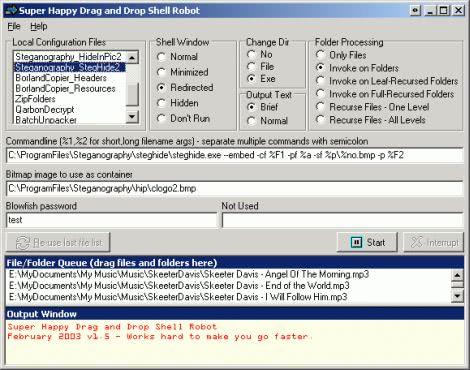
The most interesting aspect of this software is probably that it is possible to add custom configuration files. This is excellent for users who work with audio or video encoders for instance. If you want to encode 1000 mp3 files you could simply use lame, add the command line options that you want to use, and drag and drop the folder(s) that contain the mp3 files into the window.
Mouser has created a demonstration video on the site which helps you understand the concept behind Drag+Drop Robot. The video is definitely a good start to understand how Drag and Drop Robot works. After you have watched the video, you could take a look at the online help file offering examples, tips and tricks, and related information.
Advertisement

















