
How to increase download speeds with Azureus and uTorrent

I'm using Bitcomet and love it but Azureus and uTorrent are two great bittorrent clients as well, and I know that a lot of people are using them. The AureusWiki site has an entry that tries to help you download your torrents faster. They post some interesting links in that article that deal with common problems and settings that slow down downloads. They provide a chart for example that take different upload speeds and define other settings that are optimal for good download speeds.
JohnTp published an article that tries to explain how to increase download speeds with uTorrent, another popular client. This article is really helpful, besides a step by step walk through, John added screenshots as well to visualize everything even more.
Just a side note, you will never be able to download at greater speed than your connection is capable of, that means: If your upload or download speeds are already near the maximum speeds of your Internet connection, it is not necessary to tweak the settings any more as you won't be able to benefit from the changes that you make. It´s great for everyone else who is having troubles.
Update: John's website has been taken off the web, and we have removed the link pointing to it as a consequence. You can try the uTorrent Connection Setup guide as an alternative, as it offers some helpful tips on how to configure the bittorrent client. Especially the problem section may come in handy, as it explains port forwarding, how to resolve NAT problems, or how to use universal plug and play, or nat-pmp.
Here is a quick rundown:
- Open the uTorrent client and click on Options > Preferences in it.
- Switch to Connection here as the page lists important connection related settings.
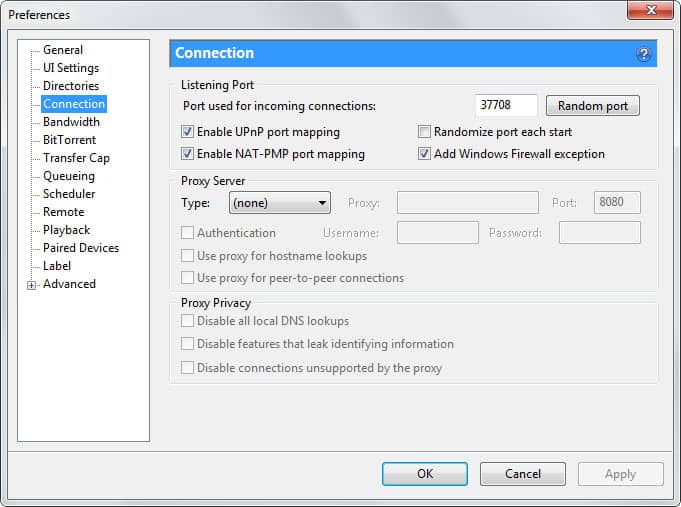
- Note the port that is displayed here. You need to make sure that your firewall or router is allowing connections to that port. It would go too far to explain how this is done, and if you are using Windows Firewall, it should have been handled automatically by uTorrent. You may need to set up what is called port forwarding in your router or mode. Before you do, use the uTorrent port checker to find out if the port is properly forwarded.
- Switch to Bandwidth and add a maximum upload rate here if it is set to 0 or near the maximum of your connection. I suggest you use no more than 50% of your total upload bandwidth for this here, as it may impact your download speed otherwise.
- Make sure the download speed is set to 0 which makes it unlimited (to the maximum of your connection obviously).
- You may also want to play around with the maximum number of connections here. Try reducing or increasing the number and monitor the speed in which torrents are downloaded in uTorrent. Make sure you monitor the values a couple of minutes at least to come to a conclusion.
- You can also change the maximum number of active downloads and torrents under Queue Settings. If you download many torrents that have only one or two seeders and peers, increasing may help you max out your connection.











JohnTp’s site is down. Anyone has got his article?
uTorrent rules. I was a long time Azareus user anddidn’t mind the high use of system resources since I have a brand new, pretty beefed up PC. But uTorrentis just more efficient, intuitive, and cleaner.
Thanks a million! Quite an immediate and appreciable increase in my download rates
Great post! I’ve switch from BitComet to uTorrent a few weks ago, but already have made myself a fan of this tiny little software.
I’ll translate it and post on my website/blog.