
Self-Destructing Cookies for Firefox

Cookies, small bits of data that Internet servers you connect to can place on your local computer, can be both beneficial and privacy-invasive depending on how they are used. Beneficial cookies store session data or preferences to preserve some information over sessions. Privacy-invasive cookies on the other hand are used by advertising companies and marketing firms to track you across the Internet.
A core issue in this regard is that cookies have an expiration data set by the server so that they may reside on the computer even after you have closed the website. While this may be beneficial at times, for instance if you visit the website regularly and do not want to log in every time you do so, it can as well reveal a lot about your surfing habits and be used to track you when you visit a site that is allowed to read the cookie.
There are a couple of things you can do to limit the privacy implications. You can for instance disable third party cookies in Firefox which blocks the majority of tracking related cookies from being set on the system.
You can also have Firefox delete all cookies but whitelisted ones on exit which is another interesting option to reduce cookie tracking.
Update: The original Self-Destructing Cookies is no longer available. Mozilla dropped Firefox's classic extensions system with the release of Firefox 57. A fork of the extension that supports the new extensions system has been released by another author. End
Self-Destructing Cookies
The Firefox add-on Self-Destructing cookies offers another interesting option. The extension removes cookies automatically from the system once you close the website that has set them on your system. This not only deletes tracking cookies regularly during sessions but also makes sure you are logged out of sites automatically which may improve security on multi-user systems.
A whitelist is provided that you can add websites to that you want ignored by the add-on so that its cookies remain on the system even after the website has been closed.
Cookies are deleted automatically after a grace period of 10 seconds, a value that you can change in the options. You receive a notification when cookies are removed.
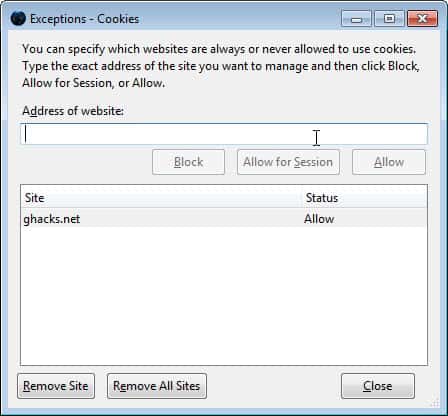
The extension honors the whitelisting settings of the Firefox browser. To whitelist cookies press Alt, select Tools > Options, switch to privacy and click on the Exceptions button next to cookies.
Add domains, e.g. ghacks.net that you want cookies whitelisted for so that they are not deleted by the extension when you close the website they have been created on during connection.
The settings of Self-Destructing Cookies lists options to disable notifications and to allow 3rd party tracking (which is disabled by default).
Verdict



















Firefox about:support shows “Multiprocess Windows” blocked by firefox extension SDC on my computer.
I can find no way around this but to disable SDC.
(W7 pro with Intel I7cpu, firefox 54.01).
The author of SDC has stated on the FAQ (https://addons.mozilla.org/firefox/addon/self-destructing-cookies/) that he doesn’t have time to rewrite it as a WebExtension. So, SDC is probably going away :(.
And thus Mozilla snips another of my few remaining ties to Firefox.
@Thrawn – Here’s a web extension in case you don’t know about it but you probably do. https://addons.mozilla.org/en-US/firefox/addon/cookie-autodelete/ and Martin’s article on that web extension https://www.ghacks.net/2017/05/15/cookie-autodelete-for-firefox-webextension/
@cezi, @Thrawn’s suggestion is outlined on the Sefl-destructing Cookies page. As it says, you can set Firefox to refuse all cookies and then set your semi-whitelisted (“Allow for session”) cookies to self-destruct when you close all their tabs. Type about:config in the URL field, accept the warning, right click on the background and pick add new, add the name extensions.jid0-9XfBwUWnvPx4wWsfBWMCm4Jj69E@jetpack.defaultBlock, and set to true. Do do a bit of research to check that this suggestion isn’t malicious first (-:.
@Ruth, @witrak
Can confirm that, too, at least for FF 35 running Linux.
And apparently there’s no way of adding it to the toolbar again.
Any solution?
I’m still waiting for a solution too, Constantin.
Constantin check this article, maybe it ioffers a solution to your issue: https://www.ghacks.net/2015/01/16/fix-add-ons-not-working-in-firefox-35/
@Ruth: I confirm that. The icon disappears after short time.
I’ve had self-destruction cookies for over one year now and love it. The only problem I have is that the icon will NOT stay on my toolbar. It keeps disappearing. I’ve tried all the suggestions to no avail. Anyone else have this problem?
I’d love a new review of SDCookies. I tried it some time ago and didn’t like it, but it now allows me to easily open the whitelists ( I can find to whitelist sites easily in FF 28), lets me set a time for *even those* to disappear (seconds to infinity, I suppose, as well as on events like browser close). It now also *clears your browser cache* when you’re idle a [set amount of minutes], which is very nice. So now I’m loving the crap out of this add-on! Really, I’d do another review of it.
(I’ve never understood why these add-ons don’t combine a bit more, like SDC could add “and clear LSOs on close”. I suppose they’re slowly doing that, like ABP does some Ghostery things now, etc. But I suppose it’s good to have competition to make ‘the best’ and get the donation! :)
Trebuchette, I will update this article once I find the time to do so ;)
@cezi: You’re free to block all cookies by default; you don’t need any addon for that. However, if you do, then Self-Destructing Cookies has an experimental mode that will let you allow cookies for selected sites only while they have active tabs. Best of both worlds.
The fact that Self Destructing Cookies automatically logs you out of sites when you leave
is useful not just for multi-user systems, but also for preventing attacks like
Cross-Site Request Forgery.
Interesting extension.
I’ve used Cookie Monster for several years which gives me very good control over cookies.
about:permissions is also decent for managing things.
I second the recommendation for CookieFast. So far, it’s the best of the many cookie add-ons I’ve tested on my Firefox. Simple, quick, effective. And, may I add?, worth a review, Martin ;)
My complete current cookie management setup on Firefox is as follows:
– On Firefox options (Tools -> Options -> “Privacy” tab): “Accept cookies from sites” UNTICKED. This prevents websites from storing cookies on my PC by default. I manage which (few) websites CAN store cookies via exceptions
– CookieFast add-on: via a simple toolbar button, it allows me to quickly add a site to my whitelist (= list of sites that are allowed to store cookies). For 98% of the sites, I don’t have to do anything at all. For the other 2%, I add them to my whitelist via the CookieFast toolbar button in a second or two. Note that I only have to use the button the very first time I visit a site whose cookies I want/need to keep.
– A couple of “helper” add-ons that make cookie management easier:
“Cookie Manager Button”: adds a toolbar button to quickly access the cookie management window
“CookieExFilter”: allows you to search cookie exceptions quickly and easily
Overall, it’s a relatively simple setup that’s VERY low maintenance and gives me fine control over my Firefox cookies.
I just gave it a 24 hours try out. Pretty good. It automatically wipes everything and logs me out once I leave a site. Kept the cookies as long as I was using it. I set the wipe timer to 60 seconds. Now if only there’s one for Android.
I just gave it a 24 hours try out. Pretty good. It automatically wipes everything and logs me out once I leave a site. Kept the cookies as long as I was using it. I set the wipe timer to 60 secs. Now if only there’s one for Android.
This addon has the same silly approach as Yesscript — better is no to all attitude + user made exemptions for concrete trusted/important to user sites – session cookies-temporarily
= CookieMonster + NoScript +for more refined rules RequestPolicy …..
Thanks Martin, sounds interesting. Looks new so might leave it a little longer and see how the ratings go.
But I don’t want any cookies to be kept on my PC. I want them gone. Why put exceptions? Defeats the purpose.
CookieFast start setting Firefox for no accept cookie.
When you visit an important site for you you can set that on exceptions list.
When you do this for all personal web sites all is done.
I would have to disagree with this. I think the Self Destructing Cookies would be a better use. Especially if one goes on to multiple sites all day long. The CookieFast requires the user to manually delete it. Might as well as save the ram load and just use Firefox’s built in history eraser.
Interesting extension but in my opinion the most simple and effective is CookieFast:
https://addons.mozilla.org/en-us/firefox/addon/cookiefast/?src=ss
Great site Martin. :-)
This sounds like an interesting add-on. Thanks for the spot!
The only problem I see is in the lack of user comfort. When I use an add-on that cleans all cookies but those from my white-listed domains, I would expect there to be a better way to actually control said white-listed domains!
There is no way, I would ever be able to keep this list up to date, if I’d need to keep going deep into the options for it (5 steps/clicks/key-presses: alt, tools, options, privacy, exceptions) every single time!
I’ve installed Self-Destructing Cookies for Firefox yesterday, and it works just fine. Personally if I just call Firefox’s Page Info for the website I’m visiting to and, if applicable, set its cookie exception. Et voila.
Transcontinental thinks this is good for you :)
This add-on has been preliminarily reviewed by Mozilla.
Interesting extension, however at this moment I find the built-in capabilities of Firefox enough for my needs (coupled with having more than one profile, because I like to clean up Google cookies, but for my blog I need them, so I created a separate profile used just for blog administration).