
Limit The Upload Bandwidth Of Windows Programs

I noticed yesterday that the popular live streaming software Sopcast was using all of my computer's upload bandwidth. The program uses P2P technologies to distribute the live stream to all connected users, just like the newly announced Bittorrent Live does.
Using all of my computer's upload speed, 10 Mbit in total, put a lot of strain on other programs that used the Internet connection (I discovered this with the help of Netspeed Monitor).
This can cause problems if you share the connection with other users, or run programs in the background that require a certain amount of upload speed to function properly and without lags. Maxing out your upload bandwidth can also cause problems with your ISP as they may limit your connection or ask you to upgrade to an account that is more expensive.
I first tried to find an option in Sopcast itself to limit the upload bandwidth, but there was none unfortunately. Research on the Internet revealed a handful of commercial programs, and solutions for Linux, to limit the upload bandwidth of a program. There seems to be only one free program for recent versions of Windows that can limit the upload of selected programs.
Netbalancer Free lets you limit the upload and download speed of all processes running on the system. You can read my previous review here: NetBalancer, Internet Traffic Monitoring, Controlling Software.
Here, I'm only describing how you can utilize the program to limit a program's bandwidth use under Windows. NetBalancer displays a list of all processes running on the system on startup. Each process is listed with its name and the current download and upload rate. You can now limit the rate of a process by right-clicking it, and selecting one of the available options from the context menu.
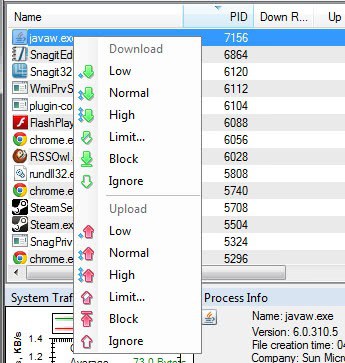
You can select one of the pre-defined values (low, normal or high), block the program completely from sending data, or use the limit option to set a custom limit in Kilobytes per second. Once you have configured the upload limit, you will immediately notice that the program won't go over that limit anymore when NetBalancer is running.
I configured Sopcast's upload limit to 500 KB/s, which resolved all the underlying issues I had with the program before.
Advertisement














ace stream upload not working just get NetBalancer – Traffic Control and Monitoring Tool ( u no were to get this software cofe cofe wink) you will be able to control the upload speed from this tool just right click ur process name aka ace_engine .exe – upload priority – then limit, pout in ur upload i leaving mine at 400 k/s
Hmm seems to work pretty nice for me; the tool does what it says…
~Splamy
Do NOT use this software, yesterday it seemed like everything was ok and working, but after turning off the computer for the night and turning it today back on today I was getting random bluescreens of death, it took me a while to figure out what I had done differently yesterday and after entering windows safe mode and uninstalling this everything was fixed.
What awful software! It ‘temporarily’ disconnected my internet connection (usb tether) and has not restored it. Now my computer won’t even recognise the modem (no problem on other computers). I’ve tried system restores, uninstalling/reinstalling hardware, half a day on and no luck. Netbalancer has changed some setting that has completely destroyed my internet connection. Thanks guys!
besteht da nicht das Problem, dass die Streams dann nicht mehr vernünftig laufen, vor allem die mit hoher qualität… war zumindest bei mir mit dem “Netlimiter” so. Lg
It obviously depends on what you use the apps for. I’d suggest to experiment with the limits if you are running into issues.
The ability to control the % of the network connection on this app looked interesting, so I decided to install it. I haven’t use dit yet but the install is a bear.
I must have gotten 50+ Comodo firewall prompts. The installed issued this message:
“Installing NetBalancer will reset your network connections and temporarily disconnect you from network. Press OK to continue.”
But did not provide a cancel button in case you were NOT OK with that.
Than when it finally looked like it was completed installing, it did some dotnet assemblies and then issued a msg that I would have to reboot to complete the install.
However, needing to reboot (which I will do sometime on Monday) didn’t stop the app from starting a service that seemed to quickly start using CPU cycles and accumulating CPU time
I stopped the service and set it to manual since I don’t intend to run this application all the time (if at all).
Martin – I’d like to see a little more detail on your experiences during installs so we know what to expect (or even if we want to do the install at all).
Is it correct to assume that TVU player has not upgraded itself (incl. bandwidth control) that much that you are considering, to go back to TVU player?
I have not used TVU Player for a very long time. Not really sure why.