
Firefox Delete Download Button

If you are using the built-in Firefox download manager to download files from the Internet and have configured the browser to remember the browsing history, you may have noticed the absence of a delete button in the download window.
While it is possible to remove individual files from the listing by selecting them first and pressing ESC or by right-clicking and selecting Remove from list, there is no option to delete the file from the computer's hard drive at the same time.
You can resolve that issue either by selecting to open the containing folder to delete the file from there manually, or install the Deletebutton extension for the Firefox web browser.
Unlike previous download manager enhancements like Download Manager Tweak or the Firefox Download Manager extension, Deletebutton only adds a delete button to the download window of the Internet browser.
All you need to do now to delete files is to select one or multiple files in the downloads window and click the Delete file button afterwards. And just like any good file deletion tool it displays a confirmation prompt before the selected files get deleted on the system.
It feels a bit strange that the Recycle Bin on Windows is bypassed by the extension. Files that you delete this way are automatically removed from the system without options to restore them later from the recycle bin.
It is not clear if this is a bug or a feature of the extension. Firefox users who want deleted files to be listed in the recycle bin should install one of the add-ons mentioned above instead which offer that functionality. Some users on the other hand might like that particular feature.
Firefox users who just want the ability to delete files permanently from the download window can install Downloadbutton from the official Mozilla Firefox add-on repository.
Update: Mozilla launched a new download interface recently. The option to delete a file that has been downloaded in Firefox is only available in the download manager but not when you click on the download button in the Firefox interface.
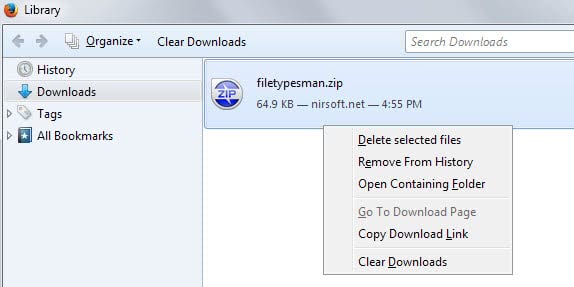
The download manager opens with a tap on Ctrl-j, or by tapping on the Alt-key and selecting Tools > Downloads from the menu bar at the top.
There you right-click on selected files and pick the "delete selected files" option to remove them for good from the system.




















The download manager is being revamped a bit (slated for Firefox 10). I didn’t read all of the details, so I’m not sure why files cannot currently be deleted, but that will be possible through the Downloads entry that is being added to the Library (with Bookmarks and History). That can already be seen in Aurora and Nightly. In Nightly UX, you can see the downloads (doorhanger) panel and some cool eye candy that goes with it.
https://wiki.mozilla.org/User:P.A./Panel-based_Download_Manager
why do you remove the delete button? It’s convenient and I use it very often.
Firefox now always do some weird things.
Actually, that icon/button only clears the list, which is what I want, as I may or may not have installed the files that I downloaded.
Then, I right click on the folder(s), Eraser shows up in the Context Menu and the files are deleted permanently!
I should have explained that better!
Thanks for the clarification.
Don’t have that problem using Download Manager Tweak, as there’s an icon/button at the bottom left that allows you to clear/delete all downloaded items.
Works well! :)
I forgot to mention that you can not use drag & drop of multiple files (not supported). You will need to do a file at a time.
Pretty boring and inexplicable!
Interesting, but less practicable if you cannot drop multiple targets.
There is also the possibility of drag and drop from the list to the trash, to delete the file :D
I think images in the post should be different, both are same.
Thanks for letting me know, removed one image.