
Firefox 4 Slim Add-on Manager

Mozilla has changed the add-on manager in Firefox 4. The reworked add-on control panel is now opening in its own tab, listing the available add-on related entries on the left, and the actual add-ons, plugins, userscripts and themes on the right.
The add-on listing uses quite a bit of space, which should not be a problem for users with a handful of add-ons installed, and users with large resolution monitors. Firefox users with 20 or more add-ons, Firefox themes or plugins installed on the other hand usually need to scroll through the list if they are looking for a specific add-on, for instance to edit the extension's options or remove it from the web browser.
Yes, a search is provided at the top but using a search for a few dozen installed add-ons? Feels like overkill.
Enter Slim Add-on Manager for Firefox. The main purpose of the Firefox add-on is to reduce the height of all Firefox add-on manager items to make up room for additional listings. Lets take a look at the standard add-on manager first.
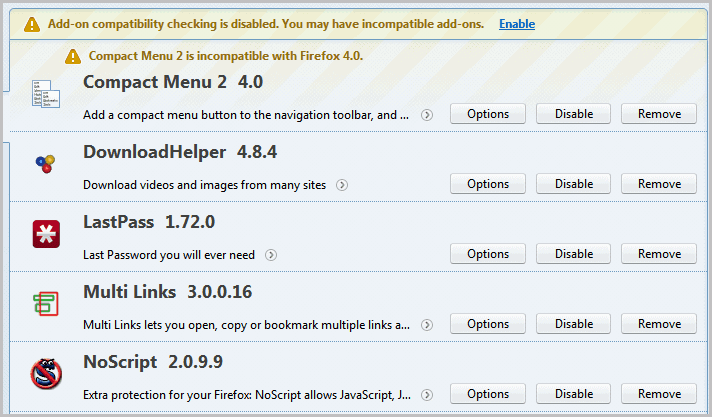
Each add-on is listed with its name, an icon, the first few words of the description and the options, disable and remove buttons at the right.
The slim add-on manager changes that. It removes the description, changes the title font and reduces the size of the extension's icon.
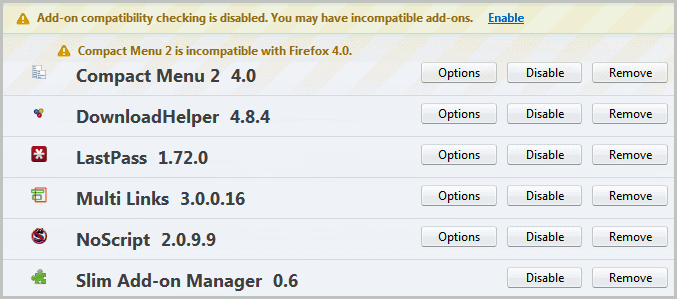
The effect? It is now possible to see more than double the add-ons in the add-on manager without scrolling. It is likely that most users will not miss the descriptions, as they usually know what each individual add-on does. A left-click on an add-on displays the short description beneath the add-on listing, another click opens the detailed listing which remains untouched.
The slimmed down listing is active on all add-on manager pages which means that plugins, userscripts and themes are all listed in the same optimized fashion.
It is likely that it is possible to manipulate the listing with userstyles as well, a quick search on Google and Bing however did not bring up anything useful. If you know how to change the appearance with styles let us know in the comments, please.
The Slim Add-On Manager is available for Firefox 4 and later. Users can directly install it from the Firefox add-on repository over at the Mozilla website.
Update: Slim Add-On Manager has been discontinued. An alternative is not available and no longer necessary due to the new line height of the add-on manager.
Update 2: Check out Cleanest Addon Manager for an alternative that compresses the listing even further.
Advertisement

















^ tested and working fine : )
Great :)
I wonder if this will work with the ‘add-ons manager dialog for firefox 4’ (wow that’s quite a mouth full) extension.
If you really need a slimmer add-on manager, you’d want to see All-in-one sidebar : https://addons.mozilla.org/en-US/firefox/addon/all-in-one-sidebar/
dude your images show how bad font rendering is in FF4. look how blurry!
Did you actually click those images? The text on the miniatures is blurred cause of your browser shrinking it down.
Thomas that’s the reason, right. I have hardware acceleration disabled in FF4 and therefor no blurry fonts or other font related problems.
Performances of Browsers:
(Credit: Chart by Seth Rosenblatt/CNET)
http://download.cnet.com/8301-2007_4-20047314-12.html
Chrome 10 IE 9 Firefox 4
SunSpider 0.9.1 (ms) 336.20 250.60 292.37
Kraken (ms) 8,806.30 15,606.77 7265.13
V8 v6 (higher is better) 5,173.67 2,235.33 3540.33
JSGamebench 0.3* (higher is better) 322.00 1,156.00 1,482.00
Boot time (s) 26.22 21.86 17.80
Memory (kb) 390,532 205,616 148,020
Firefox 4 is strongly favored by HTML5 processing, boot time, memory usage and security.