
Buttonizer Turns A Firefox Toolbar Into A Button

Browser toolbars are sometimes a necessity, especially if they provide functionality that is otherwise not available. The main problem that many users have with toolbars is that they take up a lot of space. Firefox offers the tool to move at least some of the toolbars around but that usually is not enough to reduce the space the toolbar needs in the browser interface.
Buttonizer is a new experimental add-on for Firefox that aims to change this by turning one toolbar into a single button. This way it is possible to reduce the space needed by the selected toolbar to a single button that can be put anywhere in the browser interface.
Take a look at the Last Pass toolbar below which occupies all the space on its own (Last Pass offers to compact the toolbar, see it as an example).
The Buttonizer add-on offers to turn a toolbar like the Last Pass toolbar into a single button. The add-on displays a single button in one of the toolbars after installation.
A right-click on that button opens a list of all available toolbars with the option to select one with a left-click that is then turned into a button. A click on that button displays the full toolbar beneath the button in an overlay.
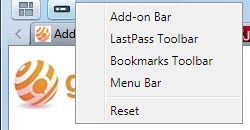
Please note that it is possible to turn the add-on bar, bookmarks toolbar or menu bar into a button as well.
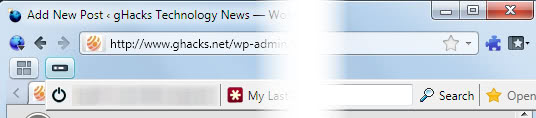
The button can be moved around by right-clicking free space on the toolbar and selecting customize. This procedure may also be needed to display the Buttonizer button in first place after installation.
Buttonizer is currently limited to turn one toolbar into a button. The add-on is compatible with Firefox 3 and 4. A download is provided at the official Mozilla add-on repository.
Advertisement

















Sounds like an interesting idea. It wasn’t clear from you description as to how the toolbar is restored to access the functions. Doe sit go back to its original position?
What would be nice is if it flew open into a floating toolbar and back to a button when you were finished with it.
And this is something that I would like to see on a Windows desktop!
But anyway, it won’t install:
Firefox could not install the file at
https://static.addons.mozilla.net/_files/272431/buttonizer-0.1-fx.xpi
because: Not a valid install package
-207