
Find Hidden, Locate Hidden Files And Directories

Files and directories can have attributes that hide them from standard view in Windows Explorer and other applications. Several system folders for instance are automatically hidden from view. Microsoft did that to prevent that users tamper with important system files accidentally.
Users can furthermore add hidden attributes to files and directories to hide them on the operating system as well.
While it is not that difficult to change the default Windows behavior to show hidden files automatically, it is often faster to use specialized software to locate hidden files on the operating system.
Find Hidden is a portable software for Windows that has been specifically designed for that purpose. The software can detect hidden files or directories, but not both at the same time. Users just need to point it to a starting folder or drive which is then crawled by the application.
Searches can make use of available filters to narrow down the result listings. For file searches it is possible to specify a set of file extensions, or a specific name and file extension combination.
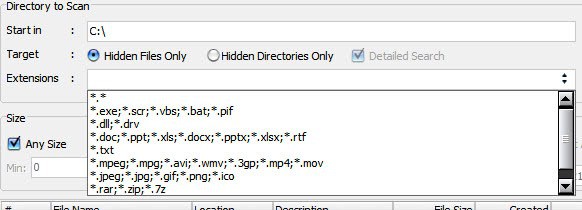
Size and date filters are provided as well to only find files of a specific size range or date range. The date filter offers to find files based on the date they have been created, modified or last accessed.
All hidden files or directories that have been found in the selected location are then displayed in a table. The listing displays file and directory names, paths, file sizes, creation, modification and last access dates and file attributes.
A right-click displays a properties menu that includes options to execute the file, change the file's attributes, open the containing folder in Windows Explorer, delete, copy or unhide, view the binary data, search Google for the selected file, or copy the file path or full file name to the Windows Clipboard. Most options are accessible with hotkeys as well.
Find Hidden is a small portable application for Windows that does an excellent job at finding hidden files and folders in the operating system. Downloads are offered at the developer website.
Update: The developer website is no longer available. You can however download the latest version of the program from a software portal such as Softpedia.
Advertisement

















Hi, If possible please send me the software thanks
http://download1us.softpedia.com/dl/99b291d541285d928763b55d1a763cad/4f2110b6/100178286/software/system/findhidden_06_7a.zip
This is the software which i was searching…
Thx for posting..
Since the page is in Indonesian and English it is very difficult to find the download link. Click the Softpedia emblem and it will take you to the file.
01;1;January