
Windows Event Viewer Plus

Most Windows users shy away from the powerful Event log thinking that it is to complex and complicated to be of use. The Windows Event Viewer on the other hand can reveal information about errors or alerts that would otherwise be hard to come by, if at all possible.
Windows Event Viewer Plus was recently released for a faster way of using the Event log in the Windows operating system. The portable software can be used to view event logs from local computer systems as well as remote PCs.
All available event logs are displayed in a sidebar on start, and the main pane will be filled with recent entries after a selection has been made.
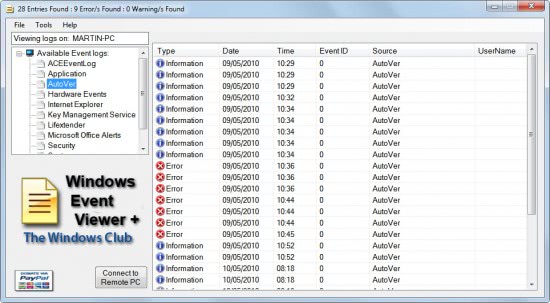
A double-click on an event log entry opens a small window with detailed information about that specific event.
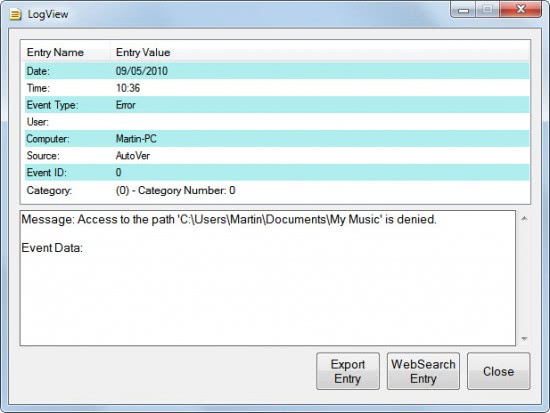
These information can be exported to the local computer system. Windows Event Viewer Plus provides access to four web search modules that can be used to search Bing Search, Google Search, Yahoo Search or the Microsoft Support site for that error.
That's comfortable as it gets rid of the copy and paste when working with the standard Windows Event Viewer and researching events on the Internet. The portable program links to several Tools in the menubar including memory diagnostics, check disk and the system file checker.
Windows Event Viewer Plus is responsive and faster to navigate than the built-in Windows Event Viewer. It does however lack a lot of features that the Event Viewer offers like the ability to search in the event log, sort it by one of the parameters (e.g. time) or to attach tasks to events.
Windows Event Viewer Plus is available for download at the Windows Club website. The program ran fine on a 64-bit Windows 7 Professional system. It should run fine on most Windows systems as well.
Advertisement

















There is another much more robust program called EventSentry that some may want to look at, They have a free version here:
http://www.netikus.net/products_downloads.html
I liked this because it has the capability to send an email on an event condition (error, warning, etc.). That way, you don’t have to actually look at the event log.
http://www.netikus.net/downloads/eventsentry_light_setup.exe
EventSentry light? There is no download link for the free version. I won’t create an account for this. No, thanks.
Gee, it’s just too much problem to create a FAKE account to get a robust, FREE product?
People like yourself are really, really annoying!
Thank You very much for information and review of Event Viewer Plus. For me, interesting and useful little program.
Thank You for the review over Event Viewer Plus. Alot of the features missing from the current version will definately be rectified in the next version as will even more features that will help the average user to diagnose problems. I enjoy your reviews here at GHacks and value your feedback.
Lee Whittington