
Orage: Xfce calendar application

As we continue on with our travels down the Xfce path, I thought it would be smart to highlight the Xfce calendaring application Orage. This tool is not an "all in one" tool like Evolution, nor does it have all of the bells and whistles of the Mozilla Sunbird calendar. But what it does, it does well and does so without taking up tons of your resources or your desktop real estate.
In this article you will see how this calendar is used so you can continue making your decision if Xfce 4 is the desktop for you.
Features
The Orage calendar won't blow you away with features. But it does have a nice set:
- Runs from notification area.
- Import/Export iCal files.
- Alarms.
- View selected date/week.
- Archiving.
- Popup notification for alerts.
- Daily event listing.
Installation
Orage does not automatically install with Xfce. Instead you have to install it manually by following these steps:
- Open up your Add/Remove Software tool.
- Search for "orage" (no quotes).
- Mark orage for installation.
- Click Apply to install.

Setup
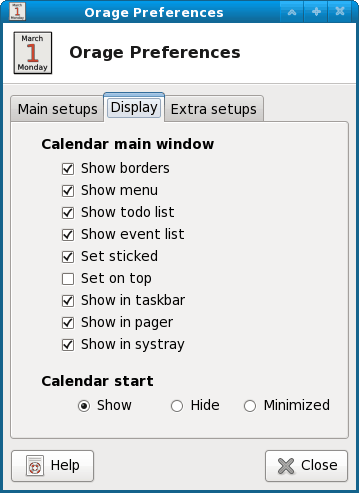
To set up Orage so it will run in the notification area (or system tray...or systray), you have to open up the Preferences window. To do this click Edit > Preferences. In the Preferences window click on the Display tab and make sure Show in systray is checked (see Figure 2).
There are a few other preferences you might want to take a look at. In the Main Setups tab you can set your Archive threshold. What this will do is automatically archive your calendar when it reaches the set threshold. So if you set your threshold for 3 months, every three months you calendar will archive. If it is set to 0 auto archiving is turned off.
Import/export
One of the features that made me decide to cover this tool is the Import/Export feature. Before I get to far with this, there is not auto-publishing feature for Orage. All of this is done manually. But if you are migrating from one calendar to another, it is helpful.
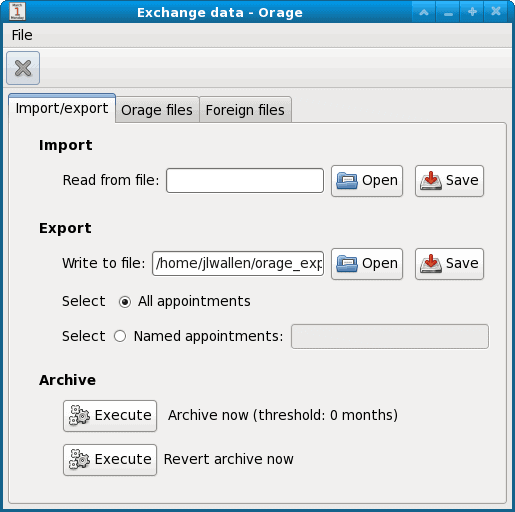
Orage allows you to Import and Export .ics calendars. This means you can import/export to Google calendars (if you use them). It's very simple to do. Click File > Exchange Data and then (from the Exchange Data window - see Figure 3) you can import and export your .ics files.
Now you may notice the Foreign files tab in the Exchange window. This is different than the Importing feature. The import feature actually imports your .ics files into your main Orage calendar file. The Foreign files feature allows you, basically, to add new calendars so that Orage is reading multiple files. This way you don't have to combine calendars. If you think about it, this would also allow you to share out calendars with other users. What you would have to do is have those other users' calendar files set as Foreign files and add them from a shared directory. You can set these caledars as read-only if you like.
Final thoughts
Orage is a nice little calendar application. It won't blow you away with it's features and tricks, but it will work and work well for you. The ability to import/export ics calendars add "external" calendars is quite nice as is its tiny footprint. If you are looking to use Xfce, you will want to take a look at Orage and consider it as your calendaring application.
Advertisement












…unfortunately, it looks like this app/package is no longer supported. Kind of a bummer because I absolutely love the configurable aspect of the clock in the panel (I really liked being able to just put the whole date in there w/o having to hover over it).
Also wanted to say to Mr. Wallen that I appreciate all your Linux articles & tips!
I been using Orage for years. I’ve tried most of the other calendar apps but find them either limited in features or they take up too much screen real estate. Orage has a nice balance. It’s small and can sit permanently on my screen and it’s reminder system is tops.
Thanks. This is an excellent app. I downloaded it, works out of th ebox, using Cinnamon, no problems. I was using firefox’s calendar but I don;t like to keep ff running. Lightning I tried but it was a mess. I was used to the mac’s calendar and this fits the bill. Easy to use, lightweight and has enough options to do all I need.
Hello. Thanks for the write up on Orage. It’s a very good application.
I wonder if it’s possible to set it so that it does not import duplicate entries when it imports a file. For instance, say I import my calendar from my LineageOS (basically Android) phone into Orage on my desktop. Great, both calendars are identical. Then, a week later after I’ve made newer entries on my phone calendar, I once again export an ics file from my phone calendar and import this into Orage. This time I notice that there are duplicate entries created of the events that were included in the first ics file import I did a week prior. So, I do wonder if it’s possible to set it so that it does not import duplicate entries.
Also, I wonder if it’s possible to export only a range of entries. For instance, following the example above, let’s say after the first import/export of entries via an ics file occurs. Now both Orage and my phone calendar show the same entries. Great. Then, a week later, I’ve been primarily using Orage and I decide to update (in essence, “sync”) my phone calendar with an exported Orage ics file. Can I just export the entries from that week to avoid potentially creating duplicates on the phone calendar of the events prior to that week?
Well, Orage works well when you are younger than 44 and have no contacts older than 44. Because Events with a start date before 1971 are simply not shown. A “pretty well written app” should do this. And a serious software test should have noticed that.
I’m 67, and I use Orage exclusively. I’ve tested other calendar apps but they fail, or take up too much screen real estate. Orage sits on my screen, out of the way, but within constant view. I plan everything on it.
Nice article, I’m using wget to fetch my Google calendar from the private link and schedule it with chron and then set the path to my Orage calendar file to the file I recieved from wget. It’s a little bit more automated and convenient.
like stated, Orage just works. it’s a pretty well written app. i find it highly useful for my integration w/ my tint2 panel setup