
Firefox Sync

What once was Mozilla Weave Sync is now Firefox Sync. Mozilla changed the name of the synchronization service for the Firefox web browser.
No word is out why they changed the name but it is likely that Mozilla Weave Sync was just not descriptive enough whereas Firefox Sync exactly describes what the service is all about.
Firefox Sync

Note: Firefox Sync has been integrated natively in the Firefox web browser. Mozilla launched it as an add-on initially, but it is now available without extra installation of any kind.
The process of setting up Sync is straightforward:
- Load the page about:preferences#sync in the address bar. This opens the Sync page of the Firefox preferences.
- You can either create a new Firefox Account on the page, or sign in to an existing one. A Firefox Account is required for Sync functionality.
- Once you have signed in or created the account, you may select which bits of data you want synchronized: bookmarks, history, tabs, passwords, add-ons, and preferences are selected automatically and you may add addresses and credit cards to the data.
- It is probably a good idea to rename the Device as well for easier identification. You do so on the Sync preferences page. Just type a new name for the device, e.g. Main Work PC and confirm the change with a click on the "change device name" button.
- Open the Sync page on any other Firefox instance or device you use, and select the Sign in option. Use the same account, so that data is synced between these Firefox profiles or devices.
You can modify the sync data on any device individually; if you don't require some data on a device, simply uncheck the option on the Sync preferences page to disable it.

You can enable two-factor authentication for the Firefox account to add another layer of protection to it.
Note that you can manage your Firefox account online as well. You can use the online dashboard to delete the account entirely or disconnect some of the devices that sync data with the account.
Sync Resources
You may find the following resources useful when it comes to Firefox Sync:
Archived information
A new version of Firefox Sync was released as well (Firefox Sync 1.3b5) which offers considerable advantages over earlier versions.
This includes an improved response time, a new production server clusters built to handle larger loads, client user interface facelift and more.
The full list of changes is listed in the release notes.
Take a look at the screenshots below to see how easy it is to configure Firefox Sync to backup browser data that can be restored and synced with other devices. Data can be stored on Mozilla servers or custom servers.
Firefox sync supports continuous synchronization of the bookmarks, Firefox preferences, browsing history, saved passwords and tabs.
Existing Firefox Sync users can log in while new users need to create an account first.
The Firefox Sync server (Mozilla or custom), username, password and email address need to be configured in the Sync account creation window.
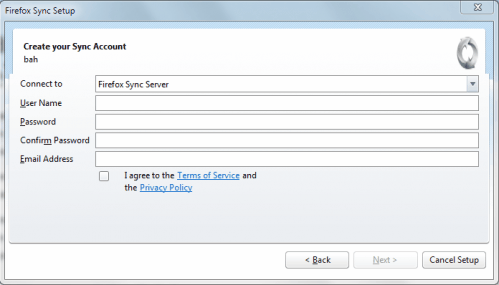
A secret phrase needs to be entered which will be used to encrypt and decrypt the data.
The data that should be synced can be selected in the next wizard window. It is possible to sync everything or only specific data sets.
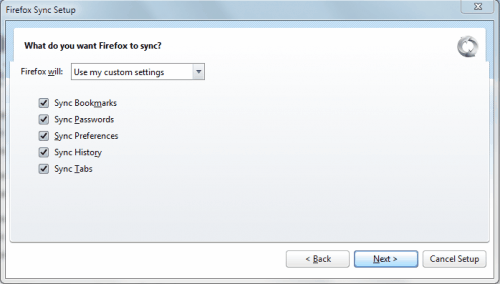
A captcha appears on the screen afterwards which feels a bit strange. The setup completes afterwards and Firefox Sync will appear in the status bar of the web browser indicating that it is performing the initial syncing of data to the selected servers.
The latest version of Firefox Sync can be downloaded from the official Mozilla Labs website. A click on Experimental version next to Download Weave now will download and install the latest beta version of Firefox Sync.
Update: Mozilla has integrated Firefox Sync into recent versions of the Firefox web browser. Users can now configure data synchronization in Firefox with a click on Tools > Options in the Firefox menu, and the selection of the Sync tab in the Options window.
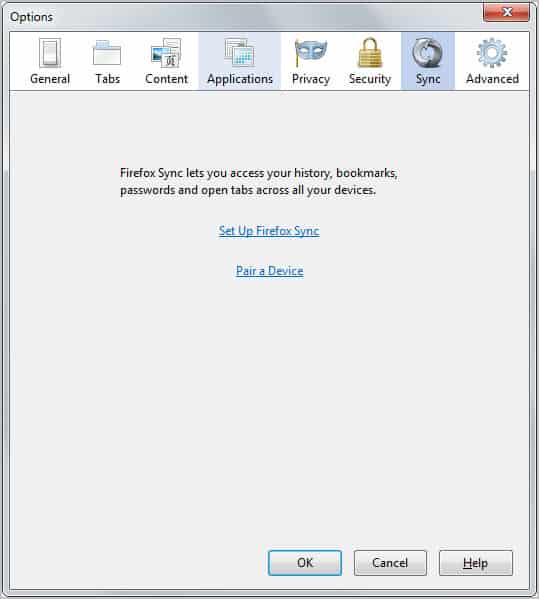
It is necessary to create an account before data can be synchronized between different versions of the Firefox web browser. Once setup, it is possible to sync data such as bookmarks, passwords and soon add-ons with Firefox running on other devices.



















I had to KILL my gmail address. ID stolen. So I still have a gmail address but many many programs use my old defunct address. As you can see i amforced to use it sometimes, but password resets are impossible, They keep sending new passsword data to non existant address.