
Shardana Antivirus Rescue Disk Utility

Many antivirus developers offer bootable rescue ISO images of their antivirus software programs so that users can use them to scan the computer system without having to boot into the installed operating systems. Shardana Antivirus Rescue Disk Utility combines antivirus rescue disks and system tools (like partitioning programs or boot managers) in one ISO image. This gives the user the means to run multiple antivirus rescue disks and other system tools from one disk or USB drive.
The core program can be downloaded directly from the developer's website. It does not ship with any of the antivirus rescue disks or system tools though. It is up to the user to download them individually with the possibility to skip programs by simply not downloading them.
The program itself is divided into four tabs that list the various tools that are supported by the antivirus rescue disk. The Italian interface can be switched to several other languages. A click on any entry will open a website with download possibilities. Some websites are also shown in the Italian language but it is usually not a big problem to change those to another language like English or German to download the tool in the right language.
The downloaded images and tools have to be placed in the right directory so that the program will recognize them during the creation of the bootable disk image. Here is the list of supported antivirus rescue CDs and other tools:
antivirus: Avira Antivir Rescue System, Bitdefender, Dr. Web Live CD, F-Secure, GData, Kaspersky Kav Rescue CD, Panda Safe CD and VBA Rescue
utility: Floppy win98SE, Clonezilla, Gparted, NT password, Parted Magic, System Rescue CD, Ultimate Boot CD
Linux: Austrumi, Damn Small Linux, NimbleX, Puppy Linux, Slax
PE: LiveXP, MegalabCD, WindowsPE, UBCD4Win, VistaPE
The program offers then to create either an ISO image which can be burned to CD and DVD or to make to copy the files to an USB device and make that device bootable.
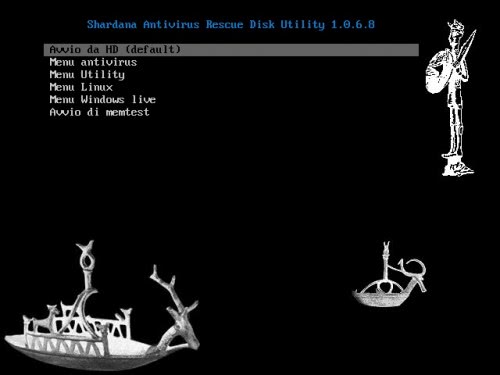
Shardana Antivirus Rescue Disk Utility is slightly more complex to setup initially. The tools that are combined on the disk or USB device on the other hand might make it an interesting option for users who usually run multiple antivirus programs and utilities in situations where they are needed.
The program can be downloaded from the developer's website.
Advertisement
















New Version SARDU 1.0.7.2
Changelog:
Upgrade syslinux to 3.86
Multiple PE 1.x
Fix Clonezilla
Add Dutch (thanks to Oddy)
Add Spanish (thanks to mlopez)
Add Polish (thanks to SamuraJack)
Add Turkish (thanks to H. Canik)
Change support VBARescue-beta to VBARescue
Fix Gparted
Add link to Forum
Add Link to SARDU on Facebook
Add support to Win XP Recovery disk (Test)
Add support to Win Vista Recovery disk 32/64 bit
Add support to Win 7 Recovery disk 32/64 bit
Add defrag for USB
Added update databases for Avira
Added update databases for BitDefender
Added update databases for F-Secure
Add progress bar
Add Support to kaspersky Rescue Disk 2010
Add Support to Ubuntu/Kubuntu
Add Support to AVG Rescue CD
Add PLoP Boot Manager v5.0
Fix support to Min Dr.Web LiveCD 5.0.x
Fix Partition Wizard
Add SHORT Keys: CTRL+ALT+C for list
New release: 1.0.6.9
Changelog:
Change memtestp to 4.00
Fix Floppy Win98 (new link, file .img)
Change graphic CD/DVD/USB
Add TestDisk, Photorec, LiloPwd
Fix new name ISO puppy changed in pup*.iso
Fix menu for ISO with pebuider
Fix errors boot with pe
Change Help
Change Link MegaLabCD
Fix RadioPE
Great find! Antivirus as self-running images are good idea but pain to maintain.
Will surely try this soon. :)
I picked this up about a month or so ago and love it. Probably one of my most useful utilities and the disk is one I carry at all times.