
Online Network Troubleshooting Analyzer Netalyzr

Network Troubleshooting can be one of the most frustrating tasks especially for the average computer user. There is always the question where to start the troubleshooting process. The Windows operating system comes with troubleshooting wizards that usually do not help at all except for the most basic of troubles that users can run into. But problems in the form of forgetting to plug in the network cable are not as common as slow or corrupt downloads, page loading errors or Internet connection drops. Those on the other hand are much harder to come by and troubleshoot.
The ICSI Netalyzr is a new beta online network troubleshooting analyzer that can analyze various aspects of a computer's network connection. It is made up of a Java applet that has to be executed on the user's system. The benefits of a Java Applet are that it is system independent and that it can access and analyze the computer's hardware and other aspects of the computer system.
The analysis will take a while and an in depth network troubleshooting report will be generated and presented to the user in the end.
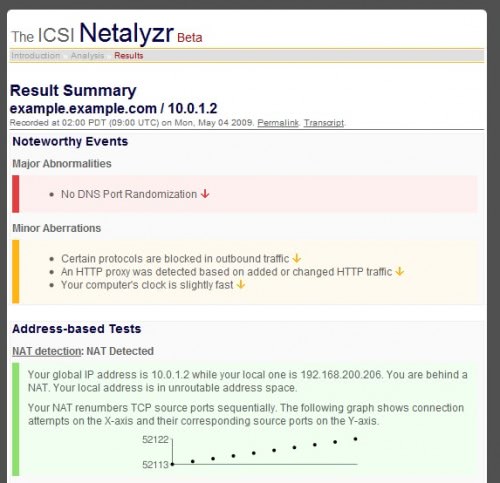
The network troubleshooting report is divided into two sections. The first reports on noteworthy events and is further divided into major abnormalities and minor aberrations. The second section displays the detailed network troubleshooting report that is colored for easier access. Entries with red backgrounds describe network problems while green backgrounds display unproblematic network elements.
Each title in the report is clickable leading to a short explanation of how the tests are conducted. Please note that you need Java installed on your system to run the software in the web browser.
Advertisement
















Is there a similar utility that will debug my hopeless LAN performance? From time to time I have a go at fixing it, but as Martin says, these can be tough jobs. My endeavours always ends with me going around in circles and ending-up with the LAN just as slow as before. 500MB file takes 15 mins between Win XP machines. The only fix that reliably works (for a short while) is to reinstall the OS.
Hoi Martin,
i have installed the Sun Java Runtime Environment 6 Update 14 (2009-05-29)
Hoi Martin, here is me again.
I myself really do not think its main connection/network connection. I even allowed java script and cookies. Next to that the site is very very (very) slow in loading the first (link) page and than after this, i am going to a second page called “the icsi Netalyzr beta and this page stops at something like 80 % ( with stile a white screen)
Do you have the latest JRE installed?
When I tried to analyze my connection avast antivirus let me know that this is some kind of a bug… What the hack guys? close this crappy site
LOL@Martin
I have to say I was just thinking whilst reading the article that building an online network troubleshooting app is an odd design decision.
Well it has probably been designed for situations where the connection is working but causing troubles. Maybe it is even possible to download the applet and run it locally.
To bad that the website is not working, wright know, i have looked for a different link without result. Could it bee that the website is only open by school hours?
working fine for me, maybe you have got network problems ;)