
Create A Free US iTunes Account From Any Country

If you have a US iTunes account you can get all sorts of freebies like new songs or media that is only being made available for US users. We previously mentioned how to get a free US iTunes account but Apple soon after disabled that option. You see, if you want to create a new iTunes account you usually have to add one of your credit cards to that account. The problem for non-US iTunes users is that the billing address of the credit card has to be located in the country that you are claiming to be a user of. Most non-US users do not have a credit card that has a billing address in the United States of America which essentially means that they cannot sign up as a US user.
There is however a very easy and straightforward way to create a US iTunes account without having to add a credit card or any other means of payment during the account creation phase. The famous None option will be selectable during account creation. Start by visiting the iTunes store. Make sure you are in the United States store. If you are not scroll down to the bottom and change the store to United States. Access the App Store that contains applications for the iPhone. Select a free one from the list of Top Free Apps and click on the Get App link in the detail view. The next window is the login window with the option to create a new account.
Click on the Create New Account button and on Continue in the next window. Accept the license agreement and click continue once more.
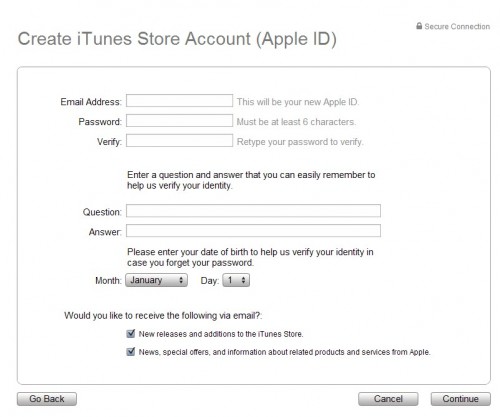
Now fill out basic account details, like the email, username and password of that account and click on Continue again.
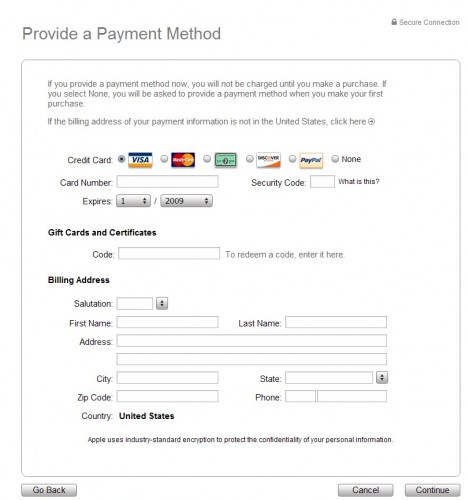
After that the screen with the payment information and address will appear. Select None as the payment and fill out the address information using a address in the United States. The easiest way to do that is to search in Google for hotels, e.g. Miami hotels, New York hotels and use the address of the hotel as the address.
Verify the email in the last step and you are set to use the US iTunes account. Here is a quick recap:
- Open the United States iTunes store
- Download a free iPhone application
- Select to create a new account
- Enter username, password and email
- Select none option and add a US address with matching zip, town and street.
- Verify the email
This should work from any country. If you got problems or tips let us know in the comments.
Advertisement
















it ask me to contact itunes support to create this
thank you, working,
there isnt any option for none again
i followed all steps to create new acct for USA and choose NONE for payment option, but it keeps saying to contact itunes support to complete transaction. why is this so? this thing is so embarrasing
Hi I need iTunes account you can you create for me please?
I’m gonna try making an itunes account wid da help of dis 2-tor-real. Can somebody plz give me some advise on the problems u guys have faced.
I’ll be dankful,
hacker47
I tried those steps but ERROR 1009 appeared on the screen. what can I do about it? If you have any idea, let me know?
HEY IT WORKED THANKS GHACKS YOU ARE THE BEST IIIIIIT WORKED!!!!
plz could u send me billing Address for Itunes
@Paul, do I need 2 signup in evopoint.net or wat, pls tell me?
@ExplodingBoy, I ve tried evrytin possible 2 no avail. Kindly borrow me ur own, dis my email…robocop_cia74@yahoo.com. Tanx vry much.
Thanks for the help, awesome :) i found a place that sells prepaid vouchers and uses PayPal http://www.evopoints.net
You know why this doesnt work nowadays, Apple recently removed the “none†option for payment about a week ago,luckily i was able to secure my free account before that happend…… If anyone needs it just email me.
Hello ExplodingBoy, kindly help by borrowin me ur apple-id plsssss, tanx vry much.
it works, thanks
follow instruction..its so easy simple to create your own
really great..it work’s on me well..thanks
Thank you Thank you Thank you Thank you Thank you Thank youThank you Thank you Thank you Thank you Thank you Thank you Thank you Thank you Thank you Thank you Thank you Thank you Thank you Thank you Thank you Thank you Thank you Thank you Thank you Thank you Thank you Thank you Thank you Thank you Thank you Thank you Thank you Thank you Thank you Thank you Thank you Thank you Thank you Thank you Thank you Thank you Thank you Thank you Thank you Thank you Thank you Thank you Thank you Thank you Thank you !!!!!!!!!!!!!!!!!!!!!!!!!!!!!!!!!!!!!!!!!!!!!!!!!!!!!!!!!!!!!!!!!!!!!!!!!!!!!!!!!
hi guys im from ksa saudi arabia i want to creat apple id but the none option is not available.then i try to use the us store but still the same. please help
thaaaaaaaaaaaaaaaaaaannnnnnnnnnnnnnnnnxxxxxxxxx in advance
I want to create itunes account without credit card but i don’t have “none” button what i have to do now please answer me
it works!! nice job!! thank you!!
ok i got a ipod touch 4th g for christmas and i cant get a itunes account because my parents wont let me use ther credit cards.
ive heard of a none payment button but it isnt there anymore. Help please
i have followed all procedures to create a free itunes account but to no avail. does it really work? is there any other way? i really need to open this itune account because i want to learn how to open my ipad. pls respond asap. thanks.
thx alot, this rocks
Hey, thanks! It really worked.
im from the country not listed but i have itunes but i use it as USA. but the only problem always its the itunes gift card and certificates code????????????????????????????
worked wonders…am very happy that i can now get to use all the benefits of the iphone4….thank you very much…my struggles are over.
Help me! :(
Every time i tried, they would said “Your Credit Card was declined. Please enter valid credit card information” . i did press the none option and it’s US itunes account.
Help me!
Does this still works?
Cos, every time i tried they would said “Your credit card was declined. Please enter valid credit card information” I did press the “none” option and it’s US itunes Store. But, it still dont work.
Help anyone!
worked great…
the none option was there
us hotel postal address used
my 2nd email (.co.uk) used
easy as 123 and ABC
thanks!! :)
Not working any more. Tried several times, but each time itunes states that the credit card details were declined, even though NONE was selected, using US version of itunes, downloaded on pc, with US English specified in Edit/Preferences
Very annoying!!
thanks
Just used this from Norway. Works perfectly after going to download free app. Note that in edit preferences make sure USA is chosen as country
for those cannot work try this.
Use a PC, download itunes softwares & install, change country to US, please choose a free game 1st or else there is no none option for credit card. register a account with valid email address and fake name & us address & nos. the rest just read for yourself. I just done mine, still work.
i got the none button but where do i get a valid US zipcode from plzzzzzzzzzzzzz help
sorry, just found my error;-)
there is actually a none possibility!
only with apps, no free songs!
Nope,
Does obviously not work anymore:
No “none” option
Perfect instruction, i just created an US itunes account so i could download my iPad apps!
Everything worked fine except the ‘verification’ part. It just wont send me the email with verification link.
Anybody ever been able to resolve this issue?? Help pl
i don’t get a confirmation mail… how can i change this?
Thanks very much… after reading a million posts and trying them all, this one is the only one that worked!!
Great!
Umm is this illegal by any chance
hi! i did everything and i thought everything will work out smoothly…however, d only problem is with the verification part…after clicking the link from the verification email, it opens the itunes, i put my account name and password then it keeps on telling me i still hav 2 verify d account!!! pls help!!!!
Hi what’s up
Firstly, thanks!
Secondly,
For those who keep saying no “NONE” option,
make sure you purchase “Free” Apps, then it will ask for your iTunes account. Only then, you will have “NONE” option in payment mode.
Regards,
Pyisoe
Finally got the apple ID which was my other email address. But I dont have the “NONE” option. what should I do. Pls let me know
I cant seem to get an Apple ID. I have tried all sorts of names, words, numbers, languages but it keeps telling me “the address you entered is already an apple ID.
Don’t know what to do? I haven’t even gotten to the pay or non pay window as yet. How do i get an apple ID that does not exist already?
i love itunes
Worked perfectly, Thanx.
thanks for all the insights…really helped a lot to gain access to all the free stuff….u guys r great….cheers.
THERE IS NO NONE OPTION
Find a free app, click on “free”, create new iTunes account, THEN the None option will appear.
Thanx a lot! It worked!
Go to the App Store in iTunes, then look on the right side under “Free Apps”. I clicked on Facebook to try to download it. iTunes will prompt you to make an account and the “none” option is there! :D
Now I can redeem US iTunes cards. THanx a lot guys!
Hi..
i m not getting none payment option…please help me ro create an US i tunes account
iwant account pleae giveme
Can someone just give me a free iTunes account. Nothing I do seems to work so some one should post a u.s. Account username and password that everyone can use. It doesn’t need to have money or credit card stuff. I just want the stuff in the iTunes store that I can’t get here in canada. Please help.
انا لم يقبل التسجيل معي
و نون غير مووجودة
can’t see the none thingy in the payment method
thanks
Help me! I’m in New Zealand but have the store set to US. When I get up to the payment thing there is no none option =( What do I do? (p.s i have the latest itunes version)
i can’t see the none thingy in the payment method
you need to first try and download a free app..
only then you get the “none” option…thats it
you can no longer select “none” for payments…
It worked for me….but this site really helps! tnx a lot! :)
THANK YOU SOOOO MUCH! worked like a charm :-D
hallo its not working free Account Why Somebody can help me please
sorry i speak little bit English please help me ? Thank You very much
Worked for me!
Works like a charm!
Remember to click on a free app and then on the create new account link.
hi
i have tried this soo many times but yet it still doesn’t work.
I have clicked on a free application and tried creating an acoount using nearly every country and still doesn’t work!
I am sure apple have removed the NONE option recently hence I can not create a free account :(
If any one can help me create a free account I would really appreciate it:
email- xiou123@hotmail.co.uk
thank you so much in advance :)
THE NONE OPTION ISNT THERE !!!!?
Wats up
worked…. thanks a lot man
thnax
Just select argentina as your country..u will get an option none..use some fake postal code of argentina in description. u will now get ur own itunes account
hai i have checked for free option as stated above but that option is not there what shall i have to do pls any one help me out to passs this tedt
hey.. i did all that and i am sure that i select the united satets store but i couldnt find the none buton in the payment methode plz reply
hi farrukh, you should try to use other email address you have, or create new email account (gmail… etc) and make sure your email is working fine, and type correctly on the iTune registration form and finish the form step by step and carefully.. hope this can help.
tok
i trying a 100 times, but i dont able to use the itunes. how can i used, because the mail is not verified, how can i verified email becuase mail is not came to my ID.
i’d like to create an itune account
Thanx a lot man
Yet
it worked for me, however the verification e-mail did not go through my email address so i am unable to use it
hey!!
Thanks a lot man..
Nice Job
Hats Off
Thanks a lot man… i really need that account… it worked fine with that fake names website and WHEN I OPT FOR A FREE APP…..
thanks a lot
(2009-03-30)
This worked just fine for me (2009-03-25). Thanks!
i did all of that clicking on the free app thing and put none as an option and filled out the information and it gives me an email to the download page for itunes and i don’t know why and its really annoying. anyone else have this problem or is it just me?
EVERYONE ATTENTION!!!!!!
THE NONE ON THE PAYMENT PAGE DIDNT SHOW UP WITH YOU BECAUSE U HAVE TO CLICK ON FREE APP SMTHN,, IT DIDNT WORK WITH ME THE FIRST TIME BECUASE I COULDNT FIND THE FREE APP SMTHN SO THE NONE BUTTON DIDNT SHOW UP, BUT THEN I KEPT LOOKING FOR FREE APP SMTHN THEN I FOUND IT, SO WEN I CONTINUED TO THE PAYMENT PAGE THERE WAS SMTHN CALLED NONE
Hi iPhone hackers, I eventually found the new trick, if you create itune account direct from iTune signup, the “None” option was not showed anymore, follow this:
1) change location to US store
2) click on any software to download, iTune will prompt for account sign in.
3) Here you go click created new account, from this page u will enjoy the “None” option payment.
4) finish your registration and enjoy App store
Tell me this can help!!
Thank a lot
Hi Tok,
I would like to say thank you, it really nice! God Bless – ladyrochelle18
Thanks , you help me alot.
Hi, i wanted to make a account for the itunes store for free so i looked on this website. i followed your steps, and i changed the place i live to the “United States” and then it went to the payment part or the “sign up”. There was NO “None” option, i was just wondering if you could help me with this? Anyone with any help options please email me : cassidyproctor_10@hotmail.com
Thank-You!
it didn’t have none as an option 4 a payment plan
Please help me to get 1 free us iTune account,
the “None” option in payment was removed, thanks
worked this evening ta very much
You know why this doesnt work nowadays, Apple recently removed the “none” option for payment about a week ago,luckily i was able to secure my free account before that happend…… If anyone needs it just email me.
U ar such goog freind and u help people so this is my email u can send me ur free User name and Password.
Thank you soooooooo muuuuuuuch
I’d REALLY appreciate the chance to use your free account! E-mail me at: NuffSaid@live.fi
Please, thank you :)
I i really need a free itunes accont can you send it to my email address
Thanks
Tino
CAn you please loan it to me. i was alittle too late.
hi there
i would like to use you free use apple account to use it if you dont mind
Hi exploding boy I don’t have the none option and was wondering if I can use your account I have the 4th gen I pod and just want to get free apps thanks
Hey u let ur acc borrow for us?? can i borrow pleasE?
i know its been a while since you’ve published this post, but I need an itunes account to download apps onto my ipod, and I was wondering if you would let me use your account if you still have it.
Thank you
hi there
can you help me get ‘none’ please??
thanks
Hi dear friend,now adays i bought a second hand iphone and now i want to have some apps in it so plz plz plz dear if u can help me how to have an acount i will be greatful of u my friend i am also having problem with no none option
plzzzzzzzz dear plz help me
Hi exploding boy i need a usa account but they removed the non payment pls can you help me?
hey i wanted to do this tutorial but found no NONE option possible if i could use your one. is it registers to the US.
Thanks
plz send me a copy of i tunes with the none option!!!!
i need a free itune account
plzz brother send me the id and the password.. i m using iphone… plzzz
hello ExplodingBoy
can you please provide that free account am new to ipod and like to download one of free apps.
thanks in advance
Hello ExplodingBoy how are you?
As you said in your post about anyone needing your account, they can get it if they e-mail you.
My e-mail is asp0360@yahoo.com
Thank you very much.
Luis…
plz ineed it
hai bro.i really need ur help about iTunes Id..can u share it me…
from aril.malaysia
huh, could you send me please?
I didn` got that ‘none’ option in payment method..
it did work for me, I live in the Netherlands. followed every step of the tutorial.
Hello Mark how are you?
I am working on my ipod touch but I cannot fine the “none” payment, they’ve removed it.
Can you give me your account name and password so I can install applications on my ipod touch..
Thank you very much..
Your sincerely,
Luis…
Okay
Before u create an account click a “free app” on AppStore
Then make an account the u should see on one of the payment options (none)
Hope this helps
Chris
Doesn’t work – when you get to the payment page there is no ‘none’ option…
I spoke too soon. Everything worked except I don’t get the verification email. I’ve tried to resend it three times and also tried changing the email address.
Can’t thank you enough!
Do you need to install iTunes first? I hate iTunes, is so heavy… Foobar rules!
Thanks Martin. It worked as a charm
Changed store to US. But still not getting ‘none’ option in payment method.
Same Here
Worked like a charm, thank you!
I did something similar with a gift certificate a while back. Is that the hack that no longer works? This looks like a very straightforward way to gain access. But, it also beggars the question, why is the system so freakin’ parochial, anyone anywhere should be able to access any information anywhere rather than it being restricted to country TLDs, regions, and what have you.
I ve ffd all instructions 2 create my own acc buh it’s nt workin out. Pls I nid help. Tanx in advance.
ok when i tried it there is no none button on my iTunes screen. why?
follow instruction..its so simple* to create your own
iwant account please giveme