
Launch Software Automatically With Xecutor

We all know about the autostart mechanism of the Windows operating system (and others) that will automatically start applications and processes that are listed in one of the many different autostart locations. Worse than that are the options to configure automatic software startups while the system is running. The Windows Scheduler is not really capable of bringing much choice into the process.
Enter Xecutor a multi-lingual (German, English and Spanish) software program that can be used to load software automatically at any time if the computer system is running. It can even import Windows autostart entries from both the Windows Registry and autostart file and include them in its own list although it is not recommended to import security software or system processes that way.
The main interface of Xecutor divides the applications into startup, shutdown and scheduler tabs which can be used to launch software automatically during startup, shutdown or user defined when the computer system is running.
Many of configuration options are available for all three types of situations. Executable files from the computer's hard drive can be picked by using the file browser. It is possible to add parameters, to configure wait times and an option to minimize the software after launch.
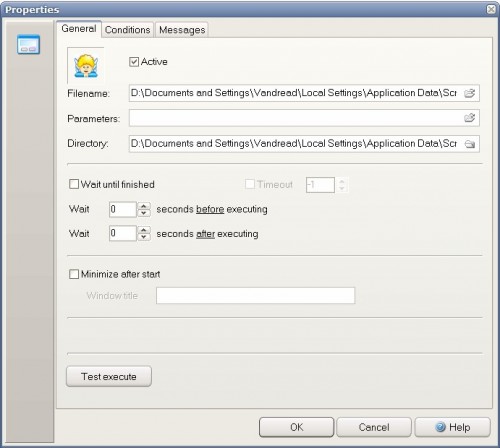
Launch conditions can be defined. The day of the week the software should be launched can be configured. Applications can be set to only launch before or after a specific time. The Scheduler adds another option: The possibility to start an application at a specific time or in intervals. The last option is to add a question before and a message after execution.
Update: The program website is no longer available at the time of writing. This could be due to a technical issue, or that the developer has dropped the website. The latter would mean that the program is no longer actively developed. We have removed the link to the program homepage as a consequence. Windows users looking for a start-up software should look at the excellent Autoruns instead.


















Windows PowerPro does for me delayed start too with time or scheduler options. Does not tasks for shutdown, though.
– no, not the same as Startup Delayer, which cannot do anything at computer shut-down. This one can.
same as startup delayer, in fact.
Fine article, and a fine program!
However, you forgot to tell the price:
“If you only download Xecutor for your private use, then the software is free, if you mail us a picture postcard of your hometown with some nice greetings. Please mail the postcard to:
Andreas Spang
Kapellenstr. 14
86391 Stadtbergen
Deutschland”
does this do anything that Windows Task Scheduler can’t do?
Yes. It can schedule applications to start in intervals, at a specific time and specific days or before the computer shuts down or