
The Specified Port Is Unknown

The specified port is unknown was the error message during the installation of a new shiny HP OfficeJet K5400n printer. The installation itself went smoothly until the installer requested to connect the USB cable to the computer. It was able to identify the HP printer but quit the installation shortly after with the specified port is unknown error message.
The port was most likely a USB port and a quick check revealed that there was not a USB0001 port which usually is created when adding a USB printer to the computer system. The printer worked fine on another computer system running Windows Vista Home Premium which confirmed that the printer was working fine and the problem had to be on the first computer system running Windows XP.
The first thing that had to be done was to uninstall all leftovers from the installation of the HP printer. This can be done with the HP Scrubber software which should be available on the installation CD. The uninstallation software can also be downloaded directly from the HP website. (It is located in the /ccc/ folder on the disk and can be started by clicking on uninstall.bat)
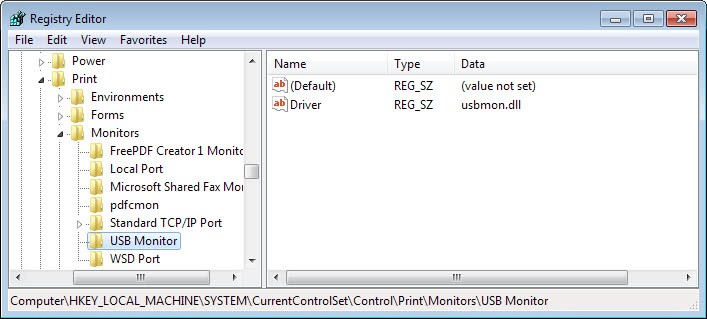
All leftovers were removed after a reboot which ensured that the next installation would be a clean one. The problem had to be connected to the USB Monitor. A quick check of the Windows Registry verified that assumption.
Start the Windows Registry Editor with [Windows R], [regedit] and [enter]. Now navigate to the following Registry key:
HKEY_LOCAL_MACHINE/System/CurrentControlSet/Control/Print/Monitors
Check if a subkey with the name USB Monitor exists. If not create it by right-clicking Monitors and selecting New > Key. Name that key USB Monitor.
Now right-click in the right pane and select New > String Value from the menu. Enter Driver as the name. Double-click driver and enter usbmon.dll as the value.
Now restart your computer and perform the printer installation again. The installation should go through without problems now and the error message the specified port is unknown should not appear.















13 years later…. still fixes printer problems. Windows 10.
Thank you!!!!!!!!!!!
I checked my system, and the specified folders/keys exist, but I still get the error.
Whatever is the cause for the error, it is not the missing usbmon.dll reference (I’m installing a network printer, anyway, not a USB printer.)
Thanks a LOT
This really helped me!
Thanks you, you help me so much
the info you provided was helpful but did not solve my problem….Iam trying to install an epson cx8400….at wits end…..thanks.
Thanks.
Paste text below into notepad, save as file usbmon.reg, double click to enter into registry:
Windows Registry Editor Version 5.00
[HKEY_LOCAL_MACHINESYSTEMCurrentControlSetControlPrintMonitorsUSB Monitor]
“Driver”=”usbmon.dll”
Hi guys, I am having same problem with my new notebook. I have tried 3 printers without success.
Brother tech support suggested your comments. I have followed the instructions but the USB driver is there. Any other ideas???
Thanks P.
Thanks a LOT
This really helped me!
/AJ
thanks alot….. I have been going crazy trying to figure this out and it finally worked…. thanks alot….
Thanks for this. Had been trying for months to get my printer working and this sorted it out. Cheers mate.