
Command Line Directory Switcher

If you want to switch between directories on the Windows command line you need to type in the path directly most of the time especially if the files are located on different partitions. The tab feature is great for completing a file or directory name but there is no option to switch directories fast.
Wherever Change Directory is the name of a Windows script that is offering a way to change directories in the Windows command line blazing fast. It indexes the directory structure of the computer system at first start of the application which takes some time to complete as it needs to scan all folders and index them.
The time it takes to do so depends largely on the hard drive, the folders and the performance of the computer system.
After that it is possible to change directories with the command "wcd directory", for example wcd desktop to switch to the desktop directory.
The default search looks for every directory name that begins with the search term that the user enters. Wildcards can be used to change that behavior so that you can select letters in the middle or end of the folder name instead using them.
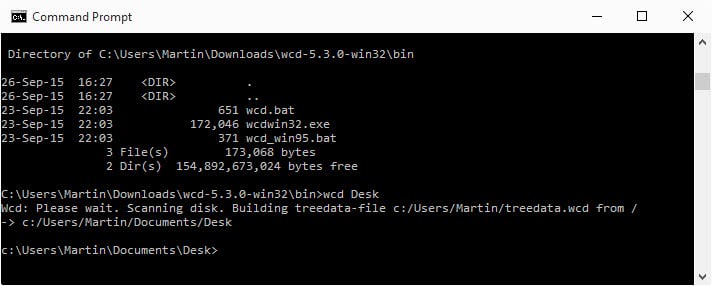
WCD will display all directories with desktop in their name giving the user the option to pick one to change to. If only one directory with the name was found on the system WCD will immediately make the directory change.
Wherever Change Directory supports local directories, Windows LAN UNC paths, alias directories and subdirectories.
A user who has the intention to work regularly with the software program should either move it into a system path directory or add the new directory to the system path to be able to run wcd from every location and not only its source directory.
The program offers a quick way to navigate between folders using the Windows command line. While designed specifically for Windows, it is compatible with Linux and Unix as well.




















Definitely a nice app. I included it in my post on DownloadSquad on October 1st.
WCD is great… and if you want to copy the path you have just found to your clipboard you can just pipe the results using:
cd | clip
“clip” isn’t a native win32 dos command, but can be found here:
http://www.petri.co.il/software/clip.zip
you must copy the clip.exe file into windows\system32
Tony, do me a favor and change from c:\windows to e:\downloads\apps\scripts\scripta, then to f:\backups\e\scripts\scriptb and back to c:\windows\
That will take some time with your way. It’s ok for the occasional change but not if you change regularly.
The easiest way to change directory in CMD is:
1) Open up My Documents (or My Computer) and navigate to the required directory.
2) Select the whole directory name in the Address bar and press CTRL+C (or COPY).
3) In the CMD screen enter CD and a SPACE, right click and PASTE, then ENTER
SIMPLE?