
Desktop Icon Manager

When you change the resolution on your Windows system, for instance deliberately or by connecting the PC to different monitors regularly, you may notice that icons get misplaced on the desktop during that process.
Say you use a 1280x1024 resolution normally and have to reduce the resolution to 1024x768 to work with an application properly. Every icon on the right side of the screen will be moved to the left when changing the resolution so that it still fits on the screen and can be interacted with.
Windows however does not automatically move the icons to the right side again when changing the resolution to a higher one. It's not a big problem if you change the resolution once a year but if you have to do it several times a week it becomes a burden, especially if you have your distinct layout of icons for fast access.
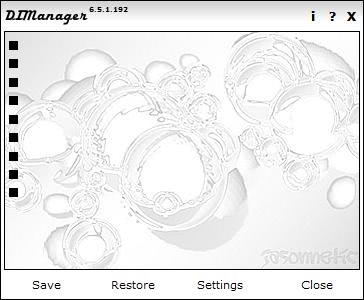
Enter Desktop Icon Manager. This little program saves the current layout of icons on the desktop in combination with the resolution and can restore the layout with the click of the mouse button.
Supported are the creation of one standard profile that can be restored or individual profiles for each resolution which would come in handy if you work with different resolutions all the time.
Each icon on the desktop is represented by a black dot. Hoovering the mouse over the icon reveals information about file so that you know what it is about.
Once you start the program for the first time it will automatically create a new desktop profile using the current resolution and layout on the desktop.
If you want to use multiple profiles, you need to open the settings and switch from standard profile to creating a profile for each resolution.
Here you can also modify several other settings such as the interval in which the program checks for icon position changes, to start the desktop manager with Windows, or change the hotkey from Ctrl-Alt-D to another one.
You can use the program to save profiles manually as well which can be interesting, and restore any profile that was saved manually or automatically at any time.
Note: The developer website is no longer available. We have uploaded the latest working version of Desktop Icon Manager to our own server. You can download the program with a click on the following link: (Download Removed)
We don't support the program in anyway. It was recently tested on a 64-bit Windows 7 system and worked just fine on it.



















Thanks
@Rob – Well the fact that there is no website ref would just make me even more suspicious. [shrug]
@jojo – it doesn’t – but I downloaded it from http://down.soft.bitcomet.com/softs/S/dl_1/200606/07/DIManager6.exe
@Rob – If you have the program installed, then it should give the actual website under the Help menu item. Does it?
@Jojo: The CNet download link did not work for me, so I searched around until I found a d/l link that worked. The homepage that CNet link to is definately not the correct one
One thing I have noticed is that this program doesn’t appear to play well with dual monitors. I’ll try Iconoid.
Looks interesting. However, I always like to download products from the actual author, not a secondary website like CNET (in this case). So using the website CNET points to for the author, I discover that it appears to be in German only and is advertising a variety of choices for telephone sex and no mention of this product, history or any updates.
I would be cautious of this program. I will skip the install myself.
Meanwhile, you mentioned a program called Iconoid back in early 2007 that can do this task (among others) also.
https://www.ghacks.net/2007/01/16/beautify-your-desktop-icons/
Seems to be more lightweight than Shock Desktop, so it will be sticking around on my laptop a little longer for a decent test.