
Clean Windows from all empty folders

It happens from time to time that folders are not deleted when you are uninstalling software in Windows. It can also happen that other applications move data and leave the original folders empty in the process.
This happened to me when I used a new mp3 tagging software that moved all my mp3 files to a new directory leaving the old folders on the system.
While empty folders do not necessarily affect system performance, they may affect usability. Take a look at your 'program files' folder for instance. I would bet that you find several empty folders in there which are not really helpful if you are searching for a specific file or program in the folder structure they may force you to scroll even more through the folder structure.
RED, which stands for Remove Empty Directories, is a software that scans your hard drives for empty folders and lists all empty folders that it found in the process. All folders are displayed with their attributes which means that you can easily see root, hidden or locked folders and delete only the folders that don't have a certain attribute if that is requirement.
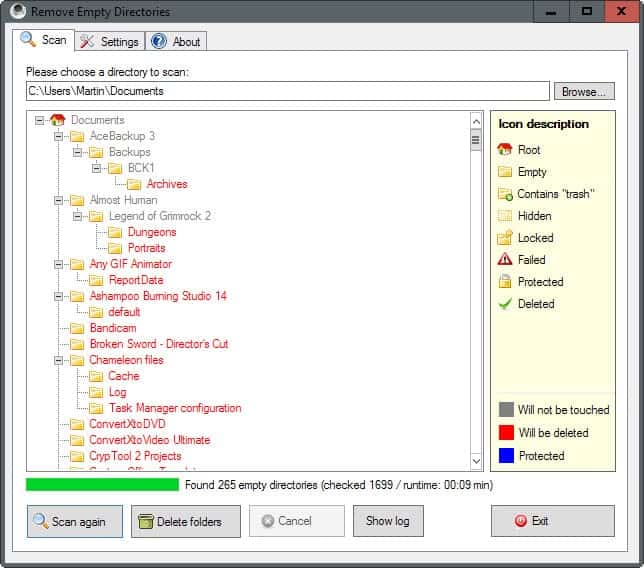
I would suggest to scan specific folders only if you want to be on the safe side as you may not want to delete empty folders that may still be used by the operating system. You can point Remove Empty Directories to the "Program Files" or "My Documents" folders to scan those to avoid that issue altogether.
Even empty folders may be used by the operating system. A temporary folder for instance may still be required, and deleting that folder may have unforeseen consequences. It is furthermore possible to create rules to keep or delete folders by using blacklists and whitelists the program supports.
The program supports several deletion modes including one that moves the deleted folders to the Recyle Bin so that they can be restored later on should the need arise.
Another feature of the program is that it can detect empy folders with empty files in them to include these in its listing as well.
The latest version of Remove Empty Directories is fully compatible with all recent versions of the Windows operating system. Please note that RED requires the Microsoft .Net Framework 3.5 or later. If the program is not installed on the system, it will be installed during program installation.
















When I need some good software, I add “Ghacks” to a search request.
So, you see, even this article from 2007 came in handy when I thought it would be good to have some empty folders removed automatically :)
I do that as well sometimes ;)