
Record Sounds from any source

While Audacity is a great audio editing utility with the ability to record and edit sounds, many may feel that it is too complicated to use for the mere task of recording any sound on your computer.
I discovered a freeware utility that can record sounds from any incoming source in various formats including ogg vorbis, monkey audio, mp3 and acm.
The best feature of Harddisk Ogg is that it sits in the tray once configured so that you do not really have to interact with its interface anymore. To start a recording you simply left-click on the tray icon once and another time to stop it again.
The quality of the recorded audio can be configured in detail including bitrate, mono or stereo recording and encoding quality. Note though that it depends in the end on the source of the audio. You cannot turn a lesser quality audio source into high quality audio recordings.
Harddisk Ogg offers several normalization modes that amplify the input signal to a constant volume. You need to download and move the lame encoder into the folder of Harddisk Ogg if you want to save the recorded audio as mp3 files.
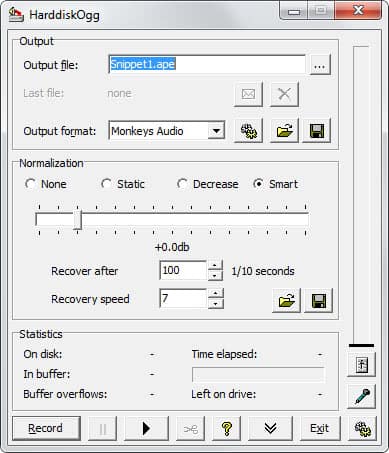
Features
- Mp3 encoding
- Automatic file numbering
- Cut feature to cut the recording
- Normalization including multiple normalization modes
- Live playback during recording sessions
- Command line support to run the entire program from the command line, great for batch scripts
- Bitrates from 32kbit to 320kbit supported
- Mono or stereo recording from 8Hz to 48 kHz
I would like to explain why a tool like Harddisk Ogg may be useful now or in the near future. Several countries have already laws in place that make it illegal to copy music from CDs if the CD is copy protected. These laws do however allow recordings of audio using audio devices, as this is comparable to recording radio using cassette tapes.
HardDiskOgg is a great program if you need to record audio sources fast on Windows. It is a 100 times better than the standard Windows Sound recorder, and while not as sophisticated as Audacity, a lot easier to use.
Advertisement
















I’ve been using Audio Record Wizard for a few years and like it a lot. Small footprint, records mono/stero 11.8 to 44.1, and can be set up for scheduling. Payware, but pretty cheap for that.
Audacity does the same thing, albeit in two or possibly 3 clicks depending upon if you are or are not recording a sound generated by the pc.