
Screengrab Add-on for Firefox 2.x

I have been using the Screengrab extension in Firefox all the time.It adds a screenshot taking feature to the Firefox browser so that you can save a web page as an image to your local system.
This is different from saving the web page as an HTML file as you end up with a single image file displaying the website's contents instead of multiple files (he HTML file includes extra image files and others). The advantage of saving the page as an HTML file is that you can copy text for example or interact with it in other ways, while you cannot do the same if you take a screenshot.
Because of this, both options have their distinct advantages.
The problem with Screengrabber was that it is not compatible with newer versions of the Firefox browser. A new version that is compatible has been uploaded to the Mozilla Add-ons repository so that you can use it once again in all recent versions of the web browser.
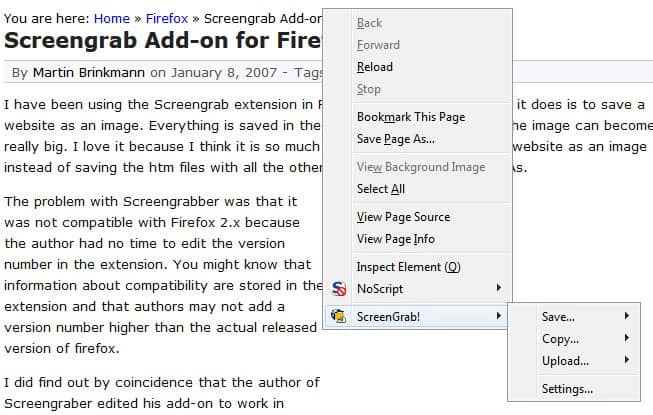
You have two options to use the extension after installation:
- Right-click on the page you want to create the screenshot of and select one of the options that it displays here.
- Use the toolbar icon to create the screenshot instead.
Both menus display the same set of options to you. You can create a screenshot of the visible part of the screen, of the complete page, or of a selection. The screenshot can be saved directly to the local system or copied to the clipboard of the operating system instead.
Tips
- You can speed up the saving by adding a local folder in the extension's options under Save and enabling the quickly save feature there. This bypasses the prompt for the file name and directory.
- The program can save screenshots as jpg or png files. The default is set to png which you can change under image.
- You can add the address of the page that you have taken the screenshot of to the image. This is done by enabling insert url in image o the Image tab.
- The Actions menu allows you to move the button to a different toolbar or to disable it completely. Here you can also define default actions for left-clicks on the icon or the down arrow next to it. You can for instance map one of the screenshot taking options to the icon so that screenshots are taken automatically whenever you click on it.

















Try this one http://www.url2jpg.co.uk/
i’m using Scrapbook extension. [ http://amb.vis.ne.jp/mozilla/scrapbook/ ]
thanks kai for the link
Page Saver is what I use:
http://pearlcrescent.com/products/pagesaver/
I don’t think it requires Java, but i could be wrong.
Sorry forgot to mention about Java. Yes it does require Java
@sparx i dont think url2pg link is working
Ohh shit Screengrab requires java to be installed..
As a stand alone utility, you can also try
URL2BMP – http://www.pixel-technology.com/freeware/url2bmp/english/
or the newer
URL2JPG – http://www.url2jpg.com
Both freeware grab in a variety of image formats, not just BMP.