
Dropsync adds two-way syncing of Dropbox data on Android

My Samsung Galaxy Note II phone came with Dropbox preinstalled, and I even got 50 additional Gigabytes of storage space for free as part of a cooperation between Samsung and Dropbox. The application on the other hand requires network access whenever you want to access a file stored on Dropbox. It displays a file and folder list basically and whenever you want to run a file, it requires Internet access to download it.
Some files may be cached so that you can access them locally, but you can't really pick a folder or files that you want synced all the time to the phone or tablet.
Dropsync is a free and paid application for Android devices that adds true two-way syncing of Dropbox data to Android devices. What this means is that data is automatically kept in synced, which means uploaded and downloaded, whenever files change, are added, or deleted.
The free version of the application comes with several limitations. It is for instance only possible to synchronize a single folder. While that may be an issue to some, it should not really be an issue to most users. The paid version does not have that limitation by the way so that it theoretically allows you to sync all Dropbox data with the Android device all the time.
The first thing that you are asked to do after installation and on first run is to link a Dropbox account to the application. Once done the application walks you through setting up the syncing on the device. You pick a local folder that you want to use for the syncing, and a folder on Dropbox. Last but not least, you are asked to pick a synchronization option. Here you can pick two way sync but also other synchronization methods such as upload then delete, download only or mirroring.
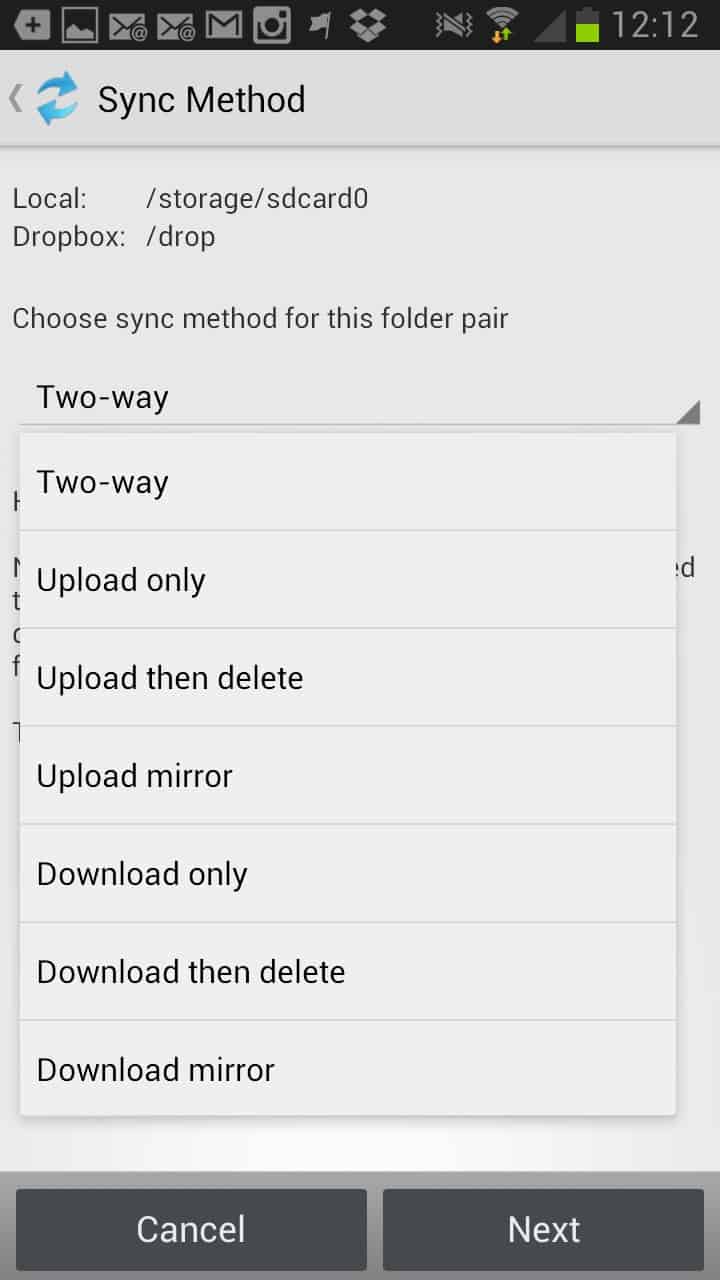
Once you have selected the sync method the program will start the synchronization right away. A tap on the menu button on the device opens a large list of settings. Here you can configure several important syncing related parameters including a maximum file size limit (set to 5 MB by default), the automatic syncing interval, disable instant upload which uploads new or modified local files instantly to Dropbox, if you want the synchronization to continue when the device is running on battery, and if so up to which battery level, if you want to sync data using WiFi only or also when you are using a mobile network, and for how long you want the sync history to be saved.
Some features can only be changed in the pro version, like increasing the maximum upload file size beyond 5 MB.
Verdict
Dropsync all in all is a great application that brings true synchronization to Android. It is not complicated to setup and once you have configured it the way you want it to work, it is working on autopilot.













I have Dropbox on several devices (laptops, desktops and smartphones) and they all sync with each other automatically.
I don’t understand the comment “you can’t really pick a folder or files that you want synced all the time to the phone or tablet”. In my case, all folders and files remain synced all the time.
When I am offline, the last synced version is always available. Syncing occurs as soon as I go online.
I can’t see any advantage in DropSync unless you want unusual features such as one way updating. The severe data limitations on the free version also go against it. It’s easy to get several gigabytes for free with DropBox.
Dropbox files are not available when you’re offline. That’s the main reason why this app is of value.
looks good alternative for those want sync . Hope Dropbox for android support it natively.