
Fix for Mega uploads not working

I have received my verification email more than 24 hours after I signed up for the new Mega file hosting site and finally got to browse around and test its features. Everything you do on Mega is happening in the browser right now as there are no mobile apps or desktop clients available at the time of writing.
What you can do right now is create folders and upload files to these folders, add contacts and share files or folders with other users. Folders can be shared with contacts only while files can be shared publicly using the get link context menu option.
Firefox is my main browser and when I tried to upload files to Mega using it I noticed that it did not work at all. I tried dragging and dropping files into the Mega tab and using the new upload button; both options resulted in a 0% status that would not move at all. Transfers simply would not work in the browser no matter what I did.
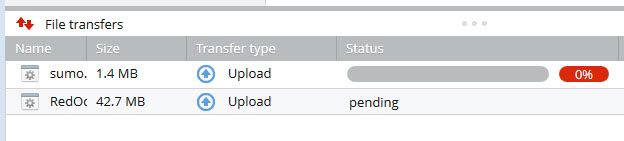
I first thought it was caused by NoScript or the file extension but disabling NoScript for the time being and selecting safe file extensions like zip did not resolve the issue at all.
I decided to switch to Chrome to see if it allowed me to upload files. Lo and behold, using Chrome I was instantly able to transfer files using drag and drop or the new upload button.
Just when I thought I had it all pinned down to an incompatibility with Firefox I noticed that a recent Chrome upload to Mega was not uploading as well. It displayed more information than the frozen Firefox uploads as it was counting the elapsed time, speed (at 0 B/s) and remaining time (infinity, very funny).
Here is what I think is causing this: server issues. Mega has seen a rush of new users in the first few days after it launched and it is likely that servers are currently not able to handle that load well. This can lead to issues when uploading files and the only way around this would be to wait and try again at a later point in time. Or, and that's an option for some, use a different file hosting service for the time being.
You can cancel transfers with a right-click on the file in the upload queue and the selection of cancel transfer. I sometimes was able to upload the file directly after canceling and adding it again to the queue.
Advertisement
















MEGA is still experiencing today. 2014.
Think this is a play to get you to pay for the full service….?
PS, Misleading title, if your gonna post a f**kwit topic, do it on Reddit.
then why do u post FIX if its not a fix ??
Mr. Brinkmann:
Thank You.
I am now able to view Youtube videos with the Mozilla Firefox browser (version 18.1).
TR
Sorry, that clown can spew FUD regarding browsers with aren’t Chrome all day long, but this is just silly and lazy coding: Downloading from Mega with Firefox needs the Flash-plugin.
Yes, you read that right.
even more frustratingly, i can actually upload files just fine, but so far 3 out of 6 large files (~1GB each) got to 100% and didn’t get saved! it completed the uploads and went on to the next item in the queue, but nothing showed up in the file browser. so i spent hours uploading for nothing.
Hi Everyone!
This is Off Topic BUT . . .
Is it just me OR is anyone else having a problem with viewing Youtube videos using the new version of Firefox: 18.1?
The videos simply don’t show!!!
I am only able to view Youtube videos after Reverting to version 18.0!
TheRube.com
Working fine for me. Do you run the latest version of the Flash plugin?
Opened my account shortly before noon, uploaded all of my photos, and now about 2 hours later the uploads are complete.
I believe the correct “fix” is “be patient.” Or possibly “don’t use a German ISP which goes through the secret Government proxy.” But that’s just speculation on my part. If this comment disappears, it will be confirmed.
Yeah Dotcom talked about Chrome being the ideal choice in a press conference last week. At the moment the site is so slow as to be unusable though. Page loads seem to get stuck in a never ending loop sometimes.
And for a site where music upload is ideal, you’d think they would have implimented some view choices like for album art etc.
Pretty poor at this stage.
who are you, and what have you done to martin?
A Good Example of keyword catching , happens to be a misleading title ..
but the issue is correctly raised as Mega has gone for a SIX – I wonder what will become of their “private servers” .. no matter which file i try its always a “pending” so I gave up
Ok, if it’s a server issue you cannot do anything, but the posts starts with FIX and the post itself do not explain how to fix the problem.
The fix is to try later.
Mega thinks my Firefox 18.1 is obsolete!
Funny indeed…
Mega has stated to use Chrome as it is the most advanced browser currently in existence.
this isn’t a fix…
If it is a server issue, there is nothing you can do other than try again later.