Turn On Tag Reviews On Facebook To Avoid Being Tagged Automatically

One of the biggest sources of spam in my opinion are tags on Facebook. The reason for this is that it is possible to tag friends in photos automatically.
Those information are then not only available on the profile of the user who tagged the photo, but also on the profile of the tagged user.
Even worse, the photos appear in the user's photo time line on the profile page. Plus, you also receive notifications when users comment on a photo that you are tagged in.
One could say that you better pick your friends carefully on Facebook, but we all know that this is not always possible. Facebook fortunately has implemented an option called tag reviews which allow a user to review tagged photos before they become visible on the Facebook profile page.
To enable tag reviews on Facebook, you need to click on the down arrow in the main toolbar next to your user name, select Settings and then Timeline and Tagging on the page that opens up.
Locate How can I manage tags people add and tagging suggestions and click on the options displayed on the right.
New information
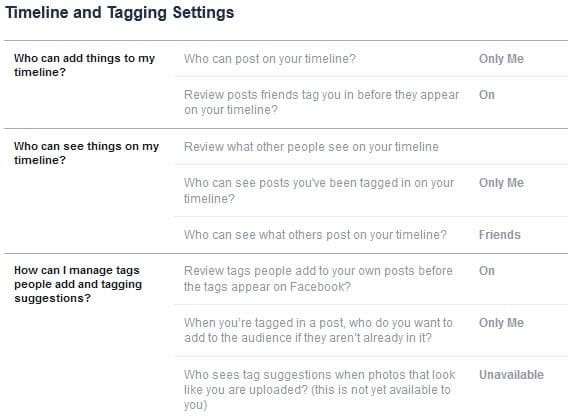
There you can control three settings:
- Review tags people add to your own posts before the tags appear on Facebook?
- When you're tagged in a post, who do you want to add to the audience if they aren't already in it?
- Who sees tag suggestions when photos that look like you are uploaded?
Old Information
This opens an overlay menu with five options to change.
- Profile Review of posts friends tag you in before they go on your profile (note: tags may still appear elsewhere on Facebook)
- Tag Review of tags that friends want to add to your posts
- Maximum Profile Visibility of posts you're tagged in once they're on your profile
- Tag Suggestions when friends upload photos that look like you
- Friends Can Check You Into Places using the mobile Places app
Tag Review is the second option in the list. Just click on the arrow icon next to it to turn it on. This displays an informational page where you can turn on tag reviews on Facebook.

Once you enable the feature you will receive notifications whenever you have been tagged by another user in a photo. You can also turn on the Profile Review feature to approve or deny being tagged in friend's posts that are displayed on your own profile.
Lastly, you can change the maximum profile visibility for posts that you are tagged in. You could for instance make it only visible to yourself, to friends or a specific group of users.
Making the changes to the tag privacy settings can really improve your privacy on Facebook and reduce the amount of unwanted posts and notifications that appear on your Facebook profile page. (via)
Advertisement