
Fix Context Menu Items Missing In Windows Explorer

Microsoft has decided to remove several context menu entries from Windows 7's Windows Explorer context menu if more than 15 items are selected at once.
The open, print and edit links are specifically removed whenever more than 15 files or folders are selected. This limit may affect context menu entries of other programs as well.
The reason for the behavior? Apparently to protect users from "accidentally performing these actions on a large number of files". While that may make sense some times, it does not if you want to perform one of the missing operations on the selected files.
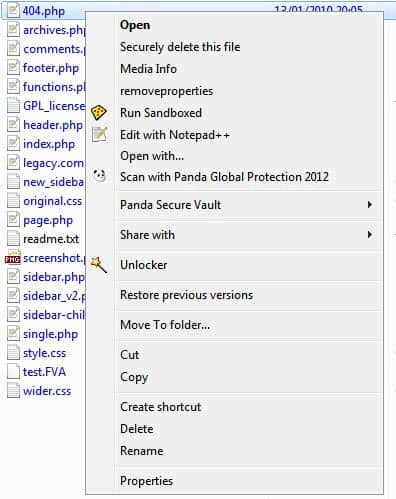
Take a look at the screenshots below. First a screenshot when one file is selected:
Now compare that context menu with one when 16 files are selected in Windows Explorer.
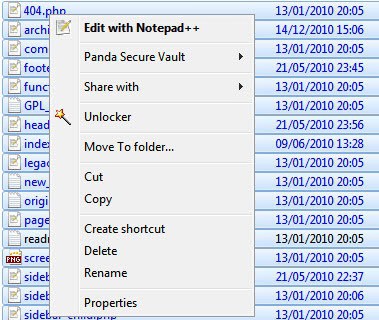
Notice the difference? Several context menu entries that programs have added are removed, for instance the option to securely delete the selected files or to run the files sandboxed.
The only option to correct the situation is to add a new key to the Windows Registry. But first, lets take a look at a screenshot that shows the same situation with the Registry setting in place:
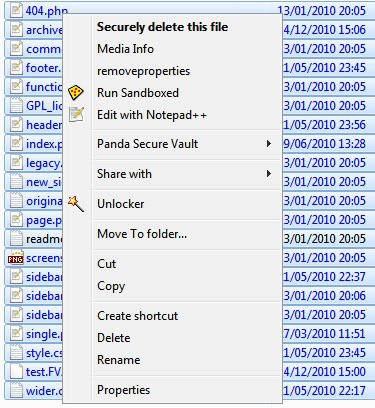
Notice that some of the context menu entries are visible again. Please note that some are missing because of the mix of file types.
Change Context Menu Limit
A parameter needs to be added to the Windows Registry to change the limit of the context menu. The fastest way to open the Registry Editor is to press Windows-R, type regedit, and the return key afterwards.
Navigate to the following Registry key
HKEY_CURRENT_USER\Software\Microsoft\Windows\CurrentVersion\Explorer
and look for the entry MultipleInvokePromptMinimum on the right side. If it is there good, if not create it with a right-click on the right side and the selection of New > DWORD (32-Bit Value). Copy and paste the name from above into the text field and hit return.
Double-click the item afterwards and change the Value data to 16.
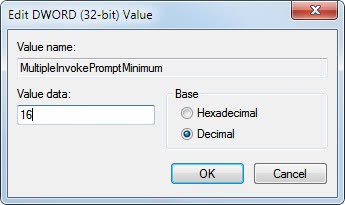
16 is interpreted by Windows as unlimited.
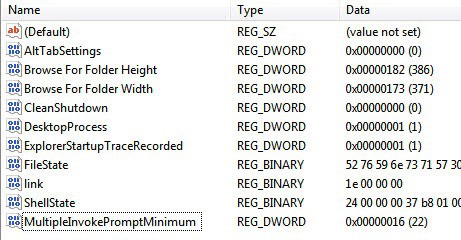
The change is immediate and it is a good idea to test it right away in Windows Explorer. Keep the Registry editor window open in case you need to make changes to the parameter.















Thanks for commenting – sut
Pls change to a higher figure – eg 128 , your value 16 does not work correctly
[quote]The official Microsoft page mentions that 16 means unlimited.[/quote]Which is incorrect.
I use a custom context shortcut to add files to my media player.
Applied patch ’16’ > folder with 33 items > select all > Add .. would only add a couple files.
Reset the key to 999999 HEX did the trick.
Known about this little tip for a while now. In an article on another tech site there were a few comments that using a value of 16 merely increased the limit from 15 files to 16 files rather than an unlimited number as intended. The solution was to use a higher figure e.g. 128 instead of 16 (128 being a large enough figure to accommodate most eventualities). I have mine set to 128 with no problems. So if 16 fails to do the trick for you, choose as large a number as you like to suit your needs.
The official Microsoft page mentions that 16 means unlimited.
I tried the 16 but it wasn’t unlimited, so i put it to 99 and it could select 99 files. but 16 meant i could only select 16 files.
Is the number to set (16) decimal or hex? You show hex in the example, which is decimal 22.
KRS it is decimal, I change the screenshot out asap, took it to early.
Cool… really useful to me. thanks
Nice tip. Thanks for sharing Ghacks.