
TruPax, Create TrueCrypt Containers Without True Crypt

It is not that complicated to create a TrueCrypt container, but it does take some time. You need the TrueCrypt software obviously to do that, and someone with admin rights to install the software. Then you need to complete a wizard to create the encrypted container.
It takes time if you have never created an encrypted container before, and even if you did, you need to follow the same creation process.
The free software TruPax offers an alternative. It can create TrueCrypt containers, without TrueCrypt or admin rights.
It has been primarily designed to offer "a convenient way to transfer arbitrary numbers of files and directories into a new volume file". Even better: The size of the encrypted container is the size of all files added by the user plus a little overhead.
The encrypted containers are TrueCrypt containers, and therefor readable by the popular file encryption software. TruPax basically is a software that eliminates all the problems and difficulties associated with creating a TrueCrypt container file.
The Java application is available as a portable version and installer for Windows, and a version for Linux.
Files and folders can be added by dragging and dropping them into the program window, or by using the Add Files and Add Folder buttons.
All files and folders are displayed with their name, size and date. Status information in the footer list the total amount of files and folders, their data size and the required size of the volume.
A click on Make Volume opens a file browser in which the location and name of the encrypted container need to be selected.
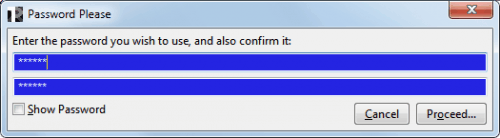
There is no option to open an existing TrueCrypt container, only the possibility to overwrite the contents with the new data. The master password for the encrypted data is selected in the last and final step.
The encrypted container can be mounted at anytime with TrueCrypt.
TruPax offers no options to change the block cipher or hash function at this point in development. It uses AES256 as the block cipher, and RIPEMD-160 as the hash function, with the promise to add additional options in future versions.
Commands can also be issued via the command line. This is detailed in the documentation. Every option in the interface has a corresponding command for the command line.
TruPax features
- creates file containers in the open UDF format, mountable on many modern operating systems.
- created containers are writable on the more recent systems (Windows 7, OSX, Linux).
- runs on any operating system where the Javaâ„¢ 6 runtime is available.
- is a completely new implementation of the TrueCrypt encryption technology.
- uses all processor cores to do its job as fast as possible.
- writes container files in just one pass. No seeking.
- is free to use. No charges. No spyware either.
- source code is available for review. No hiding.
Verdict
TruPax offers interesting options for users who need to encrypt data. Its main advantages are that it can create TrueCrypt compatible containers without admin rights, and without TrueCrypt present on the system. Ideal for systems where important data needs to be moved and TrueCrypt is not available.
TruPax download and compatibility
TruPax is available for Linux and Windows. The program requires the Java Runtime Environment, and offers both a graphical user interface and command line options. Downloads for all supported versions are available at the developer website. (via)
Advertisement
















TruPax 9 is out, supporting VeraCrypt volumes, decryption without admin, FAT volumes, and removal of Java requirement (thanks to guinness over at PFW).
TruPax v3 is now available. Wiping of files was added (after volume creation).
Point of TruPax is to take files and put them directly into a new volume, with its size adjusted to what the files need to be stored, not more (and definitely not less. Think of it as “burner for .TC files” :)
TrueCrypt *CAN* create containsers WITHOUT admin rights. Just don’t select NTFS as the file system. Select FAT or NONE as the filesystem and voila!
But you need to have TrueCrypt in first place, that’s what I mean.
Musst mal Urlaub machen ;)
Einmal alle fünf Jahre reicht ;)
Link wenigstens aufs efb……
Sorry habs verpeilt, Link zu deiner Seite hinzugefügt :)