
How To Speed Up Some Windows Software Installations

Delays during software installations in Windows are something that many Windows users experience from time to time. One of the most common causes is the spawning of an installation window in the background, especially if it is waiting for user input.
Installations won't commence until the user interacts with that window, which is bad if the window is not visible on the desktop.
Windows has a 200 second limit set for cases like this, which means that the operating system waits more than 3 minutes before the window waiting for input is pulled to the front.
Sure, it is possible to minimize all other windows to see if a window waiting for user input is delaying the software installation.
Changing the default interval from 200 seconds to a shorter interval is often a better option. Windows stores the value in the Windows Registry. To change the value, press Windows-R, type regedit, and hit the enter key on the keyboard.
Navigate to the Registry key HKEY_CURRENT_USER\Control Panel\Desktop and locate the parameter ForegroundLockTimeout on the right side of the Registry editor.
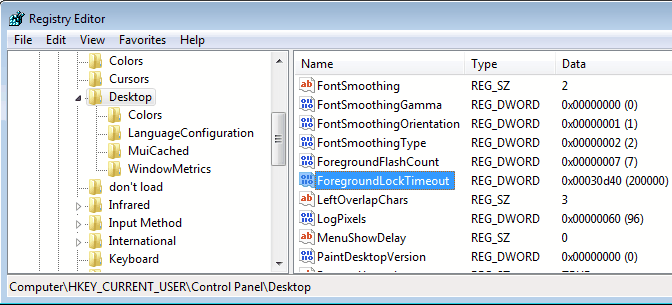
Definition: ForegroundLockTimeout, Specifies the time in milliseconds, following user input, during which the system keeps applications from moving into the foreground.
Double-click that parameter to edit it. Switching from hexadecimal to decimal to make the value changing easier. The values are listed in milliseconds, the default is set to 200000. Change the value to one between 10000 and 50000, which equals 10 to 50 seconds (just divide the number by 1000 to get seconds).
It is not recommended to change it to less than 10 seconds, considering that it will bring all windows requiring input to the front in that time, not only installation windows.
The changes are immediately active. It is always possible to go back and adjust the interval if the window changing is happening to fast or to slow.
Update: The preference is part of all recent versions of Windows as well including Windows 7, Windows 8 and Windows 10. The value of the preference has not changed at all, it is still set to 200 seconds by default.















Indeed, nice tweak.
Martin,
Thank you very much! After my very recent reload, the computer registry parameter was set to the default 200000, but not now.
That’s a very useful tip . Thanks a lot !