
Increase Size Of True Crypt Container Instantly

Users of the encryption software True Crypt have the option to encrypt a full partition of a hard drive, or a container with a specific file size, say 20 Gigabytes. Problems arise if the container reaches its size limit, as there is not an elegant official solution to increase the size of the existing container.
The official True Crypt website contains no information about resizing encrypted containers, only the forum hosts a few posts with the issue. Where it is addressed it is suggested to backup the old container, before creating a new one with the new storage size.
That's not very practical, for many reasons.
I just stumbled over the Open Source tool Extvc at Caschy's blog, and the tool seems to be exactly what True Crypt users need to increase the size of the True Crypt container.
The program has not been updated for a while, and the last compatible version of True Crypt is 6.2a which can be a nuisance. Then again, it might be faster and more comfortable to run True Crypt 6.2a during the resizing operation, than to create a new container on the hard drive (besides that it sometimes is not possible because of size limitations).
Extvc only supports volumes formatted with NTFS, and should not be used to expand an outer volume containing a hidden volume, as it will destroy the data in the hidden volume.
Enough with the limitations, lets take a look at the program in detail.
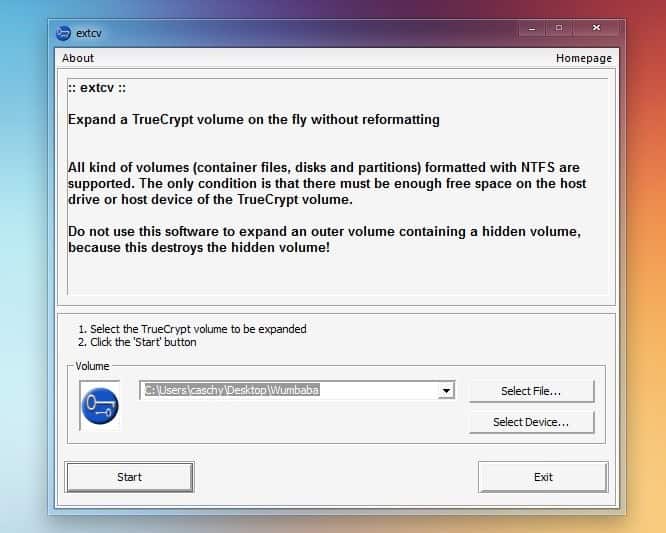
Start by moving the extvc.exe file in the True Crypt folder. Executing the program should display the screen above. The location of the True Crypt volume needs to be specified here by selecting a file or device.
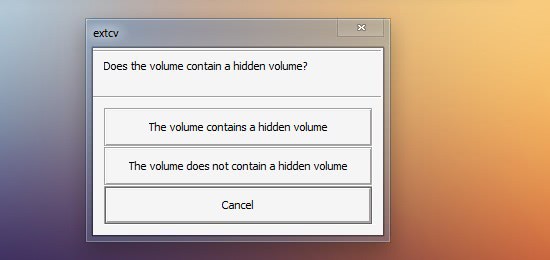
A click on start displays the next screen. A security question to remind the user that hidden volumes inside other volumes will be deleted in the process. Best option is to not use the program with hidden volumes.
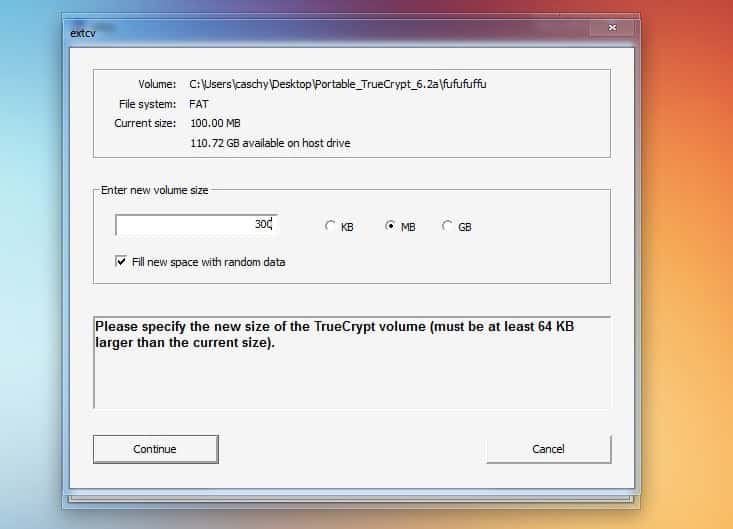
The new volume size of the True Crypt container can be selected in the third and final step. Please note that the new size needs to be at least 64 Kilobytes larger than the old size. The current size of the container and the available space on the host drive are displayed in the same window. We recommend to backup the True Crypt volume before using the application. The resizing worked without problems in our tests, but it is always better to be safe than sorry.
Extcv can be downloaded from the project website over at Sourceforge. the guys over at T3CH have created a walkthrough for Mac OS systems.
Advertisement

















A fork of extcv was updated to support TrueCrypt up to 7.1a. See https://bitbucket.org/j0s3f/extcv/overview
Though the better choice would be to use VeraCrypt instead, the current versions apparently have the expand feature built in.
The current official extcv Version 0.6 does support TC containers up to 7.0a – but not the current 7.1a – although it’s said to be in the making (V 0.7).
I like your window style, it looks different then the normal windows 7.
Are you using Windows 8?
Hoi Martin,Thanks for this article and tip. Your are mentioning about the program that this program only works with TrueCrypt version 6. Main question to you is i have version TrueCrypt 6.2a does it work als with main version?
Paulus it works up to 6.2a IIRC.
I just create dynamic sized volumes
That is a solution too, but gave me already lots of trouble. An other person created such a dynamic container. I started a copy job over night and it interupted. While searching for the error I discovered, that all the time, when the initial size of the dynamic container on the (usb) disk is filled up, the copy job broke. So there was a quicker data input, then TC could enlarge the dynamic container.