
Change The Location Of Close Button In Firefox

Firefox is displaying a close button on every open tab by default. The active tab displays that button in red colors while the rest displays a gray button instead to distinguish active and inactive tabs.
The close button adds to the length of tabs which may be a thorn in the eye of users who like to optimize Firefox menus to save space on the screen. By removing close buttons from all tabs, it is possible to display more visible tabs at the same time as you save a lot of space doing so.
There is also the kind of user who likes to use the keyboard to close tabs instead of clicking on that button. The keyboard shortcut [CTRL W] will close the active tab as long as Firefox is the active window. That's convenient and makes the close button more or less superfluous if you prefer to use the keyboard.
There is naturally also the option to right-click on tabs to close them.
Another problem that arises when displaying close buttons on all tabs is that the tab size changes dynamically. This becomes apparent when you open many tabs. If you start closing tabs you will sooner or later notice that the close button shifted because of changed tab sizes (Firefox uses dynamic tab sizes depending on the number of open tabs and the width of the browser window)
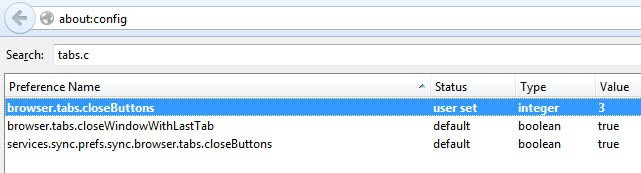
But what are the options that the Firefox developers have implemented in the web browser? The parameter [browser.tabs.closeButtons] in [about:config] handles the close button in Firefox. Just enter about:config into the browser's address bar, say that you will be careful if you see the warning notification, and enter the parameter into the search form on the page.
- 1: This is the default value, it displays a close button on every tab in Firefox.
- 0: This displays a close button only on the active tab.
- 2: This displays no close button at all.
- 3: Displays a single close button at the end of the tab bar.
Keyboard junkies will probably set the value to 2 to get rid of all close buttons. Users who regularly open many tabs will probably set it to 3 to be able to access the close button in the same place.
Update: Please note that Mozilla has removed the preference from Firefox 31. You can check your version of the browser by loading about:support in the address bar. You can get it back by installing add-ons such as Classic Theme Restorer.
Advertisement

















Thanks for the post. I kept accidentally closing the tabs with the default setting but now it’s fixed.
ALT* + F4
https://addons.mozilla.org/en-US/firefox/addon/1950
Hmmm … set to “0”, restarted Firefox (v3.04) but still annoying close buttons on all tabs.
— Update … TabMixPlus addon was overriding the change
Used this for years – I always use ‘2’ to get rid of all buttons as middle-click with the mouse is easier.
CTRL-W is a standard “close this document” shortcut in Windows. Another standard way to close a document is CTRL-F4.