
Flash Cookies explained

Flash cookies are a new way of tracing your movement on the Internet and storing lots of information about you. Their official term is Local Shared Objects (LSOs) and their primary purpose is not to track you, but to provide Flash applications with options to save data to the local system.
This can be useful when you play games, as it is one way to save your progress. But since there is no distinction between good and bad uses, many companies have started to use Flash to save persistent information on the user system as an alternative to third-party HTTP cookies.
One major disadvantage of flash cookies is that you can't locate them in your browser easily. They are not shown in the list of cookies which you can access if you open the cookie manager of the browser, nor do they appear in databases or other browser-specific storage locations.
Normal HTTP cookies can't save more than 4 Kilobyte of data while Flash cookies can save up to 100 Kilobyte by default. If you want to try out how they work you could do the following.
Go to YouTube, increase or decrease the volume of a video and delete all cookies afterwards. You will notice that the volume level is still at the same level when you close your browser and open it again.
This is done with so called Local Shared Objects, better known as Flash cookies. The main question is of course how a computer can be checked for Flash cookies and how you can delete these cookies on your system to reduce the exposure to tracking.
This is actually a very tricky thing. I was looking for a way to check them on my computer but could not find one.
After several hours of research I found information on the Adobe Flash Player website that helped me figure it out. You need to open an online page on the Adobe Website, the Adobe Flash Player Settings Manager to be precise, to manage and delete Flash cookies on your system.

The so called Settings Manager can be accessed from the Adobe website but is running locally on your computer. The Website Storage Settings display all Flash cookies that are currently saved on your computer.
You can delete flash cookies from individual sites or all at once. It is also possible to increase or decrease the Kilobyte size of all information that are stored on your computer.
Adobe does not have access to the settings that you see in the Settings Manager or to personal information on your computer.

No Flash Cookies will be saved if you go into Global Storage Settings and disable the option "Allow third-party Flash content to store data on your computer".
47 websites did store Flash cookies on my computer and I decided to delete all of them and disable the feature to be on the safe site. Did you know about Flash cookies ? How many did you find on your pc?
Update: The most recent Flash versions, at least on Windows, make available the settings manager locally as well. Open the Windows Control Panel and locate Flash there. When you open the applet, you see the storage settings right away.
Here you can click on delete all to remove all information from your computer, or open the local storage settings by site menu to get a list of all websites that use the storage.
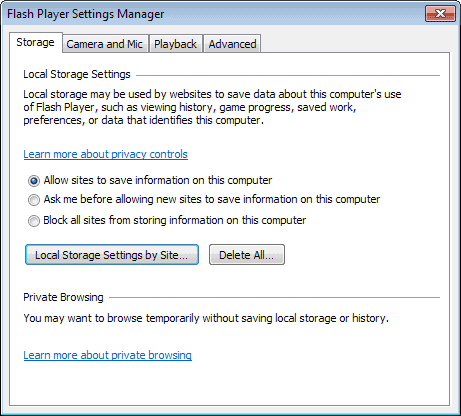
Not all use the storage to save cookies though, and you may want to go through the list to avoid deleting data that you may need in the future.
Switch to the advanced tab afterwards. Here you find another option to delete all browsing data and settings on the computer.
Advertisement













I only see flash 32bit in control panel ,shouldn’t there be flash64bit too ?
Maybe I’m confusing it with adobe.
A VERY helpful post, Martin! Thank you very much!!
Anyone try CS Lite?
Allows you control over cookies from your toolbar.
The makers of WinPatrol, now have a product called WinPrivacy that can block flash cookies, and a lot of other stuff. Check it out here: http://winprivacy.com/. And no, I don’t work for the company. Right now the program is in late beta testing, but the official release should be soon.
I have reviewed the initial version of the program here: https://www.ghacks.net/2014/12/22/winprivacy-review-new-program-of-winpatrol-maker/
Firefox prevented the download of Better Privacy!?
So what’s the best solution here?
How many people could not give a website address that worked in this description. Could you please double check and test them first! What is the Firefox addon to control these cookies?
Get this free tool
http://litschi.de/edv-service/software-2/flash-cookie-killer
Run Abine.
I am an Independent Researcher for Law Firms. I am currently researching the Flash cookie tracking via PayPal/eBay and was wondering if you could help me. I know they are tracking with all the lastest research reports that have came out via Wall Street Journals article “What They Know” and other Berkley Studies but explaing how the 3rd parties such as but not limited to ShareThis, LivePerson, MarkMonitor,etc…..
Below is a sample of LSO cookie from PayPal therefore your input on what you see would be helpful.
http://www.paypal.com paypalLSO.sol 10/21/2009 11:36:53 AM 10/21/2009 11:37:01 AM 111 C:\Documents and Settings\Owner.name [redacted]\Application Data\Macromedia\Flash Player\#SharedObjects\name [redacted]\www.paypal.com\paypalLSO.sol
http://www.paypal.com ppLsoTest.sol 10/21/2009 11:35:06 AM 10/21/2009 11:35:06 AM 48 C:\Documents and Settings\Owner.name [redacted]\Application Data\Macromedia\Flash Player\#SharedObjects\name [redacted]\www.paypal.com\ppLsoTest.sol
http://www.paypalobjects.com paypalLSO.sol 8/10/2010 8:26:47 PM 8/10/2010 8:26:55 PM 111 C:\Documents and Settings\Owner.name [redacted]\Application Data\Macromedia\Flash Player\#SharedObjects\name [redacted]\www.paypalobjects.com\paypalLSO.sol
http://www.paypalobjects.com ppLsoTest.sol 7/20/2010 5:43:51 AM 7/20/2010 5:43:51 AM 48 C:\Documents and Settings\Owner.name [redacted]\Application Data\Macromedia\Flash Player\#SharedObjects\name [redacted]\www.paypalobjects.com\ppLsoTest.sol
Thank you for any assistance you can provide.
Barbara
Hi Barbara. I’ve been a Paypal user for years. I have never seen any LSOs on my two computers. I routinely screen for *.sol and also use the Adobe Flash Manager settings to insure that flash cookies do not get attached.
You can delete all “flash cookies” in your computer (when you close your browser window) by installing a free browser plug-in called Taco Abine. I use it with my Linux system and sometimes it deletes as many as 80 flash cookies at a time. I LOVE IT!
Well thanks to your post now i have more control of my Cookies, sometimes is good to delete all them for safety.
This is something new — finally a Firefox addon that gives you real control over tracking companies (including Flash cookies), without messing up cookies for other purposes or blocking ads entirely. The list of companies covered is amazing.
Flash Cookies are not evil if you know how to control them. I have uninstalled Opera and Safari for Microsoft Windows computers because they don’t allow you to do the following.
View my post here.
http://www.google.com/support/forum/p/Chrome/thread?tid=1210467d8af6a3cf&hl=en
This is all true but there is an easy way to remove this cookies use fire fox and go to this free addon it works the first time i installed it it remove more than 600 flash cookies and it remove then every time you closed your browser now is usually abot 1 to 7 depends were i browse and is free go here https://addons.mozilla.org/en-US/firefox/addon/6623/but you have to use fire fox I like fire fox but if i dont want to use fire fox just installed it and it will remove your flash cookies from any browser you used good luck a friend
Wow. The bastards haven’t said anything about those cookies and “The Media” doesn’t say much of anything about them either.
Adobe has also failed to mention that once you have made all of the modifications on their site (cleaning out LSO’s and checking the settings to prevent future cookies), are all instantly undone as soon as you run any standard cookie cleaning program on your computer. Their “protective” cookie gets washed away leaving you right back where you were before, eliminating all of your efforts to enhance privacy.
Design flaw? I doubt it.
I really think Adobe should be dumped from all computers. They are devious and Steve Jobs has the right attitude. No f-ing with my machine.
Overuse of “so called” (snort)
I’ve noticed some flash cookies that survived many reformats,
most of which were on machines before I got them, but some of
which don’t even have the same hard drive. I wonder where they
are being stored, maybe refreshed from a database with MAC addresses?
POOPIE1980COOKIE
Nice to see you not only show the problom but also the solution.
if we stopped Google/YouTube eBay and double click plus bill gates spying on us then the internet would work twice as fast.
i’m not ebays best freind at all but shock, horror when i found they had scripts running in my freemail page and flash cookies on my machine.
To date i know of six ways we are being tracked and i bet thats not hal of them and it’s time we had a replacment for FF who is taking money from Google and can no longer be trusted.
I see all the negative posts here about flash and it’s local shared objects and I have to wonder why are you so afraid of privacy.
What I mean to say is, if you’re on the internet, nothing is private. BigBrother is watching you on so many levels you can’t even imagine.
Now flash can bring you great content and local shared objects are handy for storing information to make the best out of user experience on a flash website.
Now how developers and corporations decide to use them is another thing. Technologies are out there and if it’s not ‘flash cookies’ it’s something else they will use. And yes it’s for keeping track of your preferences and things you like, but mostly the reason is to serve you relevant content and save your time.
So ,if anyone has a problem with privacy on the internet, they might as well uninstall their browser.
“Not all flash cookies are the devil.”
No it’s just that most of mine are 1k in size and i also know eBay is placing script on pages all over the internet just to get the referer string so they know each time you log on to get your email even after you have removed cookies and deleted history.
It is not necessary to use cookies in order to save temporary information required for whatever is needed.
The point is that they don’t want you to have the CONTROL of the amount of personal information you deliver and leave viewable for ANYONE every time you are surfing the net.
Just think why didn’t they implemented that Adobe Control Panel and you only have access through the web (and its unknown still today). And this panel doesn’t remove all the information just part of it.
Haha paranoid! All your clicks and visits on the web are being monitored anyways, ip’s, location, time stored. It’s a public space. I bet you scared victorians found some porn links in your .sol folder; what’s wrong with that; your not the only one watching xtube.
Excellent summary re flash cookies. Thanks
Rad
Thats it! no more inter webs for me! lol
in some cases flash cookies are urgently required.
For example, one of my favorite sites uses flash extensively in delivering content. I have to accept their cookies or their site won’t store my preferences and my experience there would be severely adversely limited.
Not all flash cookies are the devil.
But, its great to now have some control over them. Thanks for the referral to that site.
There’s a reason for Flashblock, and it’s fuckwittery like this (not the article, which is excellent, Adobe’s behaviour).
I found 546 flash cookies on my site, some recent activity on my machine has prompted to find changes on my machine. Apparently there is some capacity for malicious behavior with these cookies, phishing and such. My mac is not safe any longer. waugh!
Thanks for the info.
On linux:
rm -R /home/user/.macromedia
ln -s /dev/null /home/user/.macromedia
Max
@#$^&@!! @$#$%^ adobe
If Macromedia/Adobe’s intentions were honorable, then they would have made it possible for the user to manage these cookies.
Guess this is one of the reasons God created FlashBlocker?
flash cookies URL?
Still, these Flash Cookies are quite usefull for me as a game developer. So there not all that evil. Otherwise u wont actualy be able to save your game (unles u want to use a SQL server).
Hello Peter,
you are completely right with everything you say, except:
“But then you ALSO need to consider the increased hassle you are making for yourself by having to re-enter data for sites like Google, YouTube, Flickr, Twitter and other respectable sites that use flash cookie tracking too. You can’t have it both ways.”
If you are using a sophisticated Cookie Manager like MAXA Cookie Manager, you can specify which cookies you want to keep (whitelist) and which ones you want to immediately delete or block (blacklist). As it support flash cookies togerther with all conventional variants of cookies, you can have it both ways indeed, using MAXA Cookie Manager:
http://www.maxa-tools.com/cookie.php?lang=en
Flash cookies are also used in ecommerce/affiliate marketing because so many people are paranoid about cookies that they delete them, which means that if an affiliate referred a customer for a merchant, that affiliate won’t get the credit if the merchant’s affiliate tracking system relies just on cookies.
Some affiliate tracking systems go further and check ip address, but with mobile growing and dsl switching ip addresses, ip tracking is not so reliable as a backup to cookies. Flash cookies ensure that more affiliates get credit for referred sales, which results in more motivated affiliates and more happy merchants.
There are just a few affiliate tracking systems that support flash cookies, and super affiliates are demanding this feature more and more as they realize that some merchants are not giving them the credit for sales they sent them, because the cookies were deleted by some paranoid shopper.
Sure this tracking method can be used in bad ways by some sites, but that’s nothing new and there’s many worse scenarios with js injection and drive by viruses on sites you visit.
If you have a problem with it then turn it off.
But then you ALSO need to consider the increased hassle you are making for yourself by having to re-enter data for sites like Google, YouTube, Flickr, Twitter and other respectable sites that use flash cookie tracking too. You can’t have it both ways.
CCleaner an excellent privacy keeper /cleaner tool , allows you to clean these automatically or at will:
http://www.filehippo.com/download_ccleaner/
I have been in the belly of the beast. This is long-winded…
About 10 years ago, I worked for a company that developed e-marketing software. To marketing companies, the Internet represents a literal “gold mine” (money, money, money) of user information unlike anything they had seen in the past (such as in the pre-Internet days). Marketers “own” YOUR data, own YOUR e-mail address, and anything you do, and anywhere you go on the Web. And marketers have their reasons NOT to be upfront and honest about their numerous tracking habits.
Even 10 years ago, marketers were concerned about people who dumped or blocked their browser cookies, so they developed alternate means to cookie tracking. Through the extremely popular use of JavaScript (and I know that developers love JS), marketers have found alternate methods maintaining other means of protecting their gold mine of marketing research data from users, without their direct express knowledge or consent.
Companies’ privacy policies might tell you about how they use traditional browser cookies (and often quite truthfully), but notice how they don’t tell you about their alternate use of LSO Flash cookies or DOM Storage Objects!
Like politicians and attorneys, marketers are masters at double-speak. That is how and why the Direct Marketing Association (DMA) issues “anti-spam” press releases, but yet conveniently grope to redefine what spam is and isn’t to suit their members, who are MARKETERS. I know. I have attended DMA conferences.
You know the “Do no evil” edict by a well-known and popular Web search company? That’s another example of double-speak. They own doubleclick, which has a long-winded disgusting reputation “to serve their clients”.
tom wrote: “These damn flash objects are shared between sites.”
You are totally wrong here!
Flash cookies are _not_ shared across domains.
I’ve found all of the suggested .bat files to be rather error prone. My best solution was to go to the Documents and SettingsUSERIDApplication DataMacromediaFlash Player folder and remove write privileges on this directory. I don’t want any site writing data to track me. These damn flash objects are shared between sites. So your Bank of American FSOs can be taken off of your PC by another site you visit.
No more FSOs…
Yes they are, all browsers using the flash plugin share the data.
Are LSO/flash cookies shared between browsers?
Thanks for this great info – I had no idea about these cookies, which seem to be a lot more powerful and intrusive than ‘normal’ cookies.
I’ve now accessed the Setttings Manager and done what’s necessary :-)
thank you! i had a ton of data and none was important
You might be interested in MAXA Cookie Manager, a software that can manage Flash cookies togerther with conventional cooies of all major browsers.
A lite-version is available for free on http://www.maxa-tools.com/cookie.php?lang=en
FYI here is what I did:
within the sol-files you will find other settings that you may want to keep (privacy-settings e.g.), so:
edit the sol-file (free editor 4win: http://sourceforge.net/projects/soleditor/),
then copy the edited file to another directory.
write/have s’one write a batch-script:
– to erase the content of the directory containing the original sol-file,
– then find the Flash/#SharedObjects Directory and set the batch-script to erase this directory, or its contents.
– tell the script to *copy* the backed up (edited) sol-file to its original location.
– make the batch-script start at system start or browser shutdown, whatever you prefer.
Please be aware that you will loose e.g. game-settings for flash-games you play online or the like.
bart
The easiest way I’ve found to locate and clean up these cookies is just Start Button/Search *.sol and there they are. Just delete the ones you don’t like.
What’s creepy is the notion that anyone can fairly easily access almost any webcam etc, using a simple webpage. I don’t have a webcam but I wouldn’t say that for everyone who does it then means they want anyone to be able to watch them.
I have windows on my house too – they aren’t there for other people to look into.
I certainly don’t want any trackable or identifiable data being saved on my machine, especially if I can’t easily delete it and control the settings.
Thanks for this, it seems to work going by what I checked. Deleted the cookies, revisited a site I was using – it didn’t remember me having been there, when I was previously being logged in. That is using Puppy linux.
Actually, even doing that isn’t enough. I followed the steps outlined above and am currently running macromedia’s flash under linux and it continues to save stuff to my computer. Granted, it’s no longer doing so under the SharedObjects folder, it’s still allowing stuff to be saved to the /support/flashplayer/sys/, even though I additionally set the storage space to nil. Don’t worry, I’m sure Adobe is SUPER concerned about your privacy. :rolleyes:
Thanks for this important info. When I located the folder that stored the cookies, I found that there were loads of them. All put there to spy on me. Disgusting. They should be exposed for this covert spying.
Hey gHacks, do you know if it’s possible to read / view the contents of these flash cookies? Thx a lot!
I agree with Levi. The only difference between Flash cookies at browser cookies is size. So what if Flash cookies can be bigger? You can easily store all your most sensitive information in the a 4K browser cookie, so it’s really about the same “security risk”. In fact it’s possible from Flash to exchange cookies with the browser anyway!
As Levi said, just make sure you trust the site presenting a form for you to type personal information into. Given to the wrong party, it can be abused no matter what kind of cookie is used. Surf safe!
Flash wouldn’t work very well without these little helpers. Most of the applications you use have to use these files for basic function. You can be on the safe side and delete these files if you wish, but really, you need to stop entering personal information into flash forms anyways. Thats the only way any data like that would be written on to your computer.
Kinda creepy you guys are so paranoid…YouTube, Myspace, all that jazz, are social networks. Anything you put out their, and anything you watch is up for grabs. Youtube get it…its TV all about you.
Copies of these LSO’s files persist even after you think remove them using the nonintuitive & hidden Adobe control panel. Check \Application Data\Macromedia\Flash Player\macromedia.com\support\flashplayer\sys after deleting the LSO’s.
I think Adobe intentionally tries to deflect privacy concerns about these LSO files by putting the settings related to them on multiple different tabs, and referring to them as “storage” settings rather than “security” or “privacy” settings, as cookies are in most web browsers.
Excellent Post!!
I knew about separate type of cookies for flash but didn’t know that they can be accessed only from a macromedia.com page. Very informative post.
Thanks a lot for the great feedback. I’ve implemented your most wishes in this update.
http://dropster.org/grab/3kfyw8taoenv/fck_0_5_1.zip?origin=web
They were certainly unknown to me. Now that I found out, I now trust Adobe/Macromedia as much as I trust Sony and it’s rootkits — NOT!
Jamie they are probably not new but relatively unknown to many users on the Internet.
Flash cookies are nothing new. Local Shared Objects have been around since at least Flash 6. I have use LSO’s for a long time. They have been used to keep track of local high scores in flash based games and MANY other tasks. So you need to make a correction, and withdraw it being new. Unless you are consider 3+ year technology new.
Thanks for this info. I wasn’t aware of this bit of spyware. To those of you who wish to have control over deleting this junk, write the following batch file in NotePad and put it into the [All Programs] [StartUp] tab of your Windows [Start] button:
del /f C:\Documents and Settings\[your user directory here]\Application Data\Macromedia\Flash Player
This delete batch file will run everytime your Windows boots up.
Note I’m suggesting deleting the entire Flash Player directory, not just the \Flash Player\#SharedObjects sudirectory, as I have found some info also stored in the \Flash Player\macromedia.com\support\flashplayer\sys subdirectory.
Hi Martin,
Flash Cookies are stored in directories depending on the OS.
In Windows it is in,
[Root drive]:\Documents and Settings\[username]\Application Data\Macromedia\Flash Player\#SharedObjects\
where [Root drive] is the drive on which the OS is installed and [username] may vary for all users.
I usually delete everything I find in the above dir.
Flash Cookies are files with a .SOL extension.
For non-Windows users,
Macintosh OSX /Users/[username]/Library/Preferences/Macromedia/Flash Player
GNU-Linux ~/.macromedia
Cheers..
Tech Xpress
I’ve made a Quick-and-dirty Flash-Cookie-Killer after reading this post. Feel free to use it :-)
Download (15.388 Bytes) : http://dropster.org/3lob8czc063f/fck_0_5_0.zip
This is the first time I hear about this, and it is a very disturbing info!
Thank you for an excellent post!!!
have a look in
dir “%appdata%\macromedia\flash player\#sharedobjects”
Great tip Martin. Good to know what browsers can do on your local machines.
Even more funny is when Flash makes the webcam and the microphone send everything you do in front of your screen. It is worth to learn what Adobe Flash can do and how to parameter it.