
Customize Google+ With GGGG GUI on Chrome

I do not spend more than a few minutes of my time per day on social networking sites such as Google+, Facebook or Twitter. When I'm on there I like to get most out of the time, and that works best with extensions and tools that help me do that.
GGGG Gui for the Chrome web browser is such an extension, as it lets me customize the layout of the stream and the Google+ page.
When you install the extension in Chrome and visit Google+ afterwards, you will notice a new row of buttons that has been added to the bottom of the page. These buttons enable changes to the layout and functionality of the site.
One of the most interesting features is the so called list mode, which lets you compact the stream on the page. The first click switches to a two-row layout, a second click to a one-row design so that all messages are displayed directly on the page without the need to scroll down.
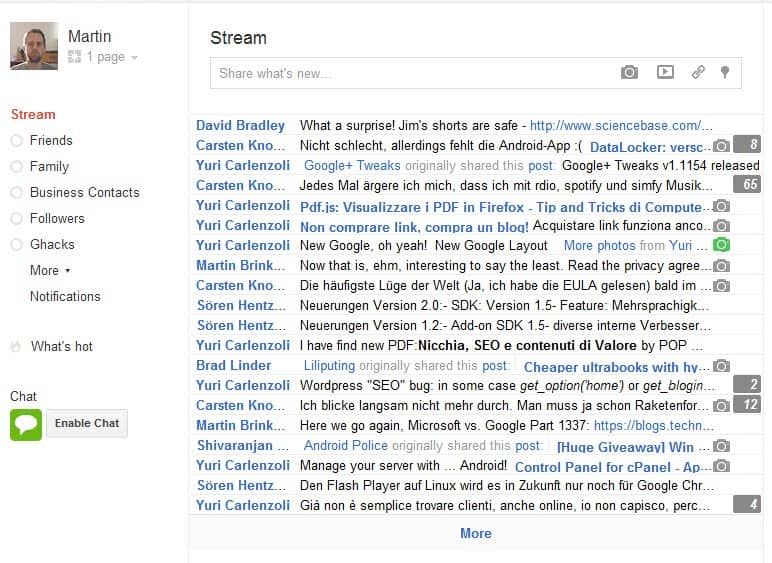
While you do not necessarily see the full message on the screen, you usually see enough to decide whether you'd like to read all of it or if it is of no interest to you. But that's not the only layout change that improves your productivity on the site.
But that is just one of the changes that you can make on the site. Here is a short list of additional options:
- Hide the right menu only
- Use a wide fluid layout for the Stream contents
- Hide the YouTube button
- Hide Hot Posts on Google+
- Move Options to the page botton
- Use a dark background color instead of white
- Display a clock on site
- Change user icon and image opacity, reduce the size of images.
The extension offers several interesting customizations for Google+ that improve the usability of the service noticeably. Chrome users can download and install the GGGG Gui extension at the official Google Chrome web store.
Update: The GGG Gui has been removed from the Chrome Web Store. Right now, there is no comparable extension available for the Chrome web browser.
Advertisement

















