
Open Typed Urls In New Tabs In Firefox

Web browsers can be configured to open urls, searches and resources either in the current tab or in a new tab in the current browsing window. It is naturally also possible to open them in a new browsing window if that is preferred.
The developers of Firefox have added options to the browser that give the user a choice when opening links with mouse-clicks.
A left-click opens the url in the same tab, a middle-click in a new tab. Users who don't have access to a middle mouse button or prefer to use the left one can hold down Shift to open links in a new tab.
I was not aware of a similar mechanism for manually typed in urls or searches. I opened a blank new tab first with Ctrl-t before I started entering the url or search in the address bar of the browser. And I would only type the url in an active tab directly if I did not need to access that particular web page anymore so that the new search or url could be loaded in it.
Then I discovered that there is an easier way that would optimize that workflow significantly. I started to test holding down Shift, Alt, Cltr plus Enter combinations until I found the combination that would open the typed in text in a new tab page and not the active one.
Firefox users can either hold down Alt before they press enter or the Alt Gr key to open the entered url or search in a new browser tab.
Website addresses (urls) are automatically loaded in the new tab while searches load the results of the default search engine instead in the new tab. Firefox will automatically switch to the new tab and restore the url text in the tab the text was entered in.
Do you prefer to open new tabs in the background instead of the foreground? No problem, all you need to do is to make a slight configuration change.
Enter about:config in the Firefox address bar and hit enter. First time users need to confirm that they will be careful. Enter the parameter browser.tabs.loadDivertedInBackground in the filter bar on top. Only one entry is returned.
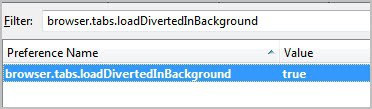
The default setting is false, which means that new tabs are not opened in the background. A double-click on the parameter changes the value to true which has the consequence that new tabs are opened in the background instead from that moment on.

















I’ve been doing this for years with the Tab Mix Plus extension; SearchLoad Options adds the same functionality to the Search box (all searches open in new tabs).
Nice to see some indispensable addon functionality finding its way to the core browser; now all they need is a checkbox in the Options dialog to make it accessible.
BTW, US keyboards don’t have an “Alt Gr” key…both ALT keys have exactly the same function.
In firefox, for plain-text links in a document, you can also select the text, and then drag the highlighted text to the URL bar which will open a new tab with the link automagically…
For real links you can also drag the link together with CTRL key pressed, to open them in a new tab, and even duplicate an existing tab by dragging + CTRL key.
You can middle-click on just about everything in Firefox to open it up in a new tab. Middle-click the Go button on the urlbar to open typed addresses in a new tab, middle-click the Search button for search results in a new tab. Middle-clicking individual bookmarks opens them up in a new tab. Middle-clicking the Reload button duplicates a tab. Middle-clicking the Home button takes care of New Tab and then Home button. Middle-clicking a folder of bookmarks causes them all to open. You can also middle-click Back, Forward or any History items as well. Middle-clicking on an individual tab closes it.
You make a good point. I personally have the go button disabled in my version of Firefox.
Great tip, Martin. Just made the change!
Thanks for the info! :)