
Why are Two Flash Player Plugins Running In Google Chrome?

Most users of the Google Chrome web browser know that Google has integrated Adobe's Flash Player in cooperation with Adobe into the web browser. The core advantage here is that Google can update the Flash plugin in the browser for its users. That's a stark contrast to other web browsers like Internet Explorer, Firefox or Opera, where the user has to make sure that Flash updates are installed in a timely manner to protect the computer system from possible exploits and attacks.
If you look at the plugin listing in the Chrome web browser you may notice that the Flash listing says something like Flash (3 files) or Flash (2 files). You need to click on Details on the page to see what's going on there.
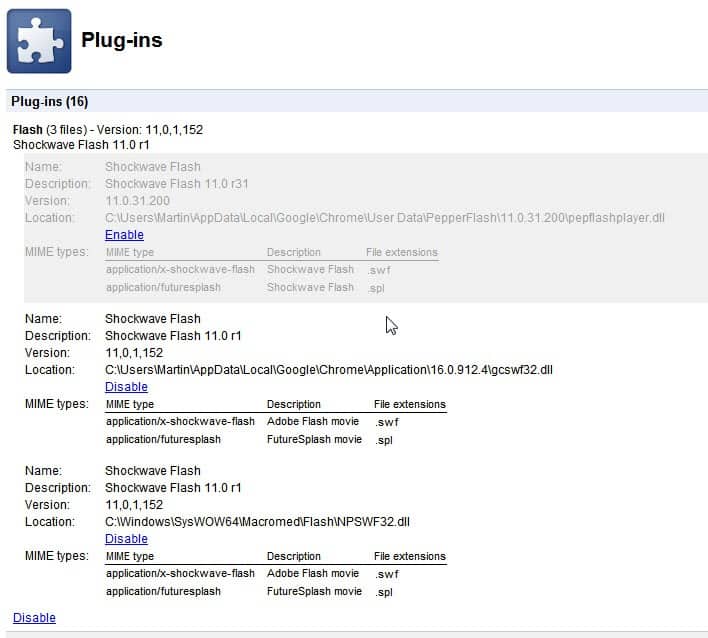
You may notice that multiple Flash plugins are loaded in the Chrome web browser instead of just the native plugin. You can click on the Disable or Enable links to disable or enable specific Flash versions in the browser. This can be handy for Flash developers who need to test their applications in a different version of Flash, and for end users who do not want multiple running plugins in the owser.
Multiple enabled Flash plugin versions in the browser are not a problem according to Google.
It's normal to see two Flash files in about:plugins. When both are listed as enabled, Google Chrome uses the built-in version by default, so you shouldn't have to specify which one to use unless you specifically want Chrome to use the system version instead (has 'NPSWF32.dll' in the location field). Keep in mind that if you use the system version, you're responsible for keeping Flash updated while the built-in version will update automatically via Chrome's auto-update mechanism.
If multiple Flash plugins are enabled and the native plugin is one of them, then that plugin is used to display Flash contents in the Google Chrome web browser. This does not explain why a second Flash plugin is enabled in the browser, as it does not make sense if the native Flash plugin is always used if active.
My suggestion would be to disable the non-native Flash plugin in Chrome to be on the safe side.
Advertisement














Yes. Thank You.
BC
“My suggestion would be to disable the non-native Flash plugin in Chrome to be on the safe side.”
How can I tell which of the two Flash plugins is the non-native one?
The PepperFlash one is the native one.
The only problem with it is a serious one,
I have never got a notification by installing flash it will use my upload bandwidth via P2P. I can only see this in setting (through control panel), in chrome for adobe flash plugin it is a free all you can eat bandwidth buffet. Be on limited bandwidth or even an limited plan, and this can become a serious worldwide sceme (which already is happening)
Well it is a fact flash can and uses p2p, meaning users bandwidth to distribute content, it is enabled in settings by default, so it is very shady business to have the plugins options neatly hidden and IMPOSSIBLE to turn off in a plugin like in chrome. When there wont be an option to have to turn of this, goodbye flash. It is the principle of it. Mainly flash provides ads, and why should a person effectively be paying for delivery of it.
Hope You understand the importance and security issues if this kind of plugins are allowed in the future,
unfortunately is still an issue for the 32 chrome version, disabling the built in version a lot of misbehaviours get fixed!!
Your article helped me to find the reason why the game I developed run slower on Chrome. I don’t understand the reason why Adobe and Google don’t fix this.
The Chrome integrated version of Flash (PepperFlash) is crap. It’s constantly re-installing itself even after I’ve disabled it and it causes nothing but problems. The normal computer plugin version of Flash works A-OK. Google needs to get rid of the integrated Pepper Flash now!
thanks for this post. i was having trouble that the flash settings were not being saved and the global settings not honored. now i have disabled the chrome version and things are working fine again.
good…………………….
“My suggestion would be to disable the non-native Flash plugin in Chrome to be on the safe side.”
I’m not sure that’s necessary at all. If one looks, the priority for the Adobe one is much lower.
I’ve not had issues with Google’s version of Flash in Chrome for as long as I can remember.
I have some concerns. First, if the non-native plugin is not updated immediately, does it leave your PC open for attacks and exploits? Second, if the plugin is loaded, does it use RAM and cpu even though it is not used? Third, are there incompatibilities if two Flash plugins are loaded?
thank you for the tip, i was searching for some info on this
Just checked Plug-ins page in Chromium 17.0.915.0 & only the one(NPSWF32.dll) is listed.
Is not that because Chromium does not have have a native Flash plugin integrated?
Yes,of course,that’s true.
I do not have the two version issue, however
I do not update Chrome automatically and
have always done so manually with
the latest standalone installer.
Perhaps that is a way to
avoid this. Perhaps not.
One of the reasons I can’t be bothered with Chrome. I do not need Google updating my software for me. I am no idiot and I know how to update my own software. It is my computer and I choose how to use it.
Chiming in here that the Google-provided plugin is not reliable. In Chrome 12 and 13 it made all Flash games on kongregate.com that rely on keyboard control totally unusable. Thanks for spreading the word about this — but I too recommend people disable the Google plugin and use the Adobe one.
Many Chrome users seem to have problems with the integrated player – forums have been moaning about it for more than a year.
I routinely advise people to disable it and install the standalone player from Adobe (which by default is set to automatic update notification) which cures most problems.
Good to know. Since the latest in-Chrome flash updates I have had a lot of Flash issues. As in, flash crashes every 2nd or 3rd time a website calls for it. I have just lived with it for now, but I think I will try disabling built-in flash and using the system version. It says a lot that even with this flash-crash I still can’t bring myself to go back to Firefox.
Thanks for share… I had 2 flash player 10 and 11 and I disable version 10. :)