
Collusion, Visualize User Tracking In Realtime

User tracking has been one of the hottest privacy topics over the past years. There have been light efforts to reduce user tracking, for instance by Mozilla with their Do Not Track headers. Many users on the other hand are not aware of the underlying issues, mostly because the tracking is done in the background and not visual to the user.
The Firefox add-on Collusion is an attempt to visualize how websites and services are connected with each other. It is not all about advertising and user tracking though, it is about all connections that websites have with each other.
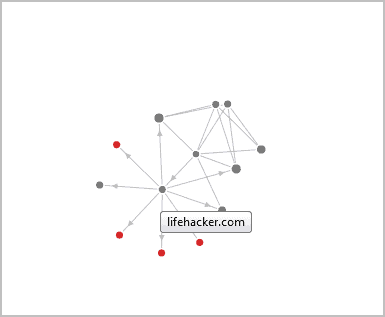
How does it work? The extension starts collecting connection information directly after it has been installed in the web browser. This is an automatic process that requires no user interaction from that point forward.
The extension adds an icon to the Firefox status bar. When you click on it, it launches the visualization screen in a new tab in the browser. Even with the page open it continues to update the connections in realtime whenever new web pages are opened.
Each dot represents a domain, connected with lines. These lines visualize the connections between sites. Colors are used to distinct between standard domains and domains that track users who visit those domains. Tracking domains are shown in red in the visualization.
Collusion displays information about individual domains on the same page. These information are displayed in the upper right corner of the screen. This includes information about the domain or tracking service, and the websites that it is connected to.

The visualization grows tremendously in size over time, and one of the criticisms that I have is that it is not possible to zoom in or out of the visualization or enter a domain name to display its connections in the list.
Update: It is possible to use the browser's zoom in and zoom out feature to zoom.
Collusion is not available at the Mozilla add-on repository. The extension is only available at the developer website. Cautious users may want to look at the source code first before they compile the add-on or install the compiled version directly.
Update 2: Collusion has been renamed to Lightbeam. It is now officially available on the Mozilla Add-ons repository.
Advertisement

















Collusion looked interesting but Firefox 5.0 would not allow the add-on to be installed, initially blocking it, and after permission was given, still blocked it, showing this popup message:
“Collusion culd not be installed because Firefox cannot modify the needed file.”
I even tried opening Firefox in Safe Mode, with all other add-ons disabled, then installing Collusion therein, but the same block occurred.
I remember that there used to be a web browser (I even believe it was DOS-based) that used to build up a web-like collection of links as you navigated from page to page.
Sadly I have long forgotten its name. Anyone know what program I’m talking about.?