
Open Firefox Download Folder

Update: The add-on is not required anymore as you can open download folders directly in Mozilla's download manager now. Just right-click on a file and select the "open containing folder" option to display the folder on the system.
I was just browsing through the latest Firefox add-on updates and saw an interesting add-on for Firefox 4 called Magic Open Download Folder Button.
The add-on adds a button to the Firefox download manager to open the download folder and an icon that can be placed in one of the Firefox toolbars.
Great add-on, but unfortunately only compatible with Firefox 4, or so I thought. The latest version of the add-on is only compatible with Firefox 4, previous editions of the add-on on the other hand are also compatible with Firefox 3.
Previous versions of add-ons can be accessed on a separate page. To go there scroll down to the Release Notes heading on the main page, and click the View All Versions link at the lower left of the screen.
All versions of the add-on that have been uploaded to the Mozilla server are listed on that page. For this particular add-on, version 1.5 is listed to be compatible with all Firefox 3 versions up to Firefox 3.6x which makes it compatible with the latest official release of Firefox, Firefox 3.6.10.
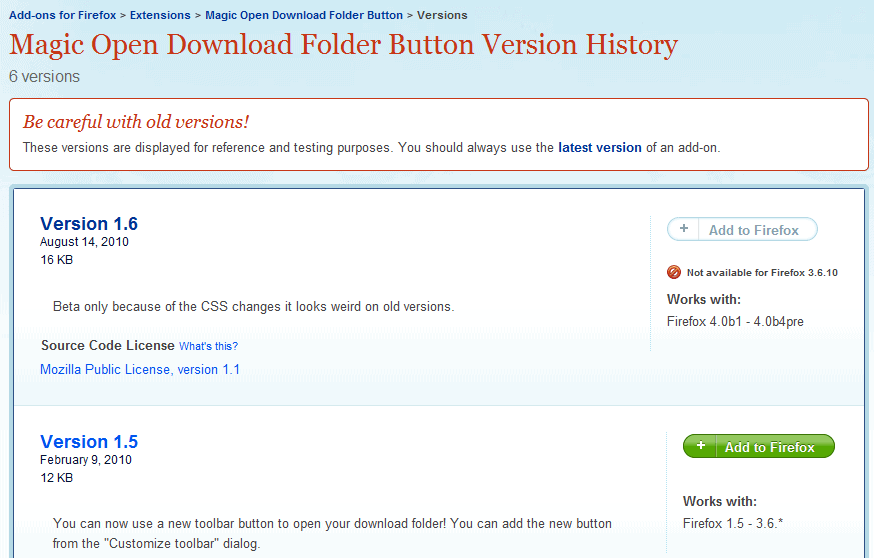
The version seems to offer the same functionality. It contains both the download folder button in the download manager, and a new icon that users can add to a Firefox toolbar to open the download folder.
To add the new icon, Firefox users need to right-click a blank space on a toolbar and select Customize from the context menu. They then need to locate the Open Download Folder icon and drag it to the toolbar to add it in that location permanently. A click on the icon opens the download folder automatically, in Windows in Windows Explorer.

The Open Download Folder button in the Firefox download manager is located in the lower left half of the window. A click on it will open the default download location as well.
Remember to take a look at the previous add-on releases whenever you encounter an add-on that appears to be not compatible with your version of Firefox.
The Firefox add-on is available for download at the official Mozilla Firefox add-on repository.
Advertisement

















Simple Add-On.
If someone doesn’t want to install yet another add-on, simply right-click the download and click on “Open containing folder”.
Isn’t this a bit too Firefox-centric? There are already add-ons like Download Statusbar that can show you to your download folder. I prefer to avoid installing unnecessary extensions.
Also, would it have been easier to have a shortcut on your desktop instead?
Yes there are other options, the extension however likely does not use any resources at all. Still, it is probably only interesting for heavy downloaders.
Hoi Martin, I cant find a link did you mean Magic Open Download Folder Button 1.6, with the link https://addons.mozilla.org/en-US/firefox/addon/48973/ ?
Yes that is it. I have added the link, thanks for pointing that out.