
Google Docs Viewer, View Documents Online

There are basically two options to access and read documents posted on the Internet. The documents can be downloaded to the local PC to access them locally, or viewed online providing the proper tools and services are available. Google for instance has added direct links in Google Search to view documents. Depending on the document type they can be viewed as HTML directly, or with the help of the Google Docs Viewer service.
Google Docs Viewer supports all document formats that Google Docs supports, and is available online without the need for a Google account. This can be a very comfortable option, especially if a document needs to be viewed without a compatibly viewer available on the local system. But there are other benefits of opening documents directly online. Security comes to mind. Instead of having to open a pdf document in Adobe Reader, users can open it online to avoid any threats targeting Adobe's product.
Lets take a look how documents can be viewed online using the service. The user first needs to open the Docs Viewer homepage. It offers a form at the top, a generate link button and some explanations at the bottom of the screen.
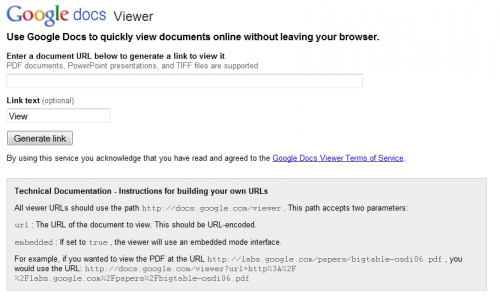
All that needs to be done now is to copy and paste a direct document link into the form at the top and press the Generate Link button afterwards. Don't get confused by the statement on the page that the service online supports PDF, PowerPoint and TIFF. You can feed it any document link that is supported by Google Docs. The service generates a clickable link and several copy and paste links to use in instant messengers, emails or to embed the viewer on a website.
The clickable link opens the document in Google Docs where the usual controls are available. As mentioned earlier, no account is needed to view the document online. Users with a Google account do however have access to additional features, like the ability to save the document in their Google Docs storage.
Google Docs Viewer is a solid option for users who want to view documents online. Other services offer a similar experience, for instance Microsoft's OneDrive offering.
Advertisement


















Zoho, gdocs and by far my favourite – ViewDocsOnline available as K-Meleon extensions > http://kmext.sourceforge.net/ext4.htm