
Internet Explorer HTTP Watch

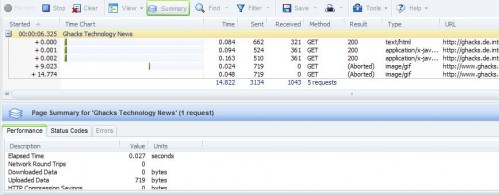
HTTP Watch is a HTTP monitoring plugin for Microsoft Internet Explorer that can give you detailed information about a website or application that is loaded in the browser.
The main reasons for using an application like HTTP Watch are troubleshooting, performance tuning and security checks. It's mostly useful for webmasters but regular users might find a reason or two to use the software as well, especially when it comes to security or privacy as you can see the connections that are made for instance.
The main interface reminds of the Firefox Firebug extension which uses a similar interface to display various information.
Note: HTTP Watch is compatible with all supported versions of Microsoft's Windows operating system and Internet Explorer, and Google Chrome. It is also available as a mobile application.
HTTP Watch
HTTP Watch for Internet Explorer is no where near as complex as Firebug or development tools integrated in browsers on the other hand. One of its main features is that it displays all connections and files that are transferred when a website or application is loaded in Internet Explorer.
This alone can be very useful for security and privacy related audits, since you can check and see which files get loaded when you open the website in the browser.
It displays the overall time it takes to load a website and the loading time of each element of the website individually. Webmasters can use those information to optimize the loading performance of their website by optimizing the load order for instance, or by removing or optimizing certain files to reduce the overall time it takes to load the website.
Results can be filtered, saved or printed for further analysis. The Internet Explorer plugin provides access to several additional features like status codes, performance reports and options to clear the system cache and cookies.
Update: The Internet Explorer plugin is available as a free and professional version. The free version is limited in several aspects, including the information detail that is displayed in the program interface when it is used or the ability to export the information to external files.














You can also monitor and test your http request and http response using this free send http tool:
http://soft-net.net/SendHTTPTool.aspx
Imho, some normal sniffers are better :).